
· Online Safety Talk
A 20 Minute Online Safety Talk for Parents' Day
13 min read
You're at Parents' Day, the meeting is running late, and the head teacher asks you to say something about online safety. You have your phone, but you don't need a technical presentation. You need examples parents recognise and actions they can use before the next suspicious message arrives.
This ready-to-read 20-minute online safety talk for Parents' Day covers three scams, two settings and one family rule. Read the script lines aloud, use the examples to invite discussion, and send families home with a simple handout.
Table of Contents
- Timing Plan and Opening Script for the Talk
- The Sent-by-Mistake M-PESA Message and How to Respond
- Fake Job Offers and Phishing Links to Watch For
- Two Account Settings Every Family Should Set
- Check Before You Act
- What Children Share Online and How to Limit It
- Questions Parents Ask and What to Do After a Scam
- Practise Spotting Scams at Home This Week
Timing Plan and Opening Script for the Talk
Keep this minute-by-minute plan for the 20-minute talk open on your phone. The script lines are prompts, not words you must memorise.
| Minutes | Part | Script line to read aloud |
|---|---|---|
| 0 to 2 | Welcome and why this matters | Our children use phones for learning and communication, so today we cover three scams, two settings and one family rule. |
| 2 to 6 | Part 1: The M-PESA message | If a message says money was sent by mistake, check your balance and do not send it back. |
| 6 to 9 | Part 1: Job offers and phishing links | Treat a job registration fee or an account-closure threat as a warning. Verify independently before paying or signing in. |
| 9 to 12 | Part 2: Passwords and 2-step verification | Use a long, unique passphrase and switch on 2-step verification wherever it's available. |
| 12 to 15 | Part 3: Check before you act | Check the balance, check the sender, and ask someone before you act. Include a quick check of what children share online. |
| 15 to 18 | Parent questions and handout | Let's practise what to do if someone has already replied, paid or shared a code. |
| 18 to 20 | Close and home practice | Choose one action your family will take this week. |
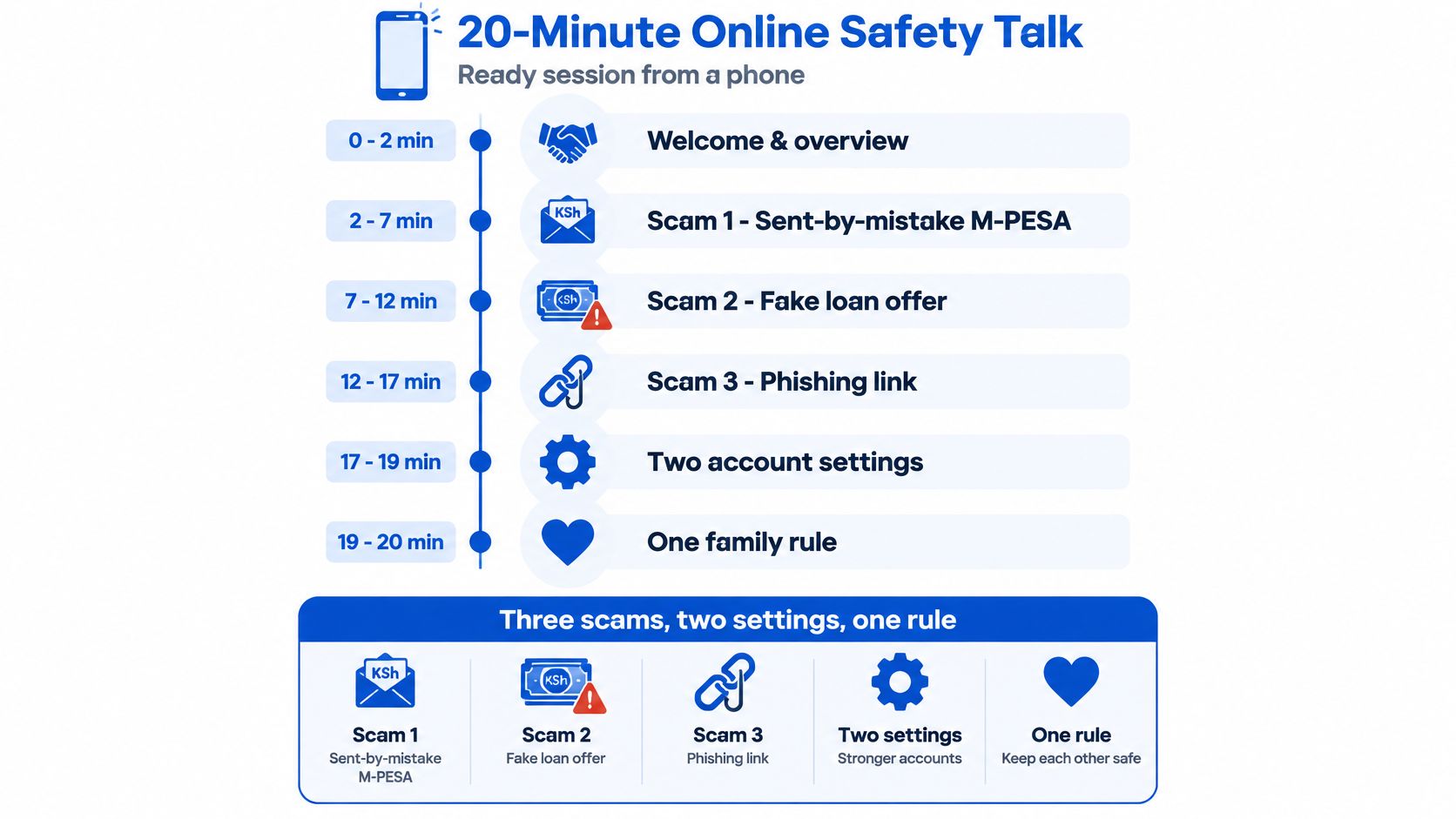
The timetable below is the running order for this talk. The visual offers a reminder of the overall format, rather than the exact timings or scam examples to read aloud.
In 2023, 47.7% of children in the SCROL baseline study reported experiencing at least one form of online harm, including sexual content, cyberbullying or unwanted stranger contact, according to Capital FM Kenya. This is about the phones families already hold, not a distant problem.
Bring a phone, the handout and an optional follow-up sign-up sheet. Keep individual explanations short, allow extra time for the M-PESA routine, and take longer personal questions privately afterwards.
Read aloud: Thank you for coming. Today isn't about blaming children or frightening parents. It's about knowing what to check when a message asks us to hurry.
The Sent-by-Mistake M-PESA Message and How to Respond
A parent receives a transfer message, followed by a caller asking for an urgent refund. The caller sounds worried, and the parent wants to help. A convincing story isn't proof that money arrived.
Use this visual while explaining the routine.
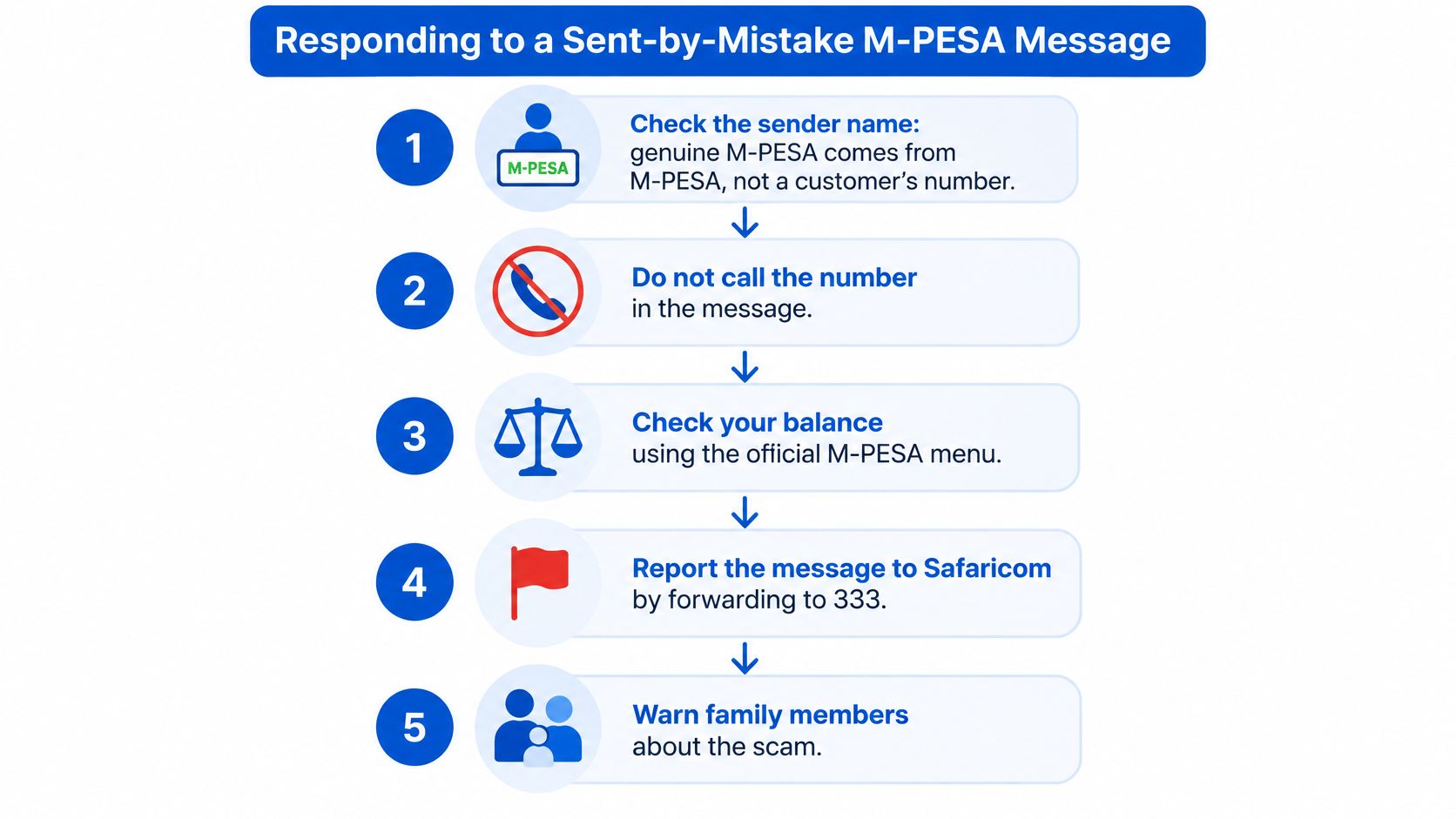
The sender-name check and reporting short codes below follow Safaricom's fake or old M-PESA message guidance, which identifies M-PESA as the genuine transaction sender and gives 456 for genuine-transfer assistance and 333 for fake-message reporting.
- Check the sender name. A genuine M-PESA transaction message comes from M-PESA, not an ordinary customer's phone number, so a personal number is a warning.
- Don't call the number in the suspicious message. Speaking to that person doesn't independently verify the transaction.
- Never send money back yourself in response to the request. If the transfer message is fake, you'd be sending your own money for a payment you never received.
- Check your actual M-PESA balance and transaction record. These let you check whether the claimed payment is there rather than relying on the message.
- If money arrived, the sender can forward the original confirmation to 456 or contact Safaricom for help. That puts the matter through the provider instead of a pressured private refund.
- Forward a fake message to 333. Reporting helps Safaricom block the reported number and protect other customers.
Ask parents which step they'd find hardest when someone is pleading with them. Remind them that checking isn't unkind, and an urgent caller doesn't remove their right to verify.
Use this video for reinforcement if time allows, or save it for follow-up.
Read aloud: Check the balance, don't refund, let the genuine sender use the confirmation route, and report fake messages.
Fake Job Offers and Phishing Links to Watch For
A job offer that starts with a payment
Say a teenager looking for part-time work or an attachment receives a message offering immediate placement. Before receiving proper details, they're told to pay a registration fee or a fee to release the position.
The attraction is understandable. A young person wants an opportunity and doesn't want to lose it by asking questions. Tell families to treat the payment request as a warning, not as proof that a place has been reserved.
Read aloud: Don't pay because someone says the opportunity will disappear. Find the organisation's contact details independently and check the offer with a trusted adult.
An account warning that pushes a link
A parent receives a message saying an account will be closed unless they sign in immediately. The link opens a page that looks familiar and asks for a password, PIN or code.
This is phishing, a message designed to trick someone into handing over information. A familiar logo or a sender's display name doesn't establish who controls the page.
Look for these warning signs:
- Unexpected sender: You weren't expecting this contact or offer.
- Pressure: You're told to pay or sign in immediately.
- A supplied login link: The message directs you away from your usual app.
- Secret information: Someone requests a PIN, password or authentication code.
- Secrecy: You're told not to discuss the message with anyone.
The safe response is to leave the link alone, open the official app or type a known official address yourself, and ask someone you trust to help check. Don't use contact details from the suspicious message to verify that same message.
Permission to pause: You're allowed to stop and check, even when someone insists that you must act now.
Two Account Settings Every Family Should Set
Choose a strong password or passphrase
A passphrase is a long password made from words. Choose unrelated words, make the phrase unique to that account, and don't build it around a child's name, birthday or familiar number.
For illustration, a name followed by a birth year is a weak choice; an unrelated sequence such as LanternCabbagePebbleCloud shows the approach. Don't copy a published example as your real password, and don't confuse a passphrase with a service's numeric PIN requirements.
Safaricom's secure M-PESA guidance warns against PINs such as 0000, 1234 or a year of birth, says the PIN must remain confidential even from relatives or supposed support staff, and recommends phone locks and two-factor authentication.
Switch on 2-step verification
2-step verification adds another check when someone tries to sign in. Look in the account's security settings and enable it for email, banking and other accounts where the feature is offered.
Invite parents to open one account's settings during the meeting, without showing anyone their password or codes. Anyone needing help can receive guidance while keeping the screen and secret information private.
- For a walkthrough: Use our strong passwords and 2-step verification guide for students and parents.
- For wider family controls: The 3rd-i resource on choosing a family safety app offers a starting point when considering an additional tool. It shouldn't replace conversations with your child.
Read aloud: Never share a one-time passcode, authentication code, M-PESA PIN, SIM passcode or password with a caller, text sender or supposed support agent. Nobody from a provider needs you to read out your code.
Check Before You Act
A family rule works best when adults follow it too. Children shouldn't be expected to recognise every scam while watching adults respond immediately to every urgent message.
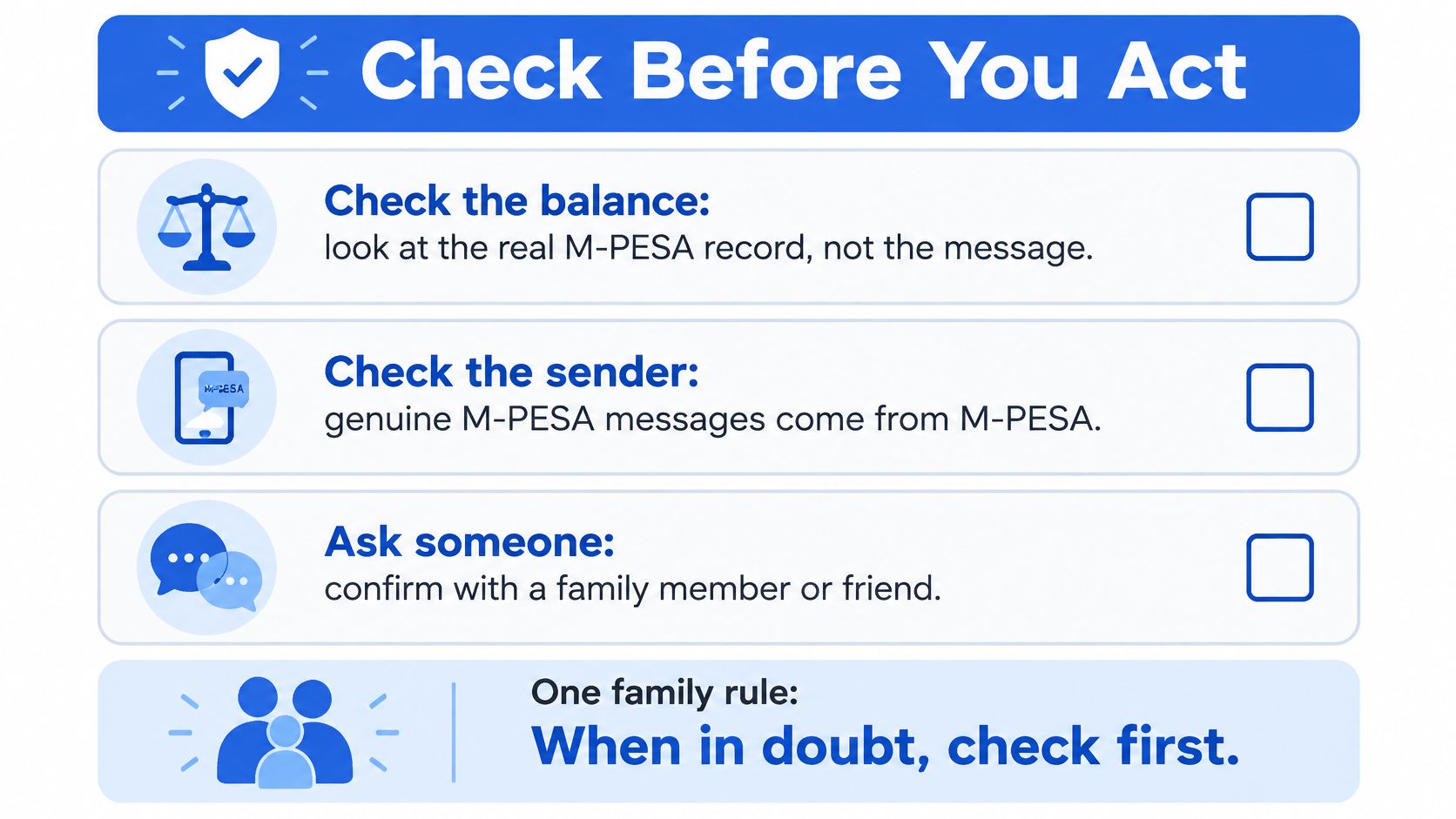
Teach three checks in plain language:
- Check the balance: Look at the actual M-PESA transaction record, not just a message claiming money arrived.
- Check the sender: Identify who sent the message and whether the claimed organisation and address match.
- Ask someone: Involve a parent, guardian or teacher before paying, clicking or replying when something feels uncertain.
Keep the visual where everyone using the family phone can see it.
Make asking for help safe
The most important part is the adult's promise. A child who expects punishment may hide a message, a payment or an uncomfortable conversation.
Read aloud: You can always come to a parent or teacher for help. You won't be punished for telling us, even if you already replied or made a mistake.
If a harmful conversation has started, help the child stop replying, keep the username or message, and tell a trusted adult. Begin with thanks for telling you, not an accusation about why they answered.
For families who also use a shared device, our guide to using a shared computer safely gives a practical follow-up task.
Family agreement: We pause, we check, and we talk.
What Children Share Online and How to Limit It
A child's profile can reveal more than a name. A school, phone number, photo, or location may help someone connect an online account to their real life. Talk about what each app asks for and whether the child needs to share it.
Read aloud: Before you post or fill in a profile, pause and ask: does this person or app need to know this?
Use the family-rule slot to practise three habits:
- Share less. Ask why an app needs a child's name, phone number, or school before providing those details. The ODPC's draft guidance on children's data explains parental consent and the child's best interests under the Data Protection Act, 2019.
- Review who can reach them. Set profile visibility and messaging permissions together. Limit contact from people the child does not know.
- Practise what to do. Show the child how to block and report harmful contact, and agree which trusted adult they can approach.
The ODPC guidance on processing children's data describes technical controls, proportionate supervision, and regular conversations as part of protecting children's information. Tell your child what you are checking and why, rather than monitoring secretly.
For a plain-language explanation of the law, read this guide to Kenya's Data Protection Act.
Read aloud: Share only what the service needs.
Questions Parents Ask and What to Do After a Scam
Invite questions without asking anyone to disclose a child's personal experience publicly. Offer a private conversation afterwards if the concern involves threats, sexual content or identifying information.
Questions to invite
- What if my child already replied to a stranger? Thank them for telling you, end the exchange and preserve the message or username. Help them report harmful contact.
- How can I check a link safely? Don't open it to investigate. Use the organisation's official app or a known address instead.
- What if money or codes have already been sent? End contact and reach the relevant provider through its official channels promptly. Explain what was shared and ask for help securing the account.
What to do if your family was scammed
| Step | What to do | Who to contact |
|---|---|---|
| Stop | Stop replying, don't send more money, and don't share any code | Nobody; end the contact |
| Keep evidence | Screenshot the message and note the date and number or username | Keep it for your report |
| Contact the provider | Use the official contact details in the app or on your card, not those in the message | Safaricom or your bank |
| Report | Forward a fake M-PESA message to 333 and report the case to the police | 333 and the police |
Don't promise that money will be recovered. Concentrate on ending further contact, protecting the account and giving the provider or police a clear record.
Prepare the take-home handout
Keep it to one side of A4, with enough space to read comfortably:
- Heading: Check before you act.
- Warning signs: Job fees, urgent closure warnings, secrecy, and requests for codes or PINs.
- Family checks: Balance, sender, trusted person.
- Response: Include the table above.
- M-PESA reminders: 456 for the genuine sender's confirmation route; 333 for fake messages.
- Our action: Leave a blank line for the family's chosen task.
Ask parents to keep it beside the family phone or on the fridge.
Practise Spotting Scams at Home This Week
At home this week, show your child a sample message from the talk. Ask them to point out anything suspicious and explain what they would do before you discuss the answer together.
Keep practice separate from real secrets
- Use the sample only: Never enter a real M-PESA PIN, banking password or authentication code into a practice exercise.
- Keep sign-in details private: Children sign in to Keybaki with their own PIN, without an email, phone number or exposed parent credentials. That PIN is for signing in, not for entering into a message.
- Explain the choice: Ask what warning signs they noticed and which trusted adult they would speak to.
Before parents leave, ask each one to name an action aloud or write it on the handout. At home, agree on a simple family rule: check the balance, check the sender, ask someone.
For a short practice session, have your child read the sample message, identify the warning signs and say what they would do next. Visit Keybaki to explore its CBE learning resources.
Comments
Loading…