· CBE curriculum Kenya
School Curriculum Tracking System CBC Kenya Guide
15 min read

A Monday morning in a Kenyan secondary school can become a race against the timetable. One teacher is preparing a lesson for a new strand, another is checking continuous assessment work, a parent is asking why a learner's report mentions a weak competency, and the head of department needs to know whether the planned work has been taught. The information may sit in a lesson notebook, a mark book, a spreadsheet, and a phone conversation, with no single record connecting everything.
That's the practical problem a school curriculum tracking system for CBC Kenya should solve. It should connect curriculum planning, classroom delivery, evidence of learning, feedback, and the next teaching decision in one manageable routine. The system must also serve families, especially where a parent uses a shared phone and needs a clear action rather than a complicated dashboard.
Kenya's CBC journey has already moved beyond the first introduction. The curriculum was piloted in 2017 and officially implemented in January 2019, alongside the staged move from the 8-4-4 model towards the 2-6-3-3-3 framework, as described in this account of CBC implementation in Kenya. Schools are now refining routines across several grade bands, rather than learning what CBC means.
This guide gives teachers, parents, learners, and school heads a practical way to understand tracking. You'll see what the system records, which features matter, how each user benefits, how to roll it out without creating more paperwork, and how to turn weekly evidence into useful home-school action.
Table of Contents
- Introduction to Curriculum Tracking in Kenyan Schools
- What a School Curriculum Tracking System Really Does
- Core Features That Make Tracking Work for CBE
- How Teachers Parents Students and School Heads Each Benefit
- Implementation Checklist and Rollout Steps That Stick
- KPIs Reports and Common Pitfalls to Avoid
- Seeing It in Action With a CBE Platform Example
Introduction to Curriculum Tracking in Kenyan Schools
A teacher may begin the week with a clear intention: cover a strand, guide learners through an activity, and check whether they can apply the skill. By Friday, the same teacher may have taught several classes, handled different learner needs, marked work, and tried to remember which sub-strands need another explanation. A mark in a book can show that an assessment happened, but it doesn't always show what the learner understood or what should happen next.
That gap becomes more important as schools manage CBC and CBE expectations across Junior and Senior Secondary. Government reporting says the first Grade 9 cohort is expected to move to Grade 10 in 2026, while the final KCSE examinations are scheduled for 2027, marking the full transition to the CBC/CBE system. The same reporting cites a 96.90% Grade 3 to Grade 6 transition rate between 2022 and 2025, but an overall retention and transition rate to Grade 9 of 88.17%, with more than 151,000 learners from the pioneer cohort leaving before completing Grade 9. These figures make learner visibility more than an administrative preference, as shown in Kenya's CBC transition reporting.
A useful tracker replaces scattered records with a shared learning trail. It links the intended strand to the lesson taught, the evidence collected, the level of mastery observed, and the support a learner needs at school or home. That record helps a teacher avoid repeating a whole unit when only one idea needs reteaching.
Practical rule: If a tracking entry doesn't lead to a teaching decision or a useful parent action, the school should question whether the entry is worth collecting.
Parents also need a place in the loop. A competency label can feel unclear when it arrives without an explanation, particularly for families encountering more complex assessment language in Junior and Senior Secondary. A better system translates “needs support in this strand” into a small home activity, a revision task, or a question the parent can ask.
Teachers looking for a plain explanation of the wider curriculum can use this guide to understand what competency-based curriculum means. After reading, you should be able to describe curriculum tracking in everyday language, identify essential features, plan a manageable rollout, interpret basic reports, and judge whether a platform is strengthening learning or merely digitising paperwork.
What a School Curriculum Tracking System Really Does
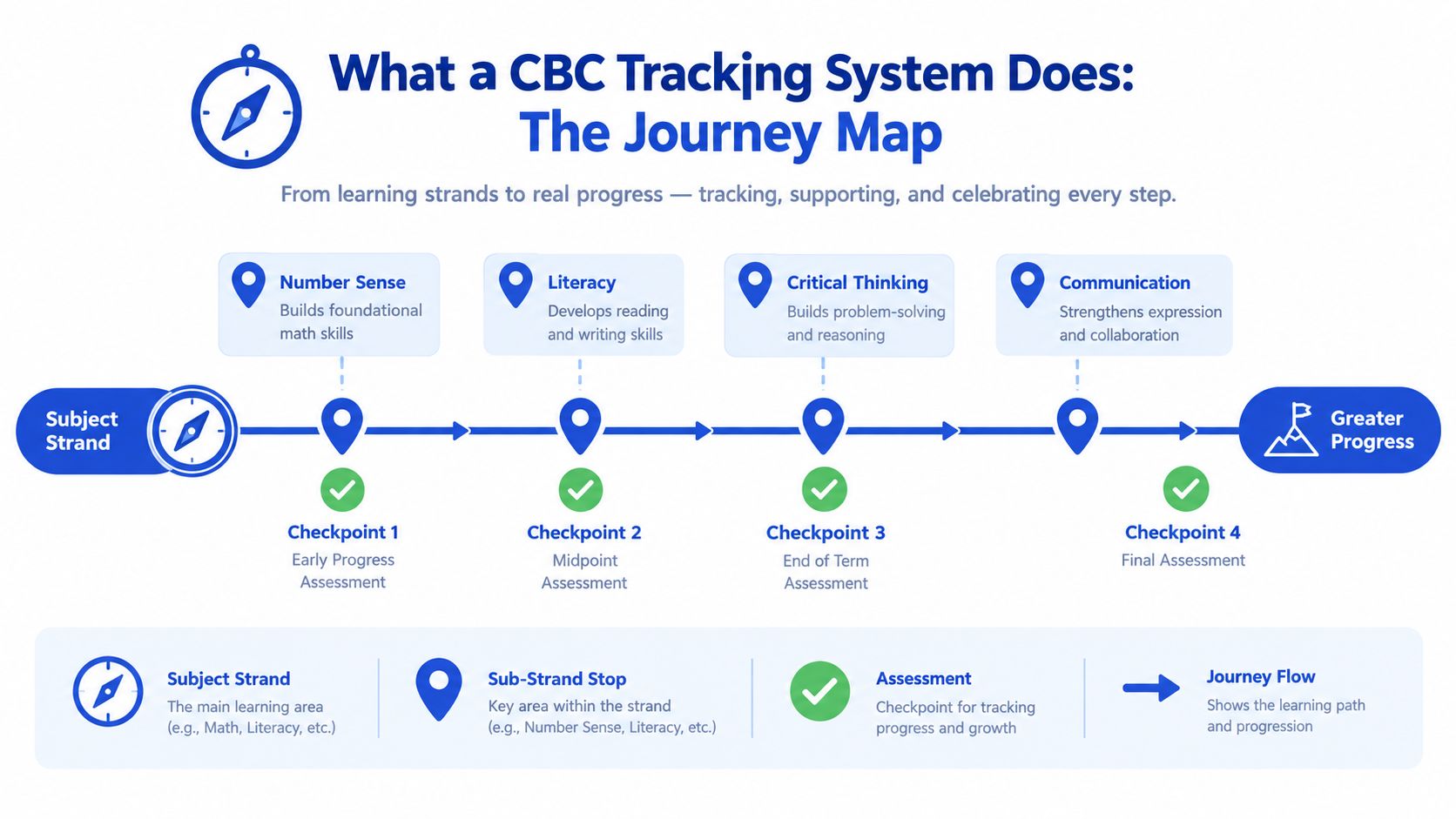
Think of a curriculum as a journey. A strand is the route, a sub-strand is a stop along that route, and an assessment is a checkpoint that tells you whether the learner can continue or needs help before moving on. A timetable tells you when the vehicle should leave. A gradebook records some results. A tracking system connects the route, the journey, and the checkpoint.
The system normally brings together three kinds of information:
- Planned coverage: what the teacher intends to teach, linked to the relevant strand and sub-strand.
- Learning delivery: what happened in class, including activities, resources, and learner participation.
- Evidence and response: what the learner demonstrated, what remains weak, and what the teacher will adjust.
This connection matters because coverage alone isn't mastery. A teacher may tick a sub-strand as taught, but learners could still need guided practice. Conversely, an assessment result without curriculum mapping tells the teacher that a learner struggled, but not precisely where the difficulty sits.
The closed loop in everyday school work
A closed loop has four simple movements. First, the teacher chooses the curriculum point and prepares the lesson. Second, the class completes activities that create observable evidence. Third, the teacher records the result against the correct strand. Fourth, the next lesson responds to what the evidence shows.
For example, a mathematics teacher may plan a lesson connected to a number-related sub-strand. Learners complete a short task, and several struggle to explain their method even though they can produce an answer. The tracker should preserve that distinction and help the teacher plan explanation and practice, rather than marking the lesson complete.
A parent doesn't need to see every planning field. The parent needs a simple message such as: “Your child is practising this skill this week. Ask them to explain one example and complete the short revision activity.” The school head, meanwhile, may need a broader view of coverage, assessment completion, and classes requiring support.
A clear explanation for a colleague is this: a CBC tracker is a shared map that links what the school planned, what learners practised, what they demonstrated, and what happens next. It isn't only a timetable, a report card, or a storage folder.
Core Features That Make Tracking Work for CBE
A school should judge a tracker by the work it removes and the clarity it creates. Features matter when they connect in a sequence, not when they sit as separate buttons that teachers must use independently.
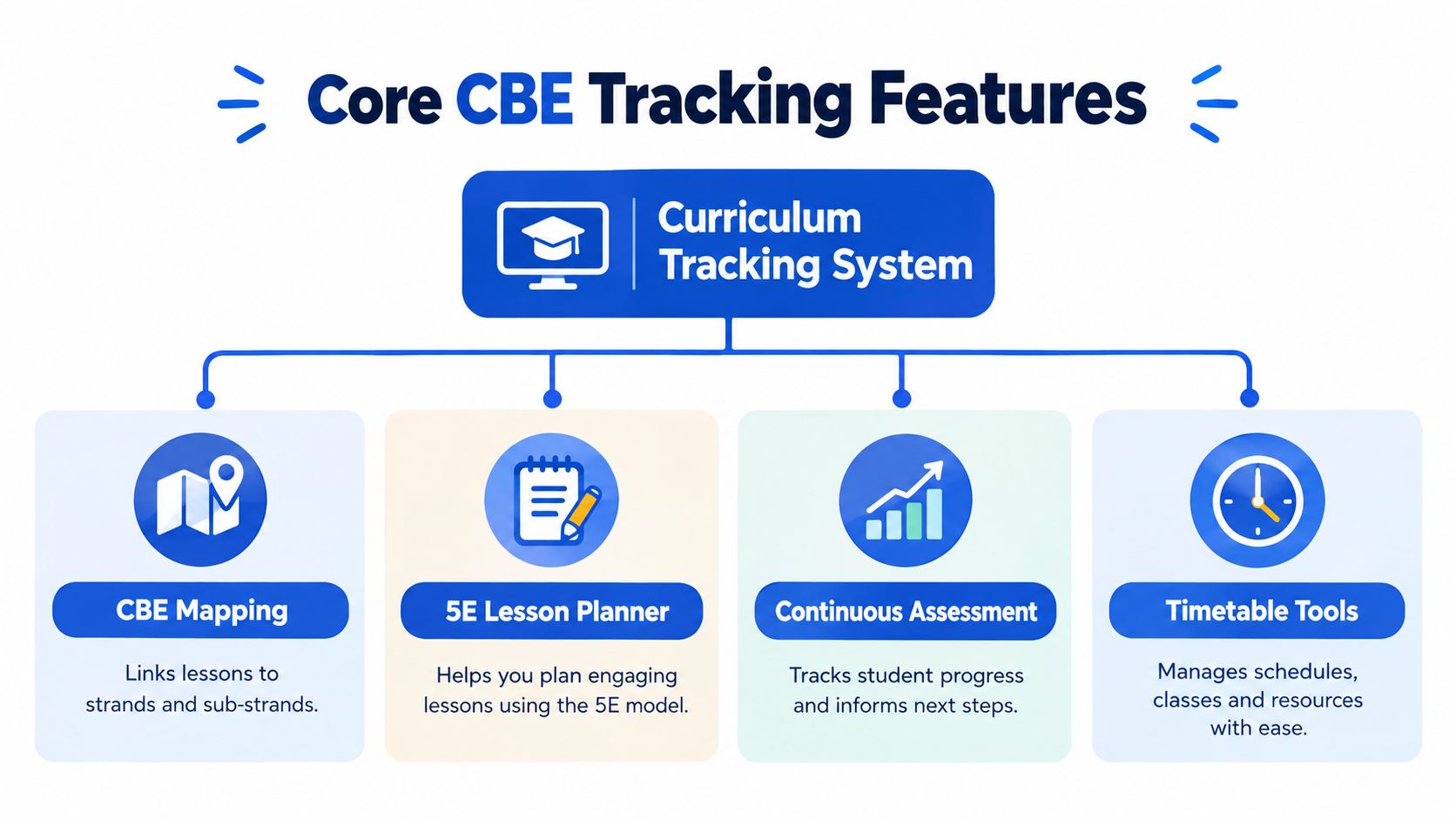
Curriculum mapping and lesson planning
The first requirement is accurate mapping to strands and sub-strands. A teacher should be able to select the curriculum point, find suitable learning material, and record delivery against the same point. This prevents a common problem with generic platforms, where a lesson title exists but its curriculum location remains uncertain.
A 5E lesson planner supports the flow from Engage to Explore, Explain, Elaborate, and Evaluate. Good design leaves room for teacher judgement. It can draft a structure, but the teacher must still edit examples, materials, differentiation, and timing for the actual class.
Timetable tools then give the plan a place in the school week. Drag-and-drop scheduling, period reminders, and layouts that work on low-resolution screens can help, but the important test is whether a teacher can move from timetable to lesson without re-entering the same information.
Assessment and visibility
Continuous Evaluation Assessments should sit on the same curriculum map. Useful options include on-demand strand quizzes, teacher-scheduled checks, and national-format mocks, with marking and mastery reporting handled consistently. The purpose isn't to make teachers test constantly. It is to make assessment evidence easier to use.
Dashboards should answer practical questions:
- Which strands has this class covered?
- Which learners need support?
- Which evidence is missing?
- What should the teacher revisit next?
- What can the parent practise at home?
A platform should also support offline caching, phone-number sign-in, shared-phone access, and lightweight pages. The World Bank survey described a student-computer ratio of about 150:1 even in schools with computers, while rural and low-income connectivity remains limited, according to the Kenya school ICT overview. A separate 2025 report cited 33.8% of secondary schools as owning teacher devices, 40% as owning operational computer labs, and an average learner-to-computer share of 52:1, with fewer than half of those labs internet-connected, as discussed in Kenya's CBE technology context.
These conditions favour asynchronous capture, shared phones, offline content, and later synchronisation. A school comparing platforms can also review guidance on a broader learning management system, but it should still test the product against its own devices, network interruptions, and teacher routines.
How Teachers Parents Students and School Heads Each Benefit
The same learning record serves different people because each person has a different job. A teacher needs a next lesson. A parent needs a manageable home action. A learner needs to know what to practise. A school head needs enough visibility to support staff without turning every lesson into an inspection.

The teacher
A teacher begins with a mapped strand and a usable lesson plan instead of searching through separate files. After the activity, the teacher records evidence once, sees the learners who need more support, and carries that information into the next plan. The gain isn't just faster data entry. It is less Sunday planning and less mental effort spent reconstructing what happened during the week.
A good tracker should also respect professional judgement. The teacher can accept a suggested activity, change it for the class, group learners for support, and record an observation that a simple score cannot capture.
The parent
Parents often receive reports full of labels but few instructions. A weekly briefing should answer three questions: what the learner is working on, what appears difficult, and what the family can do next using available time and devices.
On a shared family phone, that could mean a short explanation in English or Kiswahili, a revision activity, and one conversation prompt. The parent doesn't need to become a curriculum specialist. The parent needs a clear, repeatable way to notice progress and communicate with the teacher.
Reporting on Kenya's CBE rollout describes uneven parental engagement, limited access to digital tools, weak coordination, and differences in parental awareness, particularly in underserved regions, as outlined in the discussion of parents and CBE.
The learner and school head
A learner benefits when the system turns a weak area into a revision queue rather than a general warning. Short practice tasks, progress indicators, and a visible next step can make revision more purposeful without labelling the learner by a single result.
The school head sees a different view. Coverage reports can show where departments are moving as planned, while mastery and assessment reports can highlight classes that need coaching, resources, or timetable adjustment. The head's role is to act on patterns and support teachers, not to ask staff to produce another report.
Here's a short visual example of how digital progress information can support teaching decisions:
The strongest arrangement is not four separate systems. It is one shared record with four understandable views.
Implementation Checklist and Rollout Steps That Stick
A school doesn't need to digitise every record on the first day. Begin with the smallest routine that connects planning, assessment, and follow-up, then add complexity only when teachers can use the first routine confidently.
Start with clean information
Confirm class lists, subjects, teacher responsibilities, and curriculum mappings before importing data. Remove duplicate learner records and agree on the names the school will use for strands and sub-strands. If the foundation is untidy, every later report will require manual correction.
Use this readiness check:
- People: Name one implementation lead, one teacher support contact, and one person responsible for data quality.
- Curriculum: Confirm that subjects and strands match the curriculum used by the school.
- Devices: Test the platform on the phones, tablets, computers, and projector screens teachers use.
- Connectivity: Check what can be completed offline and when records synchronise.
- Access: Decide how teachers, parents, and learners sign in, especially on shared phones.
- Support: Agree where users report problems and how quickly the school responds.
Pilot the weekly habit
Start with willing teachers and a small selection of classes. Train them to complete one cycle: select a strand, prepare the lesson, record evidence, review the result, and plan a response. Don't begin with a long demonstration of every feature.
Schools can use CBE teacher refresher training to reinforce the difference between recording activity and recording useful evidence. The test is simple: can a teacher finish the routine without keeping a second paper record “just in case”?
Connect the timetable and assessment routine
Place the lesson inside the timetable, schedule the assessment at a sensible point, and choose a fixed weekly review time. If internet access is unreliable, teachers should enter information offline and sync when a connection is available. Shared devices need a sign-out routine, while M-Pesa access should be assigned clearly so payment or account questions don't interrupt lesson preparation.
Expand carefully and review
Roll out by department or grade band once the pilot shows a stable routine. Look for signs of progress: teachers reuse mapped plans, assessments appear against the correct strands, parents receive understandable actions, and weak areas lead to reteaching.
Stalling looks different. Teachers duplicate entries, parents receive labels without guidance, or the head receives dashboards that never change a decision. Fix the routine before adding more features.
KPIs Reports and Common Pitfalls to Avoid
A tracker is healthy when its reports lead to action. Schools don't need dozens of measures. They need a small set that shows whether teaching is progressing, learners are demonstrating understanding, and staff are responding to evidence.
Useful indicators include coverage by strand, mastery by strand, assessment completion, and reteaching follow-through. A weekly review can ask what was taught and what needs attention next. A termly review can help heads identify persistent gaps, support departments, and check whether the recording process is serving learning.
| KPI | Healthy signal | Warning signal | First mitigation |
|---|---|---|---|
| Coverage | Planned curriculum points are being recorded against actual lessons | Teachers mark activities complete without clear strand links | Review mapping and simplify lesson entry |
| Mastery by strand | Results help teachers group learners or plan support | Weak areas appear repeatedly with no response | Add a named reteaching action to the next plan |
| Assessment completion | Checks are captured as part of normal teaching | Teachers postpone entry and create a backlog | Use short scheduled checks and offline capture |
| Reteaching follow-through | The next lesson reflects the evidence collected | Reports are viewed but planning stays unchanged | Review one weak strand during the weekly meeting |
Fix the first bottleneck
Manual double entry is often the quickest problem to address. If a teacher writes the same lesson and result in a notebook, spreadsheet, and platform, the system has increased workload rather than reduced it.
A 2025 Kenyan study found that 76% of teachers agreed teacher-student ratio influences workload by reducing lesson-preparation time, while 74% said class size affects formative assessment administration, according to the draft CBE policy document. The same source notes that CBE has increased documentation, continuous assessment, and learner evaluation duties, while KNEC's 2026 timelines require schools to access assessment tools in May and upload scores by 31 July 2026.
A report is useful only when someone knows what decision it should trigger.
When coverage is low, check planning and timetable use. When assessment completion is low, simplify capture. When mastery is low, examine teaching support and reteaching. When parent engagement is low, shorten the message and make the home action practical.
Seeing It in Action With a CBE Platform Example
Consider a Grade 7 teacher planning a week using Keybaki. The teacher selects a CBE-mapped strand from the digital library, chooses a lesson resource, and adapts a 5E plan for the class. The timetable places the lesson on the correct day, so the plan sits beside the delivery routine rather than in a separate file.
During the lesson, learners work through the activity. The teacher schedules a Continuous Evaluation Assessment, and the results connect to the strand and sub-strand. A weak area then appears in the teacher's view as a planning cue, not as a forgotten mark in a book.
The following week, the teacher brings that weak strand into the next lesson for focused reteaching. The learner sees a revision task, while the parent receives a short briefing with a simple question or practice activity. On a shared family phone, phone-number sign-in, PIN access, offline cache, and English and Kiswahili content can make the exchange easier to manage. M-Pesa tokens provide a local payment route where the school or family chooses a paid plan.
The value lies in the loop. The library supports planning, the planner supports delivery, the assessment creates evidence, and the evidence shapes the next lesson and the home conversation. When a school evaluates any tracker, it should ask whether the full cycle works under its actual device and connectivity conditions, not whether the dashboard looks impressive.
Keybaki provides a CBE-mapped digital library, a shared lesson planner, timetable tools, Continuous Evaluation Assessments, and parent and student views for Grades 7–12 across 14 subjects. Visit Keybaki to explore how a weekly home-school feedback loop can connect strand mastery with the next practical learning action.
Comments
Loading…