
· KICD aligned learning platform
KICD Aligned Learning Platform: A Practical Guide
17 min read
On Sunday evening, a Grade 8 teacher in Kiambu opens her gradebook and starts planning the week. At almost the same time, a parent in Kajiado scrolls through last term's report, trying to decide whether the child needs more practice, more explanation, or more confidence. Both are asking the same question in different ways: what should this learner do next?
A KICD aligned learning platform should connect those two moments. It should help the teacher plan from the approved curriculum, support classroom teaching, record assessment evidence, and explain progress to the home in language people can use. A platform that only carries CBC labels, without tracing its lessons and assessments to KICD curriculum documents, offers a familiar name but not dependable alignment.
The practical test is simple. Can the platform support the weekly loop of plan, teach, assess, and report under the access conditions Kenyan schools and households face?
Table of Contents
- What KICD Aligned Learning Platform Really Means in Kenya
- The Curricular Spine of KICD Alignment
- What Teachers, Parents, Students and Schools Actually Need
- How the Plan, Teach and Assess Loop Should Work
- A Checklist for Evaluating Any KICD Aligned Learning Platform
- Designing for Shared Devices, Offline Use and Mobile Money
- How Keybaki Meets These Criteria and How to Roll It Out
- Adoption Questions and Success Metrics for Term One
What KICD Aligned Learning Platform Really Means in Kenya

The teacher in Kiambu may begin with a strand, a sub-strand, learning outcomes, activities, and an assessment task. The parent in Kajiado may begin with a report saying that a learner needs support in a particular area. These shouldn't be separate conversations. They should be two views of the same curriculum record.
KICD's Basic Education Curriculum Framework defines 12 core subjects for the competency-based curriculum and states that ICT is a delivery tool across all subjects. It also places junior and senior school learning within the CBE structure underpinning Grades 7–12, while the senior school phase forms part of the pathway structure. The Ministry of Education's revised terms of reference confirm that the Grades 10–12 rollout was planned to begin in 2026 and continue through 2028, making curriculum organisation and implementation timing central to platform design.
That context explains why the phrase “KICD aligned” needs careful checking. A vendor may use words such as competencies, strands, or assessment without showing the exact curriculum design behind each lesson. A stronger platform lets a teacher open a resource and see the relevant learning area, grade, strand, sub-strand, competency, value, and assessment connection.
Alignment must be visible
KICD's official CBC materials portal shows that curriculum-aligned digital resources have an established place in Kenya's education system. The portal also maintains a dedicated competency-based curriculum materials category, while formal Grade Seven materials went through evaluation and approval before distribution to schools from 9 September 2022 to 25 November 2022. This history matters because schools need to distinguish approved or traceable curriculum work from generic topic collections.
The Kenya Education Cloud provides another official baseline. It publishes digital content aligned to the competency-based curriculum for Kenyan learners and teachers. A serious platform should therefore make its own curriculum mapping inspectable, rather than asking a school to accept alignment as a marketing statement.
For teachers, the question is whether Monday's plan reflects the documents they work with. For parents, it's whether Friday's report describes the same learning journey. For school leaders, it's whether the evidence can be checked when departments review coverage, assessment, and learner support.
The Curricular Spine of KICD Alignment
A KICD aligned learning platform needs a curricular spine, not just a search bar. That spine connects the official curriculum structure to every lesson, activity, assessment, and report.
Start with the core subject and learning area. The national framework's 12 core subjects provide the broad architecture in which content is organised. From there, the platform should identify the strand, the broad organising idea within a learning area, and the sub-strand, the more specific area against which teaching and learner performance are planned.
The next layer is the competency. KICD's framework treats competencies as cross-cutting capabilities developed through subject learning, not as decorative labels added after a lesson is written. Values, pertinent and contemporary issues, life skills, and co-curricular connections should also be represented where the curriculum design calls for them.
What each tag should prove
A tag is useful only when it helps someone verify a decision. A sub-strand reference can help a department head check whether planned lessons cover the intended content. An assessment connection can show why a teacher recorded particular evidence. A competency label can help a parent understand more than whether an answer was right or wrong.
| Curriculum artefact | Where it appears on the platform | What it lets a school verify |
|---|---|---|
| Core subject or learning area | Course catalogue, timetable, lesson and report | Whether content sits within the national subject architecture |
| Strand | Lesson planner, resource library, assessment bank | Which broad curriculum area the week addresses |
| Sub-strand | Activity, learning outcome, CEA, learner report | Whether teaching and assessment target the intended area |
| Core competency | Lesson outcome, rubric, feedback, progress view | Which capability the learner is developing |
| Values and life skills | Activity notes, observation records, report comments | Whether non-academic learning is captured where relevant |
| Assessment reference | CEA, rubric, evidence record, report | How a score or judgement connects to classroom evidence |
Auditability belongs inside the lesson
A school shouldn't need to create a second spreadsheet to prove what a platform claims to teach. The record should preserve the curriculum reference from planning through assessment and reporting. That continuity gives the teacher a defensible basis for selecting activities and gives school leaders a clearer way to identify gaps.
The Kenya ICT in Education and Training Policy 2021 recognises the role of the KICD Act, 2013 in developing, evaluating, and disseminating curriculum support materials, including digital learning resources. This supports a practical procurement rule: ask vendors to demonstrate the curriculum source and the path from source to platform record.
Practical rule: If a vendor can show a colourful lesson but can't show its curriculum reference, assessment link, and reporting trail, the school hasn't yet seen alignment.
What Teachers, Parents, Students and Schools Actually Need
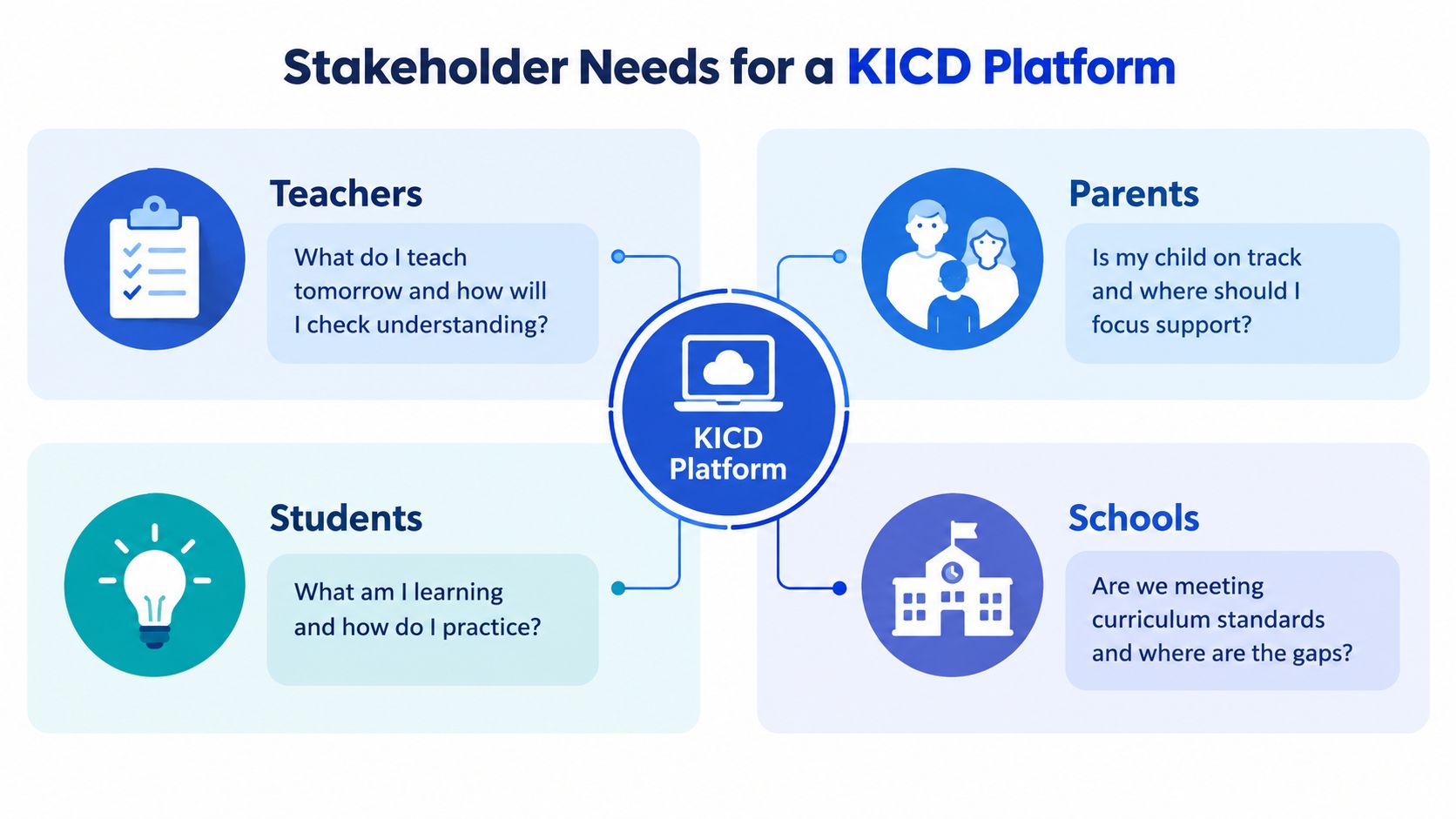
A platform earns its place in a school by helping people make better weekly decisions. A long feature list doesn't tell you whether the teacher can prepare Tuesday's lesson, whether a learner can practise at home, or whether the head can explain a department's progress.
The teacher's decision
The teacher needs a planner that begins with the curriculum, not with a blank page. A useful workflow brings together the strand, activities, materials, differentiation, and a quick check for understanding. After assessment, the teacher should be able to answer, “What do I reteach on Wednesday?” without manually comparing several notebooks or unrelated reports.
Automatic marking can help with routine checks, but teachers still need to see the questions, responses, rubric, and learner evidence. A score without context may save time while weakening professional judgement.
The parent's decision
Parents need plain feedback. “Needs support in a sub-strand” is more useful when the platform also suggests a manageable practice activity or explains what the learner should be able to do. A parent should be able to ask, “Is my child on track before the next report?” and receive a clear answer without decoding school jargon.
Low-data delivery matters because a home may depend on one phone and inconsistent connectivity. The Kenya Education Cloud access context highlights why availability alone isn't enough. Families need resources that remain usable when a connection disappears.
The student's decision
Students need short practice loops, visible progress, and a clear next task. A learner revising during a matatu ride may not have time for a long video or a complex login. Offline activities, revision queues, and immediate explanations can turn small periods of study into purposeful practice.
The school's decision
School leaders need class and department views that support action. They should be able to identify curriculum gaps, compare planned and completed work, review assessment evidence, and export records for internal meetings or official follow-up. Parent communication, payment records, and learner data should sit behind appropriate permissions, not in one unrestricted account.
A good platform doesn't give every user the same dashboard. It gives each person the evidence needed for the next responsible decision.
How the Plan, Teach and Assess Loop Should Work
Take a Grade 8 Mathematics lesson on linear equations. The teacher's week should begin with a curriculum reference and end with a usable decision, not with a disconnected collection of files.
Begin with a 5E plan
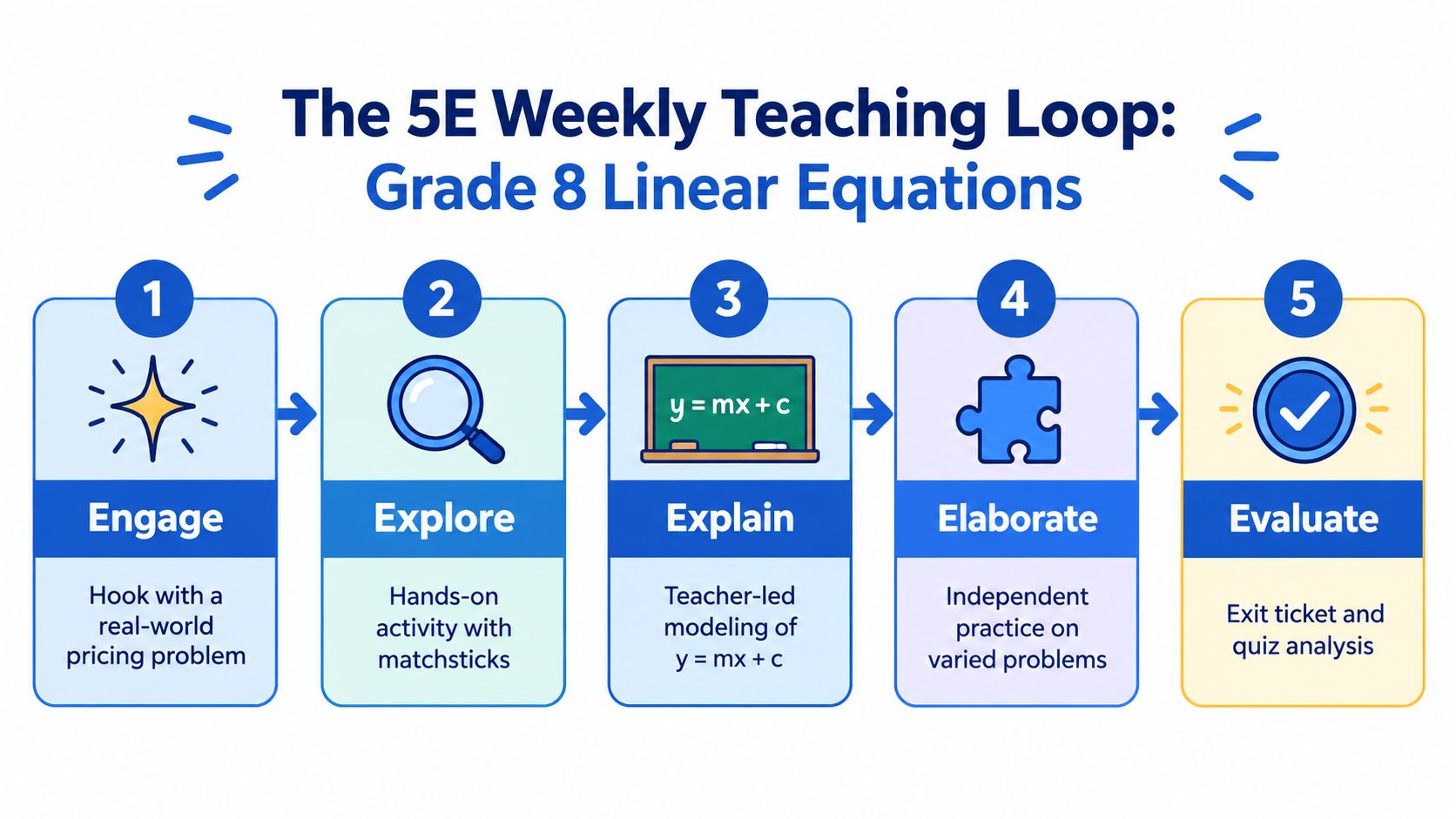
A 5E lesson planner can organise the lesson into Engage, Explore, Explain, Elaborate, and Evaluate. The teacher selects the relevant strand and sub-strand, reviews the intended outcome, then chooses activities suitable for the class.
- Engage: Introduce a pricing problem that gives learners a reason to think about an unknown quantity.
- Explore: Let learners work with matchsticks or another concrete representation.
- Explain: Model the relationship on the board, such as
y = mx + c, while checking the language learners use. - Elaborate: Provide varied problems so learners apply the idea beyond the first example.
- Evaluate: Use an exit ticket or quiz to reveal who can solve, explain, and check a linear equation.
Teachers who want a broader planning reference can also consult this lesson plan guide, then adapt the structure to their school's timetable and learner needs.
Teach with evidence in view
During teaching, learners can answer short questions tagged to the intended performance indicator. The teacher sees whether the class is confusing a coefficient with a constant, reversing an operation, or applying the method correctly. That information supports an immediate explanation instead of waiting for a later test.
Assess, group, and report
After the lesson, the teacher administers a Classroom Assessment and scores it against the relevant rubric. The platform should group learners by the support they need, such as remedial practice, on-track work, or enrichment. The grouping isn't the final judgement. It's a prompt for the next teaching action.
On the following Monday, the planner should carry forward the outcome. Learners who struggled receive a targeted activity, while those ready to extend their thinking receive a suitable challenge. The parent sees one coherent story from the week, rather than a lesson record in one place and a score in another.
A Checklist for Evaluating Any KICD Aligned Learning Platform
A procurement committee can test a platform in one meeting if it asks for evidence instead of accepting demonstrations. Score each category separately, and make Alignment the gatekeeper.
For a broader view of school technology choices, compare the curriculum workflow with guidance on an online learning platform for schools. The key question remains the same: does the tool close the weekly loop?
Alignment
Ask the vendor to open a lesson and show the source curriculum reference, strand, sub-strand, competency, activity, assessment item, and report output. Request a sample export that preserves those links.
- Evidence to request: A live mapping from curriculum design to learner report.
- Red flag: CBC terminology appears, but the vendor can't identify the underlying KICD reference.
- Test: Select a sub-strand and trace it through planning, teaching, assessment, and reporting.
Workflow
Ask a teacher to plan a lesson, deliver a short activity, record an assessment, and generate a parent update. The vendor should show how the next lesson uses the result.
- Evidence to request: A complete teacher workflow, including handover between teachers.
- Red flag: The teacher must download, rename, and re-upload files to continue the process.
- Test: Check whether mastery groupings and follow-up activities are created from recorded evidence.
Access
Test the platform on a shared phone, a low-resolution school screen, and a weak connection. Create more than one learner profile and interrupt the connection during an activity.
- Evidence to request: Offline behaviour, sync handling, phone sign-in, and multi-child navigation.
- Red flag: The platform assumes personal laptops, stable broadband, or email accounts for every learner.
- Test: Confirm that progress remains attached to the right learner after offline use.
Data safety
Ask how the platform limits personal data, manages roles, handles exports and deletion, and records payments. Kenya's education-sector privacy guidance notes breach notification to the ODPC without delay within 72 hours, so schools should ask how incident response is documented. Kenya's Data Protection Act and education guidance should inform the school's questions.
A platform scoring below 7 out of 10 on Alignment should be disqualified, regardless of its feature depth. A polished interface can't compensate for an untraceable curriculum record.
Designing for Shared Devices, Offline Use and Mobile Money
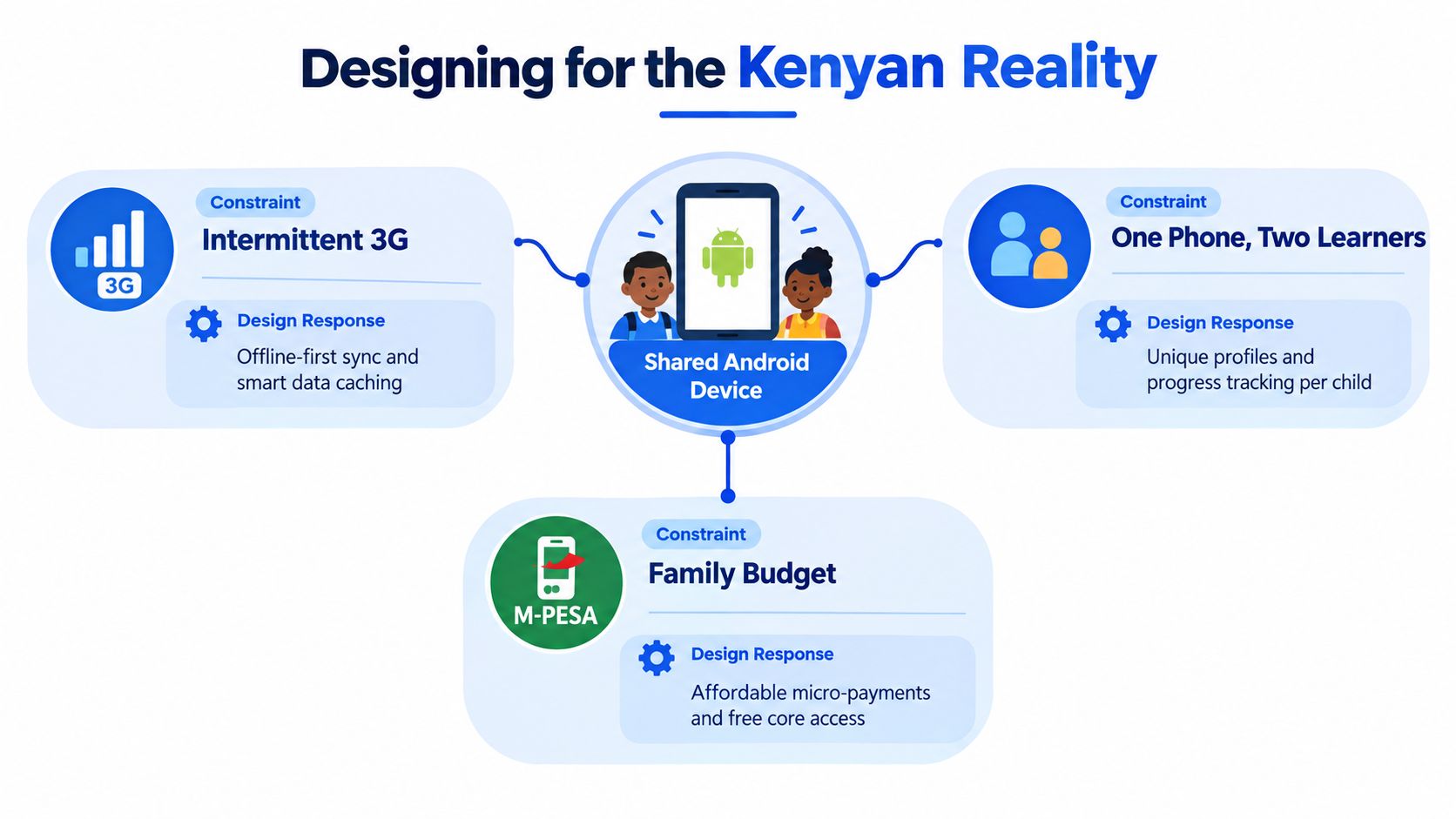
A Kenyan platform must work in the home that exists, not only in a well-equipped computer lab. Consider a family sharing one Android phone between a parent in Kiamaiko and two learners in upper primary. The connection may be intermittent, and the household budget is tracked in shillings through M-Pesa.
The access design should follow the weekly plan
When Wi-Fi or a stronger connection is available, the platform should cache the week's selected resources and assessment set. Learners can then study without repeatedly streaming content. When the signal returns, responses and completion records should sync, with the platform showing what has and hasn't reached the server.
Phone-number sign-in is more practical than requiring an email password that a household may not use. A secure one-time code or similar phone-based process should still protect the account and prevent one child from opening another child's records.
One phone must support separate learning journeys
Multi-child profiles are essential. A Grade 7 learner and a Grade 10 learner need different curriculum paths, revision tasks, and reports, even when they use the same device. Switching profiles should be quick, and each profile should retain its own progress, assessment history, and teacher feedback.
The offline tools guide for schools is useful for testing whether a platform treats weak connectivity as a design requirement rather than an inconvenience.
Payments should fit household practice
M-Pesa checkout can remove the need for stored card details, but a school should still test failed or delayed transactions. Parents need clear receipts, payment status, and a way to reconcile what was paid with the learner account.
These aren't premium extras. They determine whether a child can continue the learning sequence after leaving school, whether a parent can understand the account, and whether assessment evidence survives a poor connection. The Kenya Education Cloud connectivity discussion reinforces the difference between publishing digital content and making it dependable for daily use.
How Keybaki Meets These Criteria and How to Roll It Out
Keybaki provides a CBE-mapped digital library for Grades 7–12, with resources organised by subject, strand, and sub-strand. Its 5E lesson planner can generate editable Engage, Explore, Explain, Elaborate, and Evaluate blocks, while Continuous Evaluation Assessments connect checks to curriculum areas and produce mastery reporting.
The platform also provides teacher, student, parent, and school views. In the weekly loop, a teacher can plan from a curriculum strand, use a lesson resource, schedule or administer a CEA, and review weak strands for follow-up. Parents and learners receive progress information through their own views, while schools can use broader records for monitoring and reporting.
| Criterion | Keybaki capability | Evidence in daily loop |
|---|---|---|
| Curriculum alignment | CBE-mapped library organised by strands and sub-strands | The teacher begins with a curriculum reference and carries it into assessment |
| Planning | Editable 5E lesson planner with materials and differentiation | Monday's plan is prepared without losing teacher control |
| Assessment | On-demand and scheduled CEAs with mastery reporting | Friday's results identify areas for reteaching |
| Home visibility | Parent and student views, weak-strand briefings, revision queues | The family sees a clear next practice task |
| Access | Phone sign-in, offline cache, shared-device profiles, projector mode | Learning continues across school and home conditions |
| Payments | M-Pesa tokens and parent or school-side payment handling | The account and payment record remain connected |
A manageable rollout
Week 1 should belong to staff onboarding and curriculum audit. Department leads select representative strands, check the mapping, and agree on the evidence teachers will review each week.
Week 2 can use a pilot with two Grade 8 classes. Teachers test planning, classroom delivery, CEA recording, offline use, and report generation before expanding the workflow.
Week 3 should include parent orientation. Demonstrate profile switching, progress views, revision tasks, payment steps, and what to do when a phone is shared.
Week 4 can support a full-grade rollout. Keep the review rhythm small and consistent: examine completed plans, assessment outcomes, weak strands, and next-week actions.
The purpose of phasing isn't to delay adoption. It gives teachers time to adjust the workflow while lessons continue, so the platform becomes part of professional practice rather than another parallel reporting burden.
Adoption Questions and Success Metrics for Term One
Will offline mode sync assessments? A school should test this with a real device before rollout. Complete an assessment offline, reconnect later, and confirm that the learner, subject, strand, responses, and result remain correctly matched.
How are parent phone numbers protected? Ask what data is collected, who can view it, how long it is retained, and how families request export or deletion. The platform should use role-based access and minimise personal data, consistent with Kenya's data-protection obligations.
How do CEAs map to KICD rubrics? Open a sample CEA and inspect its curriculum reference, learning outcome, marking method, and report wording. Don't approve a tool based only on the presence of the word “competency”.
What happens when an M-Pesa payment fails? The account should show a clear pending or failed status, avoid duplicate charging, and provide a receipt after confirmation. The school office needs a simple reconciliation view.
How are reports exported for a sub-county office? Ask the vendor to demonstrate an export using actual school roles and records. The file should preserve curriculum references and assessment evidence while excluding information that the recipient doesn't need.
Use starting indicators, not pressure targets
A school can begin Term 1 by reviewing a small set of indicators:
- Teacher participation: Aim to review whether 80 percent of teachers log in weekly, using the platform's own activity record.
- Parent visibility: Track whether 60 percent of parents check mastery information, then ask non-participants what blocked access.
- Learner practice: Monitor whether 70 percent of students complete at least three CEAs per subject per month, with offline completion included after successful sync.
- Teacher workload: Compare end-of-week reteaching time before and after adoption, using teacher logs rather than a vague impression.
These figures should guide review, not punish teachers or families. If participation is low, check training, phone access, data costs, login friction, and the clarity of reports before blaming motivation.
The strongest evidence of success is a tighter loop. Teachers know what to teach next, learners know what to practise, parents know where to support, and school leaders can verify the record.
Keybaki offers a CBE-mapped library, 5E planning, strand-linked CEAs, parent and student progress views, offline access, shared-device profiles, and M-Pesa payment options for the Kenyan school and home context. Visit Keybaki to see how its plan, teach, assess, and report workflow can support a practical KICD aligned learning platform rollout.
Comments
Loading…