· Keybaki
How to Type Faster: A Typing Practice Plan for Students
8 min read

It's the night before a CBE research task is due. Your notes are on a phone, the cursor is blinking, and every sentence feels slow because you're searching for letters. This guide on how to type faster, a typing practice plan for students can use at home or in a shared lab, shows you how to build calm, accurate typing in short daily sessions.
Table of Contents
- Why Typing Faster Starts With Typing Better
- Set Up Your Posture and Home Row the Right Way
- Accuracy First, Speed Second
- A Four-Week Practice Plan You Can Actually Keep
- Measure Your Progress the Honest Way
- Habits That Quietly Hold You Back
- Practise With Keybaki's Typing Studio
Why Typing Faster Starts With Typing Better
Typing well isn't a talent you're born with. It's a practical skill that saves time on school projects, research notes, CEA answers and future work, and most learners can improve it with short, regular practice. When your fingers know where to go, you can think about your ideas instead of hunting for the next key.
For many Kenyan learners, that confidence can't be assumed. If you're starting from zero or typing with two fingers, you're not behind everyone else. You're starting where many students start.
What Better Typing Gives You
More time to think: You finish copying notes sooner and still have time to check your work.
Cleaner school work: You can type a paragraph, correct it, save it and submit it without panic.
Useful digital habits: Keyboard fluency supports wider digital literacy skills for school and work, not just speed.
Speed matters most when it helps you produce work you can actually hand in.
Four building blocks will carry you through this plan. You'll set up your posture, protect accuracy, follow a simple daily routine, and track progress against your own earlier results.
Set Up Your Posture and Home Row the Right Way
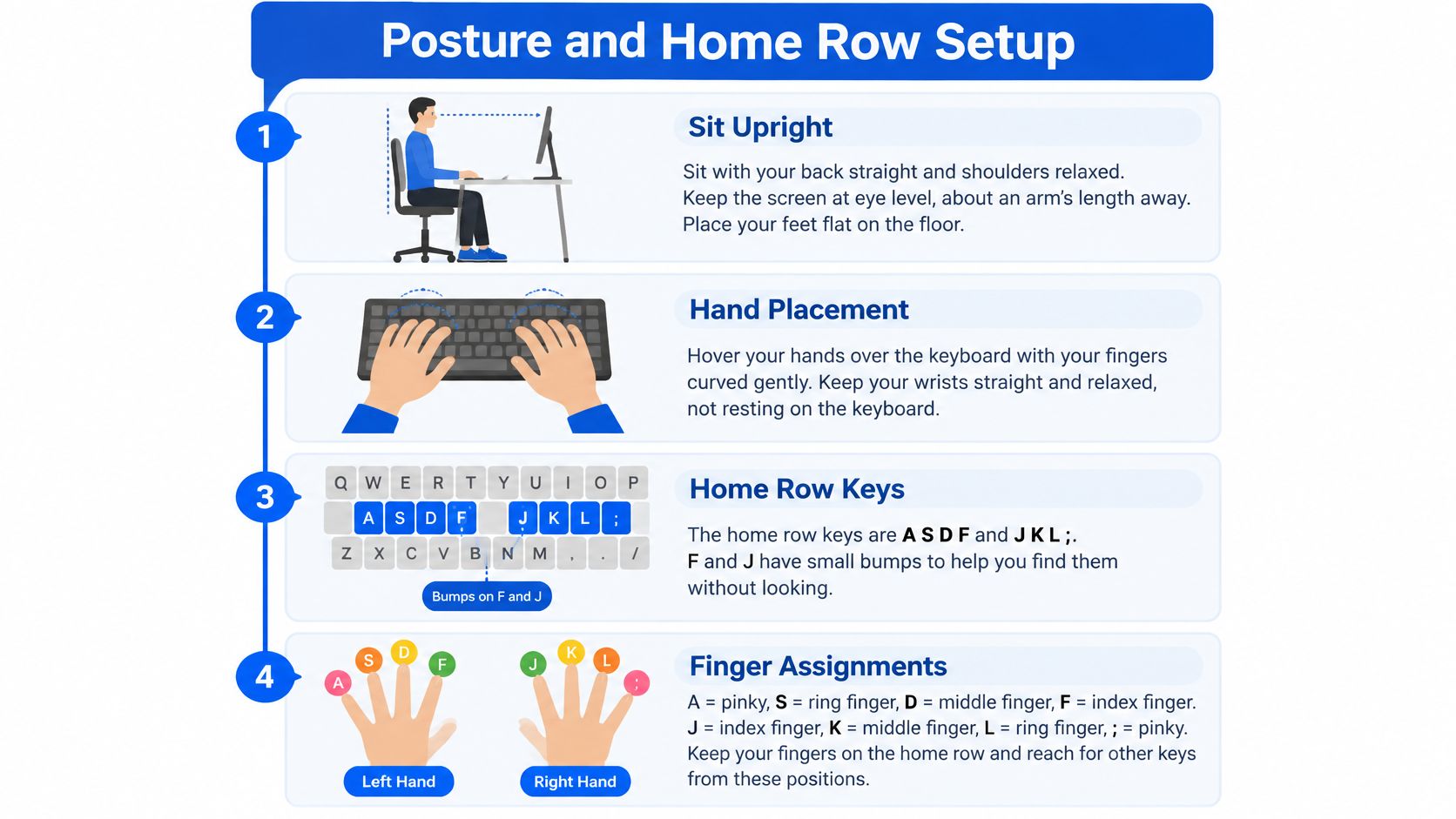
Sit upright before you touch a key. Keep the screen close to eye level, your feet flat, your elbows relaxed at roughly a right angle, and your wrists floating lightly instead of pressing on the table edge. If you're at a low table or a crowded lab desk, adjust what you can and take the same position each time.
Find Your Home Row
Rest your left fingers on A S D F and your right fingers on J K L ;. Your left index finger sits on F and your right index finger sits on J. Feel for the small bumps on F and J. They're there so you can find your place by touch, without looking down.
Each finger owns its own column of keys above and below the home row, and your thumbs rest on the space bar. Your right index finger, for example, handles J and the nearby keys it can reach without moving your whole hand. Don't let one strong finger chase letters across the keyboard.
Comfort helps you stay consistent. A flat school keyboard is enough to learn on. Whatever you use, return to the home row after every reach.
Accuracy First, Speed Second
Racing feels productive, but it often teaches your fingers the wrong pattern. If you repeatedly hit the wrong key quickly, that mistake becomes the habit. Slow, correct typing builds the right habit, and speed follows once your fingers no longer need to guess.
Checking a CEA answer works the same way. Correct content loses value when careless errors make it hard to read. Retyping, deleting and fixing also costs more time than pressing the right key once, carefully.
A Simple Test to Try
Type "The cat sat on the mat" five times without a single error. Then compare how calm that feels with typing it ten times quickly while making one or two mistakes each time. The slower set teaches your fingers more, even though it looks less impressive.
Practical rule: If errors keep appearing, slow down until the sentence comes out clean.
Keep your eyes on the screen, not the keyboard. Every glance down interrupts the muscle memory you're building and makes you start searching again. It's better to pause, feel for F and J, and continue.
Use 90 to 95% accuracy as a sensible gate before you make timed work harder. A cleaner slower passage is more usable for school work than a faster passage full of corrections.
A Four-Week Practice Plan You Can Actually Keep
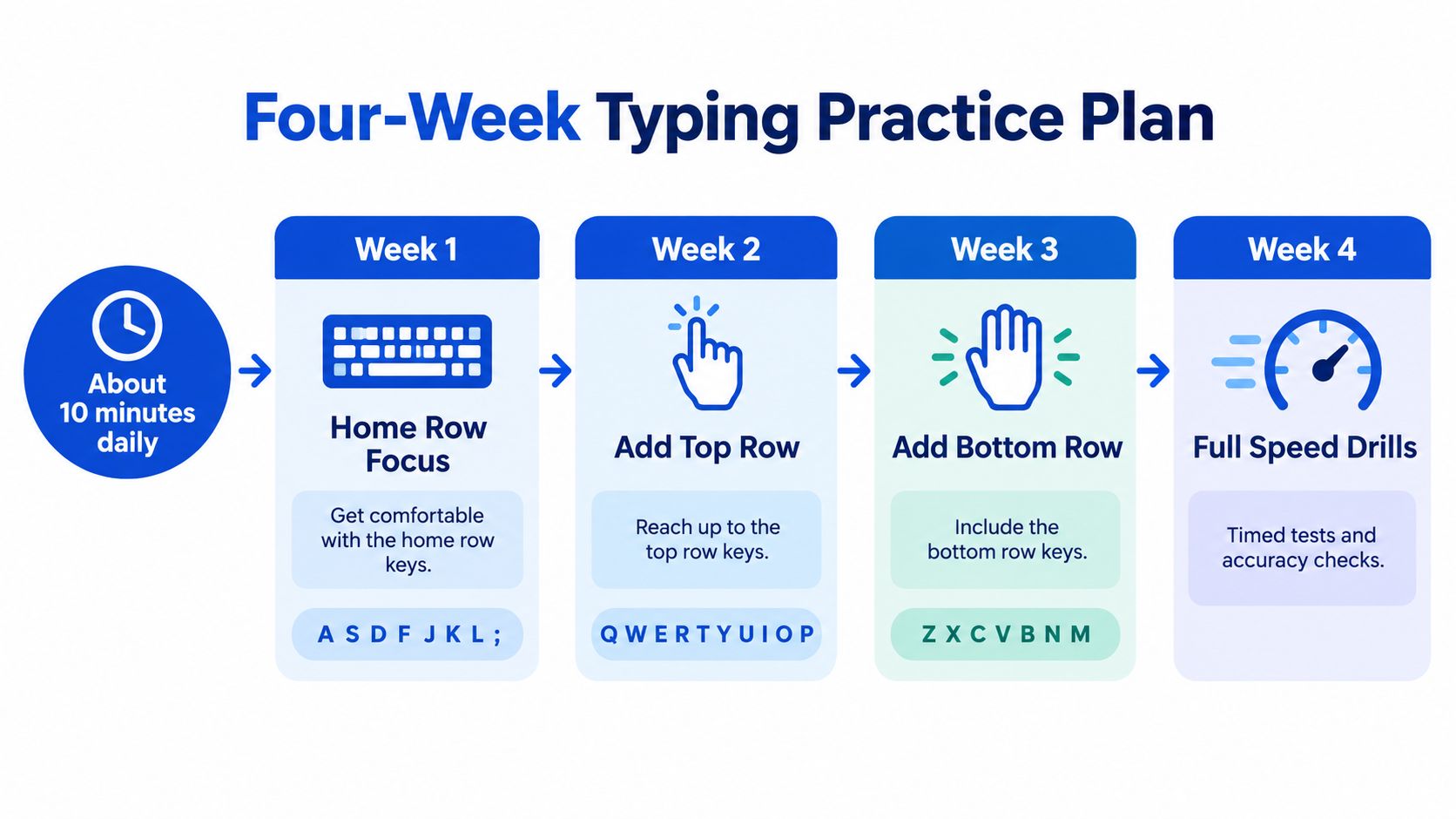
About ten minutes every day beats one long session a week. Short practice is easier to fit around homework, a shared family device or a brief turn in the school lab. Don't chase a promised words per minute score by a fixed date, because everyone starts from a different place.
Weeks 1 and 2 Build the Base
Stay on the home row first. Practise A S D F and J K L ; until you can return to them without looking, then add short two and three letter combinations. Keep each drill slow enough that you can finish it cleanly.
Weeks 3 and 4 Add the Rest
Add the upper and lower rows, then capitals, basic punctuation and numbers. Move into full sentences only when the new keys feel steady. After week four, try short paragraphs using familiar school words from topics such as the water cycle or Ushairi, and set small targets using goal setting for students who want steady progress.
Access will not be equal every day. A survey referenced by Kenya News Agency on school internet connectivity efforts reported only 35.3% of 1,000 surveyed public primary schools had internet connectivity. So make the plan flexible with these options:
Shared device: Take two short turns with a partner instead of one long turn.
Offline day: Use a printed keyboard chart to rehearse finger positions.
Lab day: Spend the first minute resetting posture and home row before you type.
By the end of week four, aim for a habit, not a headline score. You should be able to type a short paragraph without looking down and with accuracy staying high.
Measure Your Progress the Honest Way
Take a short timed test every week or two and record two numbers: words per minute and accuracy. Add a quick note on whether you looked at the keyboard. One number on its own can mislead you.

A slower but cleaner week is real progress. A faster week with many errors is a signal to return to the letter group that's causing trouble. Compare yourself with last month, not with a classmate who may have had a computer at home for years.
Keep a one line log in a notebook or phone note: date, words per minute, accuracy, what you practised. Short games can help the routine stay enjoyable, but your log is what shows honest growth.
Habits That Quietly Hold You Back
Most slow typing isn't caused by lack of effort. It's caused by small habits that place a ceiling on your progress. Notice one habit this week and correct it before you worry about the rest.
Looking down at the keys: Each glance breaks touch typing and teaches your eyes, not your fingers, to do the work.
Using one or two fingers: Hunt and peck typing forces you to search for every letter and makes longer work tiring.
Pressing too hard: Heavy hands slow you down and make your fingers ache. A light tap is enough.
Skipping the home row: Jumping straight to full sentences leaves you without an anchor when you get lost.
Practising only when tired: Tired fingers learn sloppy patterns, so a short fresh session is better than a long forced one.
Fix the habit first, and the speed has room to grow.
These corrections are part of learning how to guide your own practice. The same patience behind self learning habits that help students improve steadily applies here. You're not failing when you spot a bad habit. You're finding the exact thing that will help you next.
Practise With Keybaki's Typing Studio
Keybaki Labs turns this routine into a clear path you can open today. Start with a short level check that places you at the right lesson, then follow 15 lessons from Find F and J on the home row through other rows, capitals, punctuation, numbers and complex sentences.
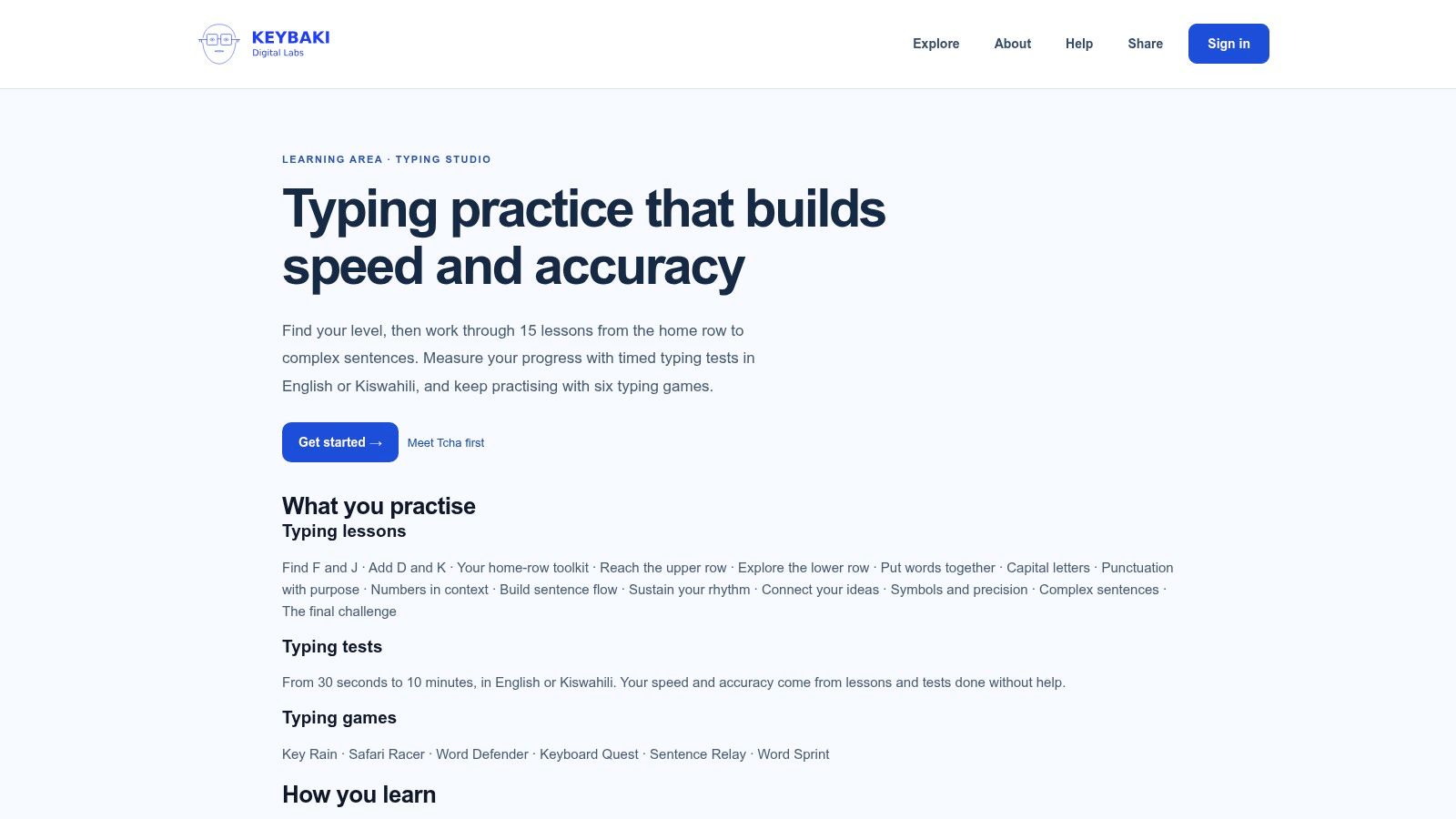
Timed tests run from 30 seconds to 10 minutes in English or Kiswahili, so they fit a ten minute slot or a short lab turn. Six games, Key Rain, Safari Racer, Word Defender, Keyboard Quest, Sentence Relay and Word Sprint, add variety without replacing the lessons.
Tcha, your guide, can demonstrate a lesson and coach you as you type. The finger position coach shows which finger reaches each key, reinforcing the home row map on screen. Speed and accuracy count only lessons and tests done without help, so your progress log stays honest.
Open Start typing practice on Keybaki Labs, run the level check tonight, and return tomorrow for your first ten minutes.
Keybaki gives Kenyan Grades 7 to 12 learners, parents and teachers CBE mapped lessons, assessments and practical digital practice in one place, including typing tools that build accuracy for real school work. Visit Keybaki to explore the platform and start building a typing routine you can keep.
Comments
Loading…