· HOD curriculum monitoring software
HOD Curriculum Monitoring Software for Kenya's CBE
13 min read
By Sunday evening, the term plan is already crowded. A school leader is checking coverage, missing CEAs, classes that need support, and whether the principal's report will consume the night. That is why HOD curriculum monitoring software matters in a Kenyan CBE school. The right system does not add another dashboard. It gives leaders control, saves time, and makes department performance easier to see and improve.
That pressure is not theoretical. In many Kenyan schools, teaching teams are already stretched. One study found 92.8% of pre-primary teachers in Malindi Sub County taught between 25 and 30 lessons per week, against a recommended weekly load of 30 lessons . When staff time is this tight, school leaders cannot afford tools that create more admin instead of reducing it.
Table of Contents
- What HOD Curriculum Monitoring Software Does in a CBE School
- Must-Have Features for Kenya's Competency-Based Curriculum
- A Kenya-Specific Selection Checklist Before You Buy
- Rolling Out the Software Across a Department in One Term
- Pitfalls That Kill CBE Monitoring Projects
- How Keybaki Closes the Loop in a Real Classroom Week
- Choosing the Right Path for Your School
What HOD Curriculum Monitoring Software Does in a CBE School
A HOD or principal rarely starts the week with perfect visibility. Classes drift off plan, evidence goes missing, and reports still have to be ready. HOD curriculum monitoring software matters when it turns planning, teaching, assessment, and reporting into one clear workflow that leaders can actually manage.
The software sits between teaching and reporting
A gradebook stores marks. A school MIS stores learner records. A department level CBE tool should do more. It should connect strand by strand coverage, lesson evidence, CEAs, weak areas and parent communication in one place. The HOD should not have to chase updates across books, spreadsheets, and WhatsApp threads. A principal should be able to see what was taught, what was assessed and what needs intervention next.
That is exactly where school leaders feel the difference. When coverage, evidence and learner progress sit in one system, department meetings become more useful, interventions become faster and reporting becomes less reactive and stressful.
That fits Kenya's CBE shift. Schools now need to align lesson planning, classroom delivery and reporting with competency based structures, not just content coverage. The Ministry's NEMIS platform already uses a web-based data model with learner records linked to a unique identifier generated by a verifiable algorithm, showing how Kenyan education data has been organised around centralised reporting and learner tracking Ministry of Education NEMIS.
The real test is simple. The tool should map subject evidence into a central record, support parent and KICD-related reporting and leave a clear trail for inspection. If not, leaders still end up doing the hard work by hand.
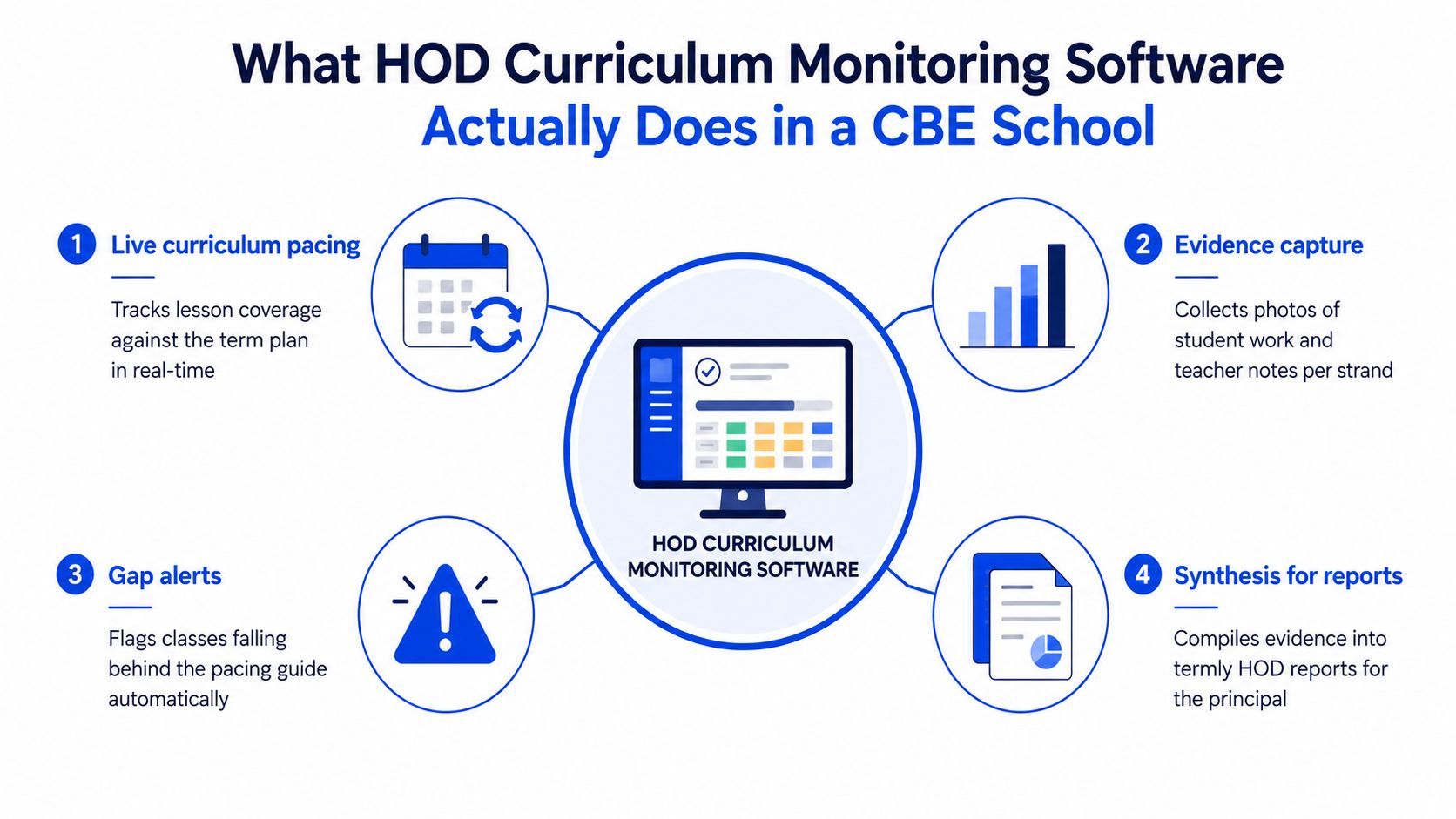
Practical rule: if the software does not show what was covered, what was missed, and what changes next week's lessons, it is not really monitoring curriculum.
For a closer look at how HODs and principals can track lesson plan compliance, that workflow matters because it turns checks into action instead of more paperwork.
A useful system reduces manual planning, flags gaps early, and packages evidence without forcing leaders to rebuild records at the end of the week.
Must-Have Features for Kenya's Competency-Based Curriculum
Most software looks convincing in a demo. School leaders need to ask a harder question. Will it make departments easier to run on a normal Monday in a Kenyan CBE school? These four feature groups matter because each one solves a leadership problem, not just a technical one.
Strand mapping and closed loops are the core
Strand mapping should link lessons to the real CBE structure, not generic subject tags. The software should align to grade-band strands, sub-strands, values, and competencies in a way an HOD can verify quickly. If that mapping is weak, coverage drifts and leaders lose confidence in the reports they see.
The next layer is the assessment-to-planning loop. When a CEA, formative check, or summative task is entered, the system should push weak strands into the next week's plan. In CBC, assessment should shape teaching, not just produce marks. For school leaders, this is the difference between collecting data and acting on it.
A second Kenya-specific pressure is digital assessment. Recent reporting says the proposed 2025 KNEAC Bill includes e-marking, electronic capture of marks, automarking, and AI-based marking for some assessments Nation report. That raises the stakes for leaders. Assessment data will move faster, so the response from departments must become faster too.
Weak dashboards hide too much. A proper mastery view should show which learners are struggling by strand, not just the class average.
Reporting has to be inspection ready
The third feature group is mastery dashboards. They should show per-learner and per-strand competency levels, plus intervention prompts. If the dashboard only shows averages, the learners who need attention first are easy to miss.
The fourth is inspection-ready reporting. Reports should be one-click, readable, and easy to share with a principal, county officer, or BOM. They should also preserve the path from lesson evidence to report line. That gives leaders confidence that what they are presenting can stand up to scrutiny.
The table below shows what each feature should do, and what breaks when it is missing.
| Must-Have CBE Features vs. Failure If Missing | What It Must Do | Failure If Missing |
|---|---|---|
| Strand mapping | Tie lessons, tasks, and evidence to CBE strands and sub-strands | Coverage drift and weak audit trails |
| Closed-loop assessment-to-planning | Turn CEA and formative results into next-week teaching actions | Assessment data sits unused |
| Mastery dashboards | Show learner-by-learner and strand-by-strand status | Hidden gaps behind averages |
| Inspection-ready reporting | Export clean reports for QA, BOM, and leadership review | Weekend rework before visits |
Keybaki's feature set is relevant here because it follows the same logic, strand-linked planning, assessments, and reporting in one flow Keybaki features. That matters when leaders need visibility without adding admin.
A Kenya-Specific Selection Checklist Before You Buy
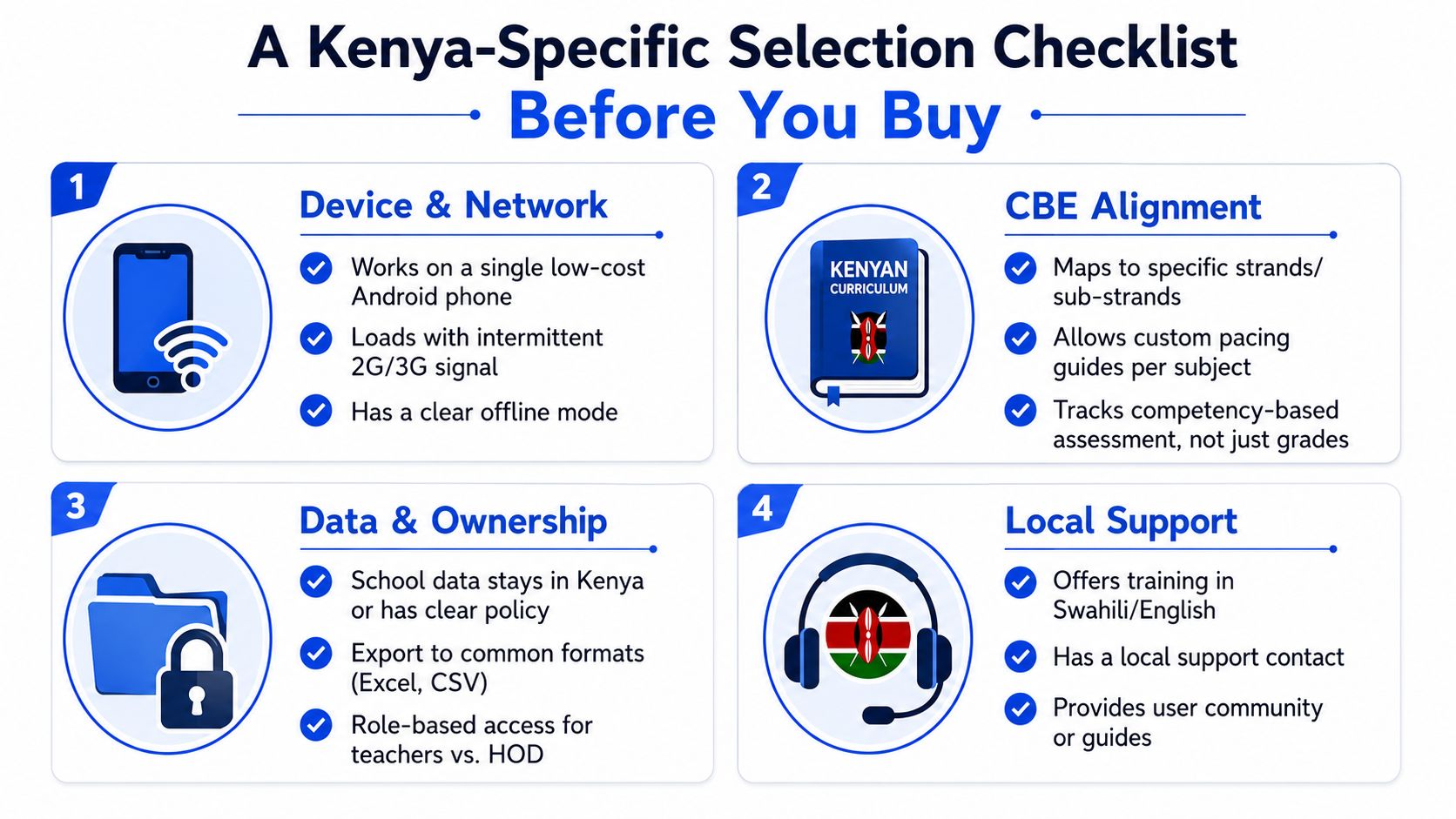
A polished demo can hide a poor fit. For a school leader, the question is not whether the product looks modern. It is whether the tool will still work with shared devices, uneven connectivity, and the daily realities of Kenyan school operations.
Test the tool against the school you really run
Start with device and network constraints. The software should work on Android, handle low-spec laptops, and keep working when the connection drops. Without offline support or a low-bandwidth mode, adoption stalls and teachers return to paper.
Second, check M-Pesa fit. Parent contributions, term fees, and per-learner add-ons should work without forcing a card-based flow. That matters because a system that ignores how schools actually collect money adds friction for both staff and parents.
Third, ask about data protection. The Office of the Data Protection Commissioner's education-sector guidance says institutions must process personal data lawfully, fairly, and transparently, inform people about recipients of their data, and recognise eight lawful bases for processing ODPC education guidance. For school leaders, that means role-based access, clear disclosure, data minimisation, and safer parent communication.
Fourth, check language and accessibility. English and Kiswahili support matter. So does a low-bandwidth parent summary.
A broader learning management system discussion helps with platform fit, but this checklist is stricter. HOD curriculum monitoring has to work in real school conditions, not only in a sales presentation.
If the vendor cannot show device support, offline behaviour, ODPC-aligned controls, and local payment handling in writing, it is a risk most school leaders should avoid.
Rolling Out the Software Across a Department in One Term
A department can only absorb so much change at once. When leaders try to migrate everything at the same time, confusion, duplicate records, and resistance usually follow. A phased rollout is easier to manage and more likely to stick.
Phase the rollout around real teaching tasks
Weeks 1 to 2 should be a pilot. Pick one class per subject, confirm device access, and load the strand map. The aim is not to impress staff with features. It is to prove that the tool fits the timetable and devices already in use.
Weeks 3 to 5 should focus on teacher onboarding. Keep training to a 45-minute hands-on session tied to the next lesson, not a generic product demo. Leaders get better adoption when training solves this week's task, not a hypothetical future one.
Week 6 is for the parent brief. Explain what the weekly report will show and how receipts are issued if an activity fee is paid through M-Pesa.
A rollout fails fastest when people are asked to learn the system before they can see how it fits their work.
Audit the term before the term audits you
Weeks 7 to 10 should be the audit dry run. Compare the evidence trail against the KICD assessment rubric and the school's internal schedule. The software should move from classroom use to inspection use without a last-minute scramble.
Track a small set of KPIs. Focus on time spent marking CEAs, percentage of strands covered against the scheme of work, parent acknowledgement rate, and the number of evidence files complete before portfolio review.
For leaders, this stage matters because it proves whether the platform is improving control, not just digitising paperwork.
Pitfalls That Kill CBE Monitoring Projects
The costliest mistake is not choosing the wrong brand. It is choosing a system that creates more work than the paper process it replaced.
Three failures show up again and again
The first pitfall is buying for feature lists instead of workload. A system can look sophisticated and still fail if entering one CEA takes longer than marking the script.
The second is ignoring offline and low-bandwidth use. If the system breaks on weak signal and cannot sync later, paper records return and trust in the platform drops.
The third is treating data protection as a legal footnote. As noted earlier, the ODPC guidance for the education sector stresses lawful, fair, transparent processing and clear information about who receives learner data. If role-based access is weak, evidence gets shared through informal channels and the audit trail breaks.
The failure patterns are easy for school leaders to spot:
Shadow spreadsheets appear when the software is too slow or rigid for daily teaching.
Abandoned logins appear when teachers cannot trust the system offline.
Non-compliant reports appear when access control and disclosure rules were never built into the workflow.
A CBE monitoring project fails when it is designed for the brochure instead of the department. If the software does not lower stress and improve visibility by week four, leaders should question whether adoption will survive term two.
How Keybaki Closes the Loop in a Real Classroom Week
A Grade 8 Mathematics department in Nairobi does not need another abstract dashboard. School leaders need a working week where planning, assessment, and parent communication stay connected, and where intervention can happen before small gaps become bigger problems.
Monday to Friday in one department
On Monday, the HOD opens the planner and sees that Strand 2.3 on mensuration ran behind last week. One period is reallocated from Strand 3.1, and the revised plan appears in every teacher's scheme without retyping.
On Tuesday and Wednesday, teachers enter CEA scores against specific performance indicators. The mastery view flags three learners below the expected level, so the department can respond before the gap hardens.
Thursday is parent day. The platform generates a weekly brief, and the HOD sends it from the same view. Two parents have already paid the agreed activity fee through M-Pesa, and the reconciliation sits next to the learning note instead of in a separate thread.
Friday closes the loop. The planner exports a strand coverage report that can be handed to the sub-county QA officer without rebuilding it manually. Assessment data, teaching adjustment, and inspection record all sit in one workflow.
The system is only useful if the next week's plan changes because of this week's evidence.
That is why this matters to school leaders. The HOD is not just collecting information. The department is acting on it quickly, and leadership has clearer visibility into what is improving, what is slipping, and where support is needed.
Choosing the Right Path for Your School
Most departments in Nairobi end up choosing between three paths. They keep the manual ledger and WhatsApp routine, add a generic LMS, or move to a CBE-native platform that follows the weekly teaching loop.
Compare the actual cost, not the sales pitch
The manual path looks cheap until the hidden labour appears. It gives flexibility, but it depends on the HOD remembering everything and rebuilding reports under pressure. For school leaders, that means low visibility and high risk.
A generic LMS can look more modern. In practice, many stop at content delivery and raw scores. They help with storage, but still leave the HOD to rebuild strands, CEAs, and reports elsewhere.
A CBE-native platform deserves serious attention when the department is overloaded and leaders need a dependable weekly rhythm. It should produce a useful first report quickly, work on ordinary local network conditions, and turn assessment into next week's planning instead of only displaying results.
| Three Paths an HOD Can Take | Weekly HOD Hours | CBE Strand Coverage | Inspection Readiness | Best Fit |
|---|---|---|---|---|
| Manual ledgers and WhatsApp | High | Weak unless the team is very disciplined | Fragile under pressure | Very small or transitional departments |
| Generic LMS | Moderate | Partial, often extra work is still needed | Mixed, depends on manual export | Schools mainly focused on content hosting |
| CBE-native platform | Lower once adopted | Stronger because strands and CEAs stay linked | Better if reports are built in | Understaffed departments that need a closed loop |
The choice comes down to three checks. How fast can the school get a useful report? Does the tool still work on an ordinary Kenyan network? And does it close the assessment-to-next-week teaching loop, or only display data?
If your leadership team is ready to reduce blind spots, cut manual reporting, and give HODs a more manageable weekly workflow, Keybaki offers Kenyan schools a strand-linked planner, CEAs, parent briefings, and coverage reporting in one loop. Visit Keybaki to see how it fits a real CBE HOD workflow and decide whether it matches your school's operational needs.
Comments
Loading…