
· Keybaki platform
Digital Curriculum Management Kenya for CBE Success
18 min read

On Sunday evening, a junior secondary teacher in Nairobi opens three WhatsApp chats, a notebook, a downloaded PDF and a crowded phone gallery to prepare Monday's lesson. The strand is clear, but the resources are scattered. On Monday, learners complete an assessment, yet the results stay in a book while the next lesson follows the original plan. A parent asks what support is needed at home, and the teacher has no simple weekly answer.
That gap is where digital curriculum management in Kenya matters. It isn't just about putting textbooks online. It connects curriculum planning, classroom delivery, continuous assessment, reteaching and family feedback so that one week informs the next. Kenya's Competency-Based Education, or CBE, replaced the older 8-4-4 system and places digital literacy among its seven core competencies across subjects, as documented in this guide to what Competency-Based Education means.
The practical question is not whether a school has digital content. It is whether a teacher can plan a strand, teach it, check understanding, identify weak areas and send a useful update home, even when internet access is unreliable or several children share one phone. This guide follows that weekly loop and explains what teachers, parents, learners and school heads should expect from a workable system.
Table of Contents
- Introduction to Digital Curriculum Management in Kenya
- What Digital Curriculum Management Means for CBE
- Benefits and Risks You Should Weigh Honestly
- How Teachers Parents Students and School Heads Work Together
- Your Implementation Roadmap From Requirements to Rollout
- How to Choose a Platform and Measure What Matters
- Local Examples That Show Digital Curriculum Management in Action
Introduction to Digital Curriculum Management in Kenya
On Sunday evening, a teacher may prepare a lesson from a scheme of work, search for an activity in a phone gallery, and record assessment marks in a notebook. By Wednesday, the class has completed the task, but the results are still separate from the next lesson. A parent asking what to practise at home may receive only, “Revise more.”
Digital curriculum management in Kenya brings these weekly actions into one working routine. CBE asks schools to focus on what learners can do, not only the content they have covered. A lesson should therefore connect to a strand or sub-strand, activities should practise the intended competency, and assessment should guide the next teaching decision. For context, see this guide to what Competency-Based Education means.
Kenya's policy direction also places technology within curriculum work. The Ministry of Education's ICT agenda includes e-learning, online assessment, professional development and governance. Earlier planning documents called for the curriculum to move from text-based formats towards digital delivery. Research on ICT integration in CBE found that access to ICT tools and quality teacher training were associated with effective integration, while also showing that equipment and preparation do not resolve every implementation challenge.
The Monday problem
A teacher can spend Sunday planning, search again for an activity on Monday, create an assessment later in the week and manually compare the results with the scheme of work. Parents may hear that a child needs to “revise more”, without knowing the strand, skill or example that needs practice.
A workable system keeps the weekly loop visible:
- Plan: Select the strand and adapt the lesson to the class.
- Teach: Use a screen, projector, printed support or content saved for offline use.
- Assess: Give a short continuous assessment linked to the same strand.
- Respond: Group learners for support, reteach a difficult idea and set focused practice.
- Report: Share a clear update with the learner, parent and school leader.
The connection matters more than the file library. If a platform leaves teachers copying content into separate plans and spreadsheets, it may shorten the search but still leave the teaching decisions disconnected.
What this guide keeps practical
Connectivity differs across Kenyan schools and homes. Some learners use a personal smartphone; others share a family phone, borrow one from a sibling or depend on a teacher's device and projector. The system should support offline access, low-bandwidth synchronisation, shared-device sign-in and parent messages that remain useful when data is limited.
Teacher judgement stays central. A tool may draft a lesson or summarise assessment results, but the teacher decides whether the activity suits the class, which learner needs another explanation and whether the strand is ready for the next step.
What Digital Curriculum Management Means for CBE
Think of digital curriculum management as a shared control tower for the curriculum. The curriculum is the route map, the teacher's plan is the flight plan, the classroom activity is the journey, and the assessment shows whether learners have reached the intended destination. If the assessment reveals a problem, the control tower sends that information back to the next plan.
A basic digital library stores files. A curriculum-management system adds relationships between those files and the work teachers do. Each lesson, activity and assessment should connect to a strand and sub-strand, so a teacher can answer three simple questions: What are we teaching? How will learners practise it? How will we know who needs help?
The five parts of the loop
Curriculum mapping comes first. The platform should organise material by grade, subject, strand and sub-strand rather than placing every resource in one large folder. This gives the teacher a reliable starting point and makes coverage easier to review.
Planning turns the selected curriculum item into a usable lesson. A 5E plan can move from Engage to Explore, Explain, Elaborate and Evaluate, with room for materials, differentiation and teacher edits. The generated draft is only a starting point. A Nairobi class, an ASAL school and a mixed-ability group may need different examples or pacing.
Delivery makes the plan usable in the room. The lesson might run on a teacher's phone, a shared tablet, a school computer or a projector. A strong system should also allow cached resources and simple presentation layouts when the network drops.
Assessment checks the same learning intention that shaped the lesson. A strand-linked quiz or teacher-scheduled check is more useful than an unrelated test because its result can guide the next teaching decision.
Response closes the loop. The system should show which strands need reinforcement, help the teacher prepare the next intervention and give parents an understandable action for home practice. Without this final step, digital curriculum management becomes digital record-keeping.
Why the strand is the anchor
Strand-level links provide traceability. A head of department can see whether planning and assessment match the curriculum, while a teacher can avoid repeating work or assigning practice that doesn't address the actual gap. Parents don't need the full dashboard. They need a short explanation of what the learner is practising and how they can help.
Practical rule: If a platform can't show how an assessment result changes the next lesson, it is probably storing content rather than managing the curriculum.
The mental model is simple: plan, teach, check, respond and communicate. Every feature should support one of these actions without forcing teachers to retype the same information in several places.
Benefits and Risks You Should Weigh Honestly
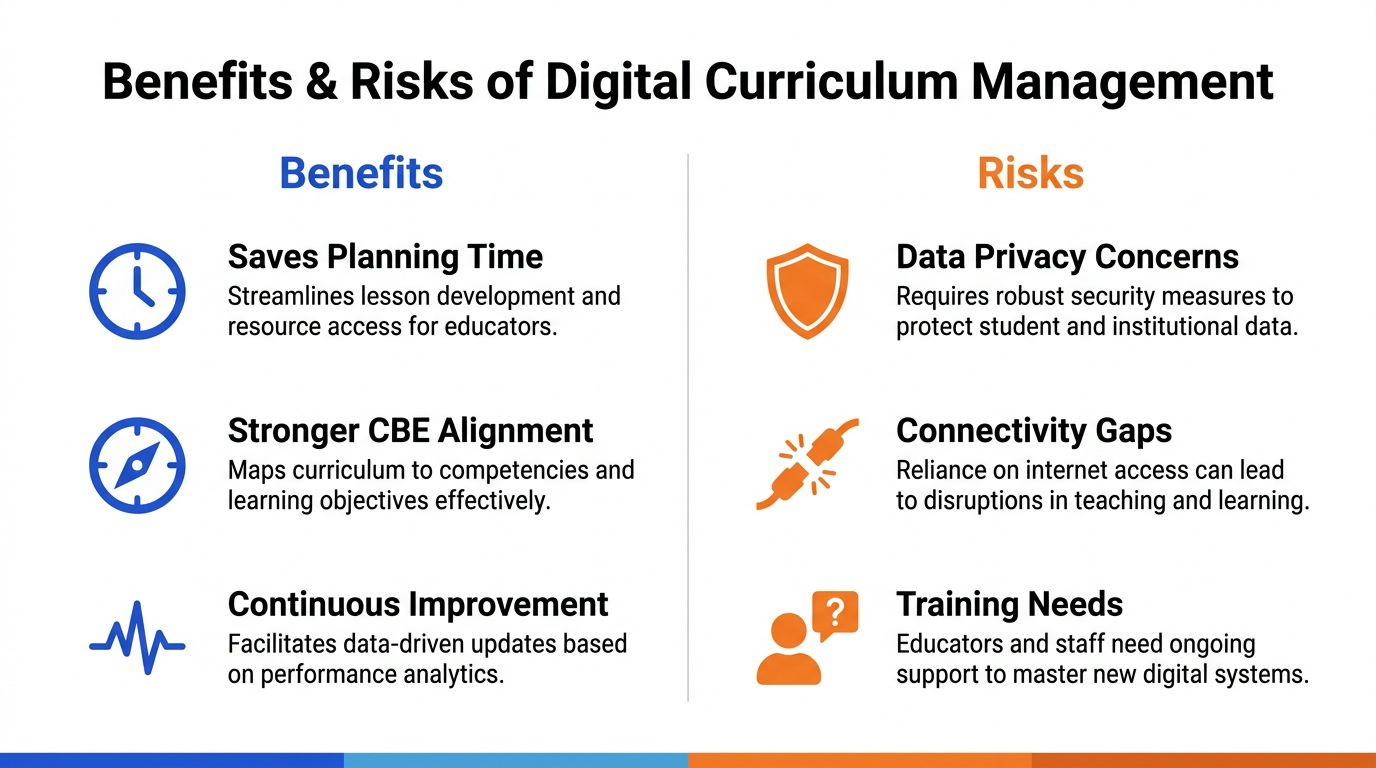
On Monday morning, a teacher may need to adjust a strand-aligned lesson, teach with a shared phone or projector, check learning and plan support before the week ends. Digital curriculum management helps only when these steps form one weekly loop. A lesson draft should be quick to edit, an assessment should connect to the intended learning and the result should point to the next reteaching action.
Kenya has built substantial institutional support for digital curriculum materials. The National Treasury recorded 50 curriculum designs for CBC Grade 10, 64 curriculum designs adapted for learners with special needs, capacity building for 150,225 CBC implementers, 168 interactive digital items for Grade 5 and 520 electronic curriculum support materials in FY 2021/22. The Education Sector Report also describes distribution through the Kenya Education Cloud. These figures show production and distribution, not automatic success in a classroom.
Where schools gain
A joined-up weekly workflow can reduce repeated preparation. Teachers can find material faster, connect plans to CBE strands and identify learners who need another explanation. Parents can receive a practical update instead of waiting for a termly mark. “Practise fractions with this activity” gives a family a clear task, while “weak in mathematics” offers little direction.
The platform must suit the teacher's confidence and available time. Research on Kenyan ICT integration has shown that digital readiness varies among teachers, even where schools have introduced devices and training. A system with clear buttons, editable templates and a short path from result to action is more likely to be used consistently.
Where the system can fail
The first risk is extra administration. If a teacher downloads a resource, copies it into a plan, creates a separate assessment and enters the result elsewhere, the school has digitised separate tasks rather than joined the workflow. Auto-generated plans also need room for local materials, learner needs and the teacher's method.
The second risk is connectivity. The Kenya Digital Masterplan sets out goals including 100,000 km of fibre and 100% connectivity for schools and other educational institutions. Until access is consistent, a platform should cache lessons, synchronise when a connection returns and support low-data sharing. Projector delivery can serve a class, while a family phone may handle revision later. Shared-phone access also requires short activities and downloadable instructions.
The third risk is privacy. Schools should collect only what the workflow needs, limit who can view learner and parent profiles and define what happens after an incident. The Kenya Data Protection Act guidance can support that review.
How Teachers Parents Students and School Heads Work Together
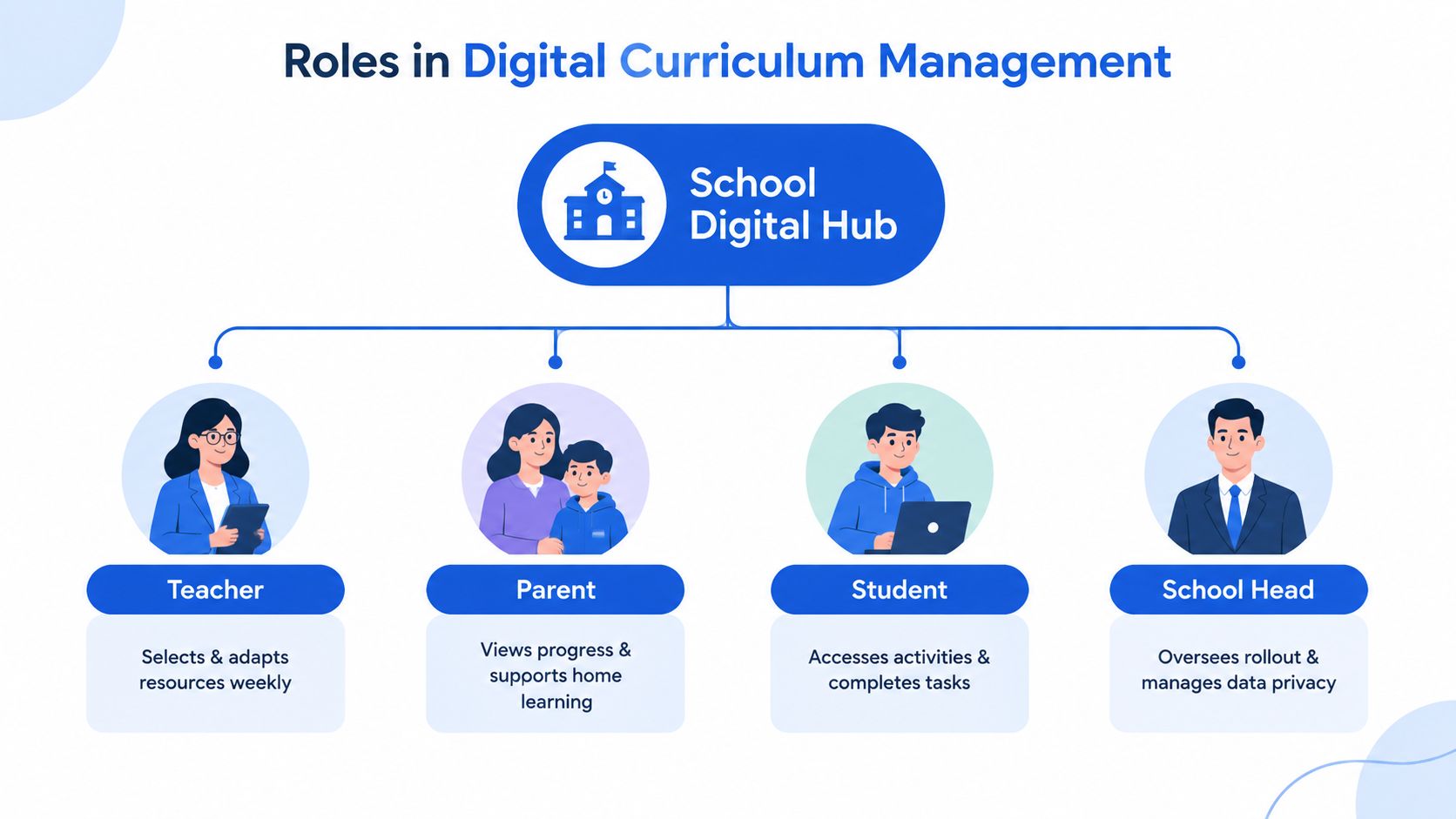
The platform works when each person receives a clear task, not when everyone sees the same dashboard. Teachers need curriculum and class information. Learners need activities and feedback. Parents need a short, practical view of progress. School heads need oversight without opening unnecessary personal details.
Monday and Tuesday
The teacher selects the week's strand, reviews a 5E lesson draft and changes examples or grouping instructions. The timetable places the lesson in the correct period, while cached resources ensure the class can continue if the connection becomes unreliable.
Learners engage with the lesson, then complete an activity or short CEA. A student who uses a shared device doesn't need a separate expensive setup. The school can provide projector delivery in class, while the learner later uses a family phone for revision when it is available.
Wednesday and Thursday
The assessment result should sort support by weak strand, not just produce a total score. The teacher reviews which idea needs another explanation, assigns a focused activity and records whether the learner has completed the correction. A learner's revision queue should stay short and relevant, especially where a phone is shared among siblings.
Parents should receive an actionable briefing. It might identify the learning area, explain the home activity and show whether the task was completed. A PIN-based family-phone sign-in can help a parent manage more than one child without requiring a separate device for every learner.
Friday and the next planning cycle
The teacher checks whether reteaching helped and decides whether to continue, extend or move on. The school head views coverage and broad mastery patterns across classes, while avoiding access to information that isn't needed for management.
A parent doesn't need a data dump. They need to know what the learner is working on, what evidence shows a gap, and what small action can happen at home.
The school should agree on roles before rollout. Teachers edit and interpret. Students attempt and reflect. Parents support practice. School heads monitor implementation, permissions and data handling. That division prevents a common failure, where a platform creates more notifications but no shared responsibility.
The weekly loop becomes meaningful when information moves in one direction: assessment informs reteaching, reteaching informs the next check, and the result informs the family.
Your Implementation Roadmap From Requirements to Rollout
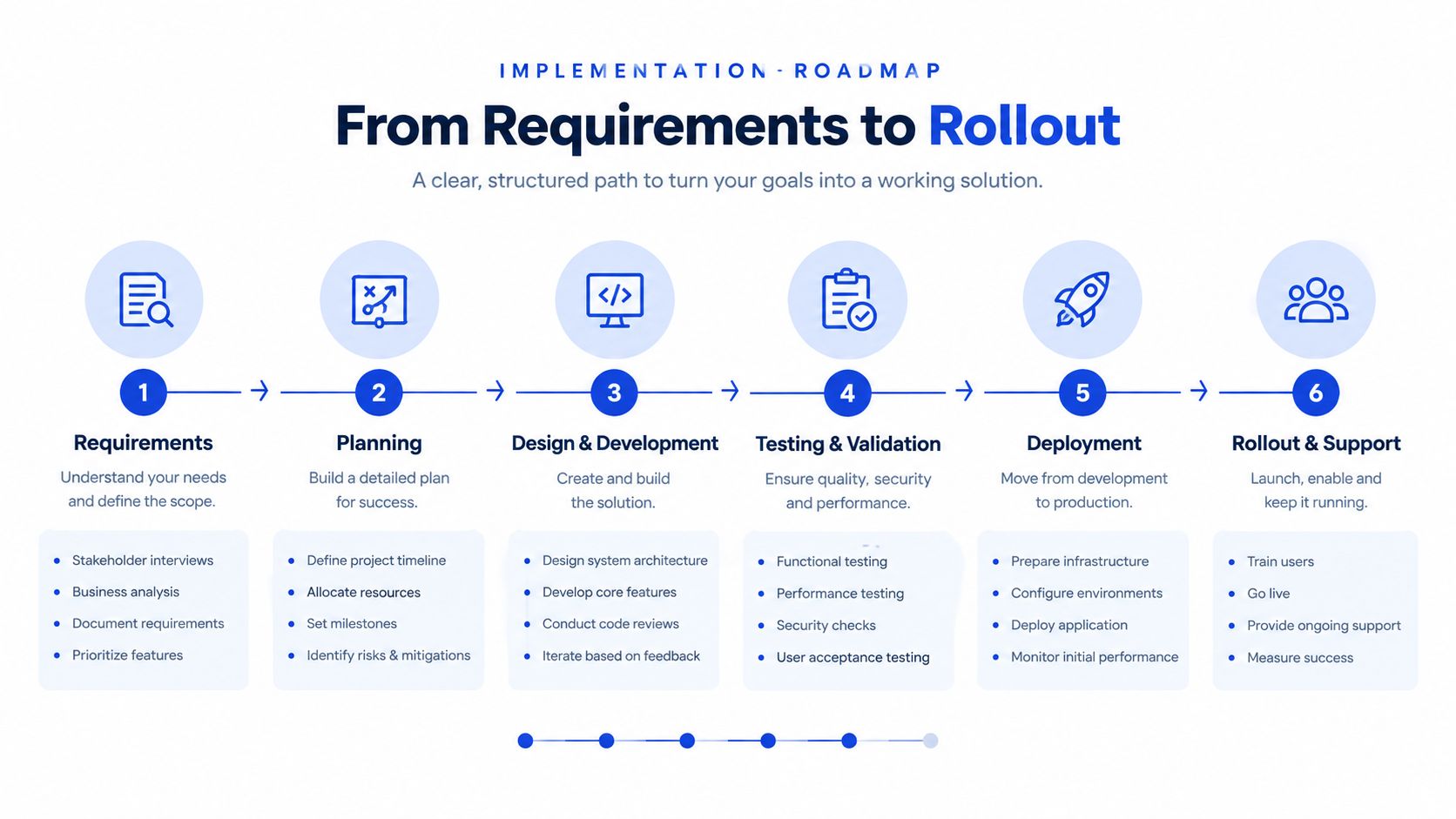
Start with the school's actual week, not a product brochure. Ask a teacher to demonstrate how they currently select a strand, prepare a lesson, give a CEA, record results and communicate with parents. Note every repeated entry, every paper hand-off and every point where a weak learner becomes invisible.
1. Gather requirements
List the curriculum areas, grades, devices, screen sizes and network conditions. Include the less visible requirements: whether several learners share one phone, whether teachers need Kiswahili support, whether parents use phone-number sign-in and whether the school needs a projector mode.
Define the minimum acceptable workflow. A teacher should be able to select a strand, edit a plan, deliver a lesson, assess learners and see the next action without opening unrelated systems.
2. Check procurement and setup
Don't begin with the largest possible device order. First confirm that existing phones, tablets, computers and projectors can run the platform. Check whether materials remain readable on low-resolution screens and whether content can be cached before a lesson.
Payments also need a local plan. If families or schools use M-Pesa tokens, explain who pays, what access the payment provides, and how support handles a failed transaction. Avoid collecting more family information than the service needs.
3. Roll out in phases
Choose a manageable group of classes or departments for the first cycle. Let teachers test one complete loop from planning to parent feedback rather than asking them to upload the whole curriculum at once.
Use the pilot to identify practical failures. Can a teacher resume a cached lesson? Can a learner submit work from a shared phone? Can a headteacher see coverage without seeing unnecessary personal data? These answers matter more than a long feature list.
4. Train through real tasks
Teacher training should use a familiar strand and a real class timetable. A trainer can demonstrate how to edit a 5E activity, assign a CEA, read a weak-strand result and plan reteaching. Short follow-up support is more useful than one large demonstration that ends before teachers use the system independently.
Parents need a separate explanation. Show them how to sign in, find the weekly briefing, switch between children and support a revision task without completing it for the learner.
5. Put privacy into the workflow
The Ministry's ICT in Education and Training Policy links education-sector technology use to the Data Protection Act, 2019, including safe, secure and ethical data use. ODPC education-sector guidance says institutions should register as data controllers or processors and report personal-data breaches without delay within 72 hours.
Set role-based permissions before accounts are issued. Keep audit logs, provide export and deletion controls, define who can download reports and create a breach-response contact list. Collect only what planning, assessment, support and lawful reporting require.
6. Design for weak connectivity
The DigiSchool School Net programme focuses on connecting schools to broadband and educational resources, but schools still need a fallback while coverage develops. A 2026 regional summary reported that 3,469 of 23,286 public schools, or 14.9%, were connected, against the National Broadband Strategy goal of universal school connectivity by 2030, according to the same DigiSchool source.
Prepare lessons for offline use. Cache the week's materials, allow assessments to store locally and synchronise later, keep file sizes manageable and provide projector-ready views. A school should be able to teach the planned lesson even when the signal disappears at the classroom door.
How to Choose a Platform and Measure What Matters
A platform should earn its place by reducing friction in the weekly loop. Compare products using the same classroom task, not a sales presentation. Ask each provider to show how a teacher moves from a curriculum item to a lesson, from a lesson to a CEA and from a result to a reteaching action.
| Evaluation Area | What to Look For | KPI to Track |
|---|---|---|
| CBE alignment | Strands and sub-strands attached to lessons, activities and assessments | Strand coverage |
| 5E planning | Editable Engage, Explore, Explain, Elaborate and Evaluate stages | Teacher planning time |
| Assessment | On-demand checks, scheduled CEAs and useful mastery reporting | CEA completion and reteaching closure |
| Offline access | Cached lessons, low-bandwidth synchronisation and projector mode | Lessons completed during connection interruptions |
| Parent and student views | Weak-strand briefings, revision queues and shared-phone access | Parent engagement with weekly actions |
| Language support | Clear English and Kiswahili options where needed | Learner and parent usage |
| Payments | Familiar local payment routes and no unnecessary card storage | Successful access activation |
| Data controls | Role permissions, audit logs, export, deletion and breach workflows | Access incidents and response readiness |
Measure teaching decisions, not clicks
Planning time matters, but don't treat more logins as success. Ask teachers whether they spend less time searching and retyping, and whether they can adapt a plan without losing the curriculum link.
Track strand coverage to see whether planned teaching matches the intended sequence. Track CEA completion to identify classes or learners who are missing evidence. Track mastery improvement after reteaching, but interpret the result alongside attendance, device access and teacher judgement.
A useful measure is reteaching closure. For each weak strand, record whether the teacher assigned support, whether the learner completed it and whether a later check showed progress. This tests the closed loop directly.
Parent engagement should mean more than opening a message. Look for completed home actions, questions sent to the teacher and regular use of the weekly briefing. School heads can also monitor whether teachers are receiving support, rather than using dashboards only for compliance.
Schools comparing approaches can review CBE e-learning in Kenya, then ask vendors for a live demonstration using their own curriculum priorities. One option is Keybaki, a Nairobi-built CBE platform for Grades 7 to 12 that provides a strand-organised library, editable 5E planning, CEAs, mastery reporting, parent and student views, offline cache, projector mode, English and Kiswahili content, and M-Pesa access.
Local Examples That Show Digital Curriculum Management in Action
A Grade 7 teacher begins the week by selecting a curriculum strand rather than searching through unrelated files. The system drafts a 5E lesson, and the teacher changes the examples, materials and grouping to suit the class. During delivery, the teacher uses a projector while learners discuss and write responses in their books.
Later, the teacher schedules a short CEA tied to the same sub-strand. The result doesn't sit in a separate spreadsheet. It identifies the weak area, so the next plan includes a brief reteaching activity and a focused practice task.
A Grade 9 learner may not have a personal smartphone. At the weekend, the family phone receives a revision queue focused on the learner's weak strand. A parent signs in with a PIN, views a short briefing and helps create time for practice without needing to interpret a full teacher dashboard.
A school head looking across Grades 7 to 12 needs a different view. The head checks whether departments are covering planned strands, whether assessments are being completed and whether reteaching is being closed. The dashboard supports a conversation with the department lead, not a replacement for classroom judgement.
In a school with unstable connectivity, the teacher downloads or caches the week's resources while a connection is available. The lesson remains usable offline, and assessment results synchronise later. Projector-ready delivery helps a class learn from one shared screen, while low-resolution layouts keep the experience practical on older equipment.
Kiswahili support can help parents and learners understand instructions, while M-Pesa tokens can fit familiar payment habits where paid access applies. These details don't solve every implementation problem, but they address the everyday conditions that determine whether a digital curriculum system becomes part of school life or another unused account.
A workable Kenyan model is therefore modest and disciplined: one strand, one lesson, one assessment, one response and one clear message home each week. That is the difference between storing digital content and managing learning.
Keybaki connects CBE-mapped planning, 5E lesson preparation, continuous assessments, mastery reporting and parent visibility for Grades 7 to 12, with offline and shared-phone workflows for Kenyan school and home realities. Visit Keybaki to see how the weekly planning, teaching, assessment and reteaching loop can fit your school.
Comments
Loading…