· CBE lesson planning software Kenya
CBE Lesson Planning Software Kenya: A Practical Guide
18 min read

At seven in the evening, a Grade 7 teacher may have the KICD curriculum design open on one phone, learner notes in a notebook, and a reminder that continuous assessment evidence is due soon. A parent may be asking what the child studied this week, while the learner is sharing a family phone with siblings. The teacher isn't struggling because the curriculum lacks structure. The difficulty is turning that structure into a usable weekly routine.
CBE lesson planning software in Kenya should solve more than lesson-note typing. It should connect the teacher's plan, the learner's activity, the parent's view, and the school's records, while still working with shared devices, intermittent connectivity, and familiar payment methods. Kenya's curriculum reform has made that shared workflow increasingly important.
Table of Contents
- What CBE Lesson Planning Software Actually Does in Kenya
- The CBE Architecture Every Kenyan Planner Must Mirror
- Must-Have Features for Kenyan Classrooms and Homes
- A Practical Checklist for Choosing the Right Platform
- A Real Weekly Classroom and Home Workflow
- Piloting and Rolling Out in Schools and Households
- Cost Models That Actually Work in Kenya
- Closing the Loop Between Teachers, Parents, and Students
What CBE Lesson Planning Software Actually Does in Kenya
A Grade 7 teacher preparing the week's lessons needs more than a digital notebook. The plan must connect the learning area, strand, sub-strand, outcomes, activities, and assessment evidence. At home, a learner may use a shared family phone, while a parent needs a clear view of the week's work. The school still needs records that leaders can review.
Kenya's competency-based curriculum began in 2017, with phased rollout continuing from 2019 onward. The pioneer cohort reached Grade 7 in 2023, and by 2024, Grade 7 was fully operational in Junior Secondary. Secondary-level learning therefore began at Grade 7 rather than Form 1. The cohort was scheduled to complete Grade 9 in 2025 and enter Senior Secondary in January 2026 (CBC and 8-4-4 curriculum timeline).
A useful platform acts like a shared weekly loop with four roles:
- Teacher: selects the grade, learning area, strand, and sub-strand, then adapts an editable learner-centred lesson sequence.
- Student: receives activities and demonstrates learning through work, discussion, practice, or practical tasks.
- Parent: sees a simple weekly summary and understands what support the learner needs at home.
- School: reviews curriculum coverage and keeps organised assessment evidence.
A generic planner with “topic”, “objective”, and “homework” fields can organise notes, but it does not preserve the relationships a Kenyan teacher must review. A Kenya-ready system should attach questions, observation points, rubrics, and portfolio evidence to the intended outcomes. It should record what learners demonstrated, not only whether a lesson was delivered.
The teacher remains the professional decision-maker. Software may draft a 5E sequence of Engage, Explore, Explain, Elaborate, and Evaluate, but the teacher must check the examples, group learners, adjust timing, and decide whether an outcome has been achieved. One learner may need a Kiswahili explanation, more time, or another practical example.
Access conditions shape the design. Kenyan evidence reports individual phone ownership below 50%, computer, laptop, or tablet ownership below 12%, teacher teaching devices in 33.8% of secondary schools, and operational computer labs in 40% of schools. Fewer than half of those labs were internet-connected (Kenya education technology access evidence).
Practical rule: The planner should save work on a shared phone, keep an offline cache, and synchronise when connectivity returns. Parent access should also fit familiar options such as M-Pesa tokens, where the school's chosen service supports them.
The platform should organise planning and evidence, not claim to replace official reporting systems or submit records automatically to bodies such as KESRA. Schools can compare Keybaki's lesson planning features with other tools, then test the complete teacher, student, parent, and school loop using real lesson materials.
The CBE Architecture Every Kenyan Planner Must Mirror
A teacher opens the weekly plan on a shared family phone, checks the learning outcome, and sees what the learner, parent, and school must each do next. That sequence is the CBE architecture. It begins with the curriculum hierarchy, then connects teaching, evidence, feedback, and school records.
The planner should move from the learning area to the strand, then the sub-strand, and finally the specific learning outcomes learners must demonstrate. Kenya's lesson-plan structure also needs administrative details, core competencies, values, inquiry questions, resources, a timed learner-centred sequence, and formative assessment. The KICD curriculum materials provide the curriculum designs that should anchor these fields.
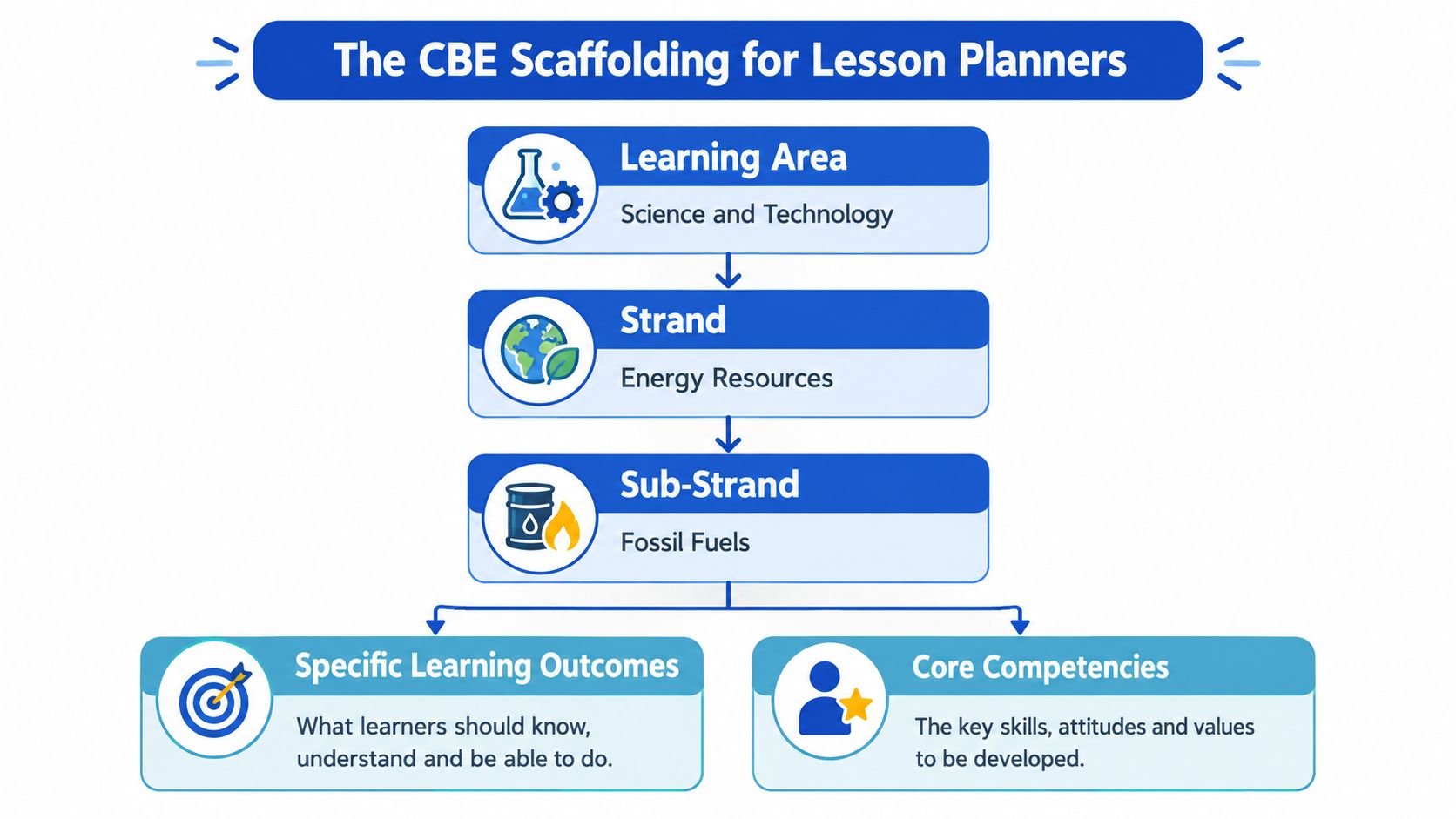
The fields should connect, not sit separately
For a Science lesson, a teacher might select:
- Learning area: Science and Technology
- Strand: Energy Resources
- Sub-strand: Fossil Fuels
- Specific learning outcomes: What the learner should identify, explain, compare, create, or demonstrate
- Core competencies: Such as communication and collaboration, critical thinking and problem solving, or digital literacy
- Values and pertinent issues: Chosen because they fit the lesson
- Inquiry questions: Open questions that guide exploration
- Resources and activities: Materials learners will use and actions they will take
- Assessment rubric: Evidence linked to the outcomes and competency descriptors
A free-text topic such as “Energy resources” and an objective such as “understand fossil fuels” may look tidy, but they leave weak records. The school cannot reliably see which sub-strands were covered, which competencies appeared across the term, or where a learner needs support.
The shared weekly loop gives each role a clear handoff. The teacher sets and checks the plan. The student completes activities and submits evidence, online or from an offline cache. The parent receives a manageable task or feedback prompt on the available phone, with an M-Pesa token where the school's service supports that option. The school reviews coverage and gaps rather than collecting disconnected files.
Metadata also makes curriculum revisions safer. An administrator can update a strand or sub-strand record without asking every teacher to search old documents. The rationalised designs published from January 2024 changed the Junior Secondary subject load, so the platform should show which current design a plan follows.
Ask a vendor to demonstrate one class report. It should show the selected strand, outcomes taught, evidence collected, competency balance, and remaining gaps. A beautifully formatted lesson note alone does not mirror the CBE architecture.
Must-Have Features for Kenyan Classrooms and Homes
A Kenyan planner needs to fit the full journey from preparation to feedback. A feature is useful only when it removes a specific obstacle that teachers, learners, parents, or schools face.
Start with curriculum-aware planning
The lesson generator should begin from a KICD-aligned strand and sub-strand. It should then create an editable 5E plan:
- Engage: Connect the idea to learners' experience.
- Explore: Let learners investigate individually or in groups.
- Explain: Help learners express and refine what they discovered.
- Elaborate: Apply the idea in a new context.
- Evaluate: Collect evidence against the intended outcomes.
The teacher should be able to edit questions, materials, differentiation, timings, and rubrics. A generated plan is a first draft, not a professional decision.
CEA tools should also link questions to competency descriptors. Objective items can be marked automatically where appropriate, while teacher-scored work, observations, projects, and practical performance still need professional review. Portfolio export then gives the school an organised record rather than a pile of disconnected screenshots and exercise books.
Design for the devices people actually use
A projector-friendly presenter helps one teacher show a lesson from a low-cost Android phone or shared school device. An offline cache lets the teacher download plans, activities, and assessment materials when a connection is available, then work during a power or network interruption.
The Ministry of Education's ICT policy positions digital integration as a central enabler of teaching and learning. Kenyan implementation evidence also reported that 44% of trained teachers in project areas were applying digital pedagogy, while 82% of targeted schools had established digital learning environments. The same evidence identified inadequate tools, poor internet, limited digital content, and unreliable electricity or network connectivity as barriers (Ministry of Education ICT in Education and Training Policy 2021).
Parents need an equally practical route. A short SMS summary can reach a caregiver without a smartphone, while a shared-phone design should allow siblings to use separate learner profiles with PIN sign-in. M-Pesa tokens can support household access, but any payment feature should explain the amount, renewal point, failed-payment process, and what remains available offline.
| Feature | Kenyan problem it solves |
|---|---|
| KICD-anchored 5E planner | Reduces repeated Sunday formatting while keeping the teacher in control. |
| Editable CEA rubrics | Connects assessment evidence to outcomes and competencies. |
| Offline cache and later synchronisation | Supports schools and households with intermittent connectivity. |
| Projector mode | Makes phone-based delivery usable on a shared classroom display. |
| SMS or USSD fallback | Keeps parents involved when they don't have reliable smartphone access. |
| Multi-learner profiles | Lets siblings use one family phone without mixing records. |
| M-Pesa payments | Matches a familiar household payment channel and avoids card dependence. |
| Portfolio export | Gives teachers and school leaders an organised record for review. |
Walk away rule: If the product lacks curriculum anchors, offline access, shared-device support, and a parent communication route, a polished demonstration shouldn't persuade you.
A Practical Checklist for Choosing the Right Platform
Don't compare platforms by counting buttons. Score them against the conditions in your school or home, then test the weakest areas first.
Give each criterion a score from 1 to 5. A high score means the platform works in your setting without a workaround. A low score means the vendor has made a promise that you haven't verified.
Curriculum anchoring
- KICD strand coverage: Can you select the exact grade, learning area, strand, and sub-strand?
- Reform updates: Does the vendor explain how curriculum revisions are incorporated?
- CEA rubric library: Are assessments connected to outcomes and competency descriptors?
- Audit reports: Can a headteacher see coverage, gaps, and evidence without rebuilding the record?
Device and connectivity fit
- Android-first access: Does it work comfortably on a modest phone?
- Offline reliability: Can you open saved lessons, activities, and assessments without a live connection?
- Battery and data use: Does the platform avoid unnecessary video and large downloads?
- Shared-phone privacy: Can family members switch profiles without exposing another learner's records?
Payments and roles
- M-Pesa route: Can a parent pay through a clear till, paybill, or token process?
- Role permissions: Are teacher, learner, parent, and headteacher views separated?
- Audit logs and safeguards: Can the school see who changed an assessment record, and does the platform explain consent, storage, export, and deletion?
The online learning platform guidance for schools can help a school team frame its questions, but every vendor should still face your own live test. Ask the teacher to create one plan, download it, deliver part of it offline, record assessment evidence, and show the parent's view.
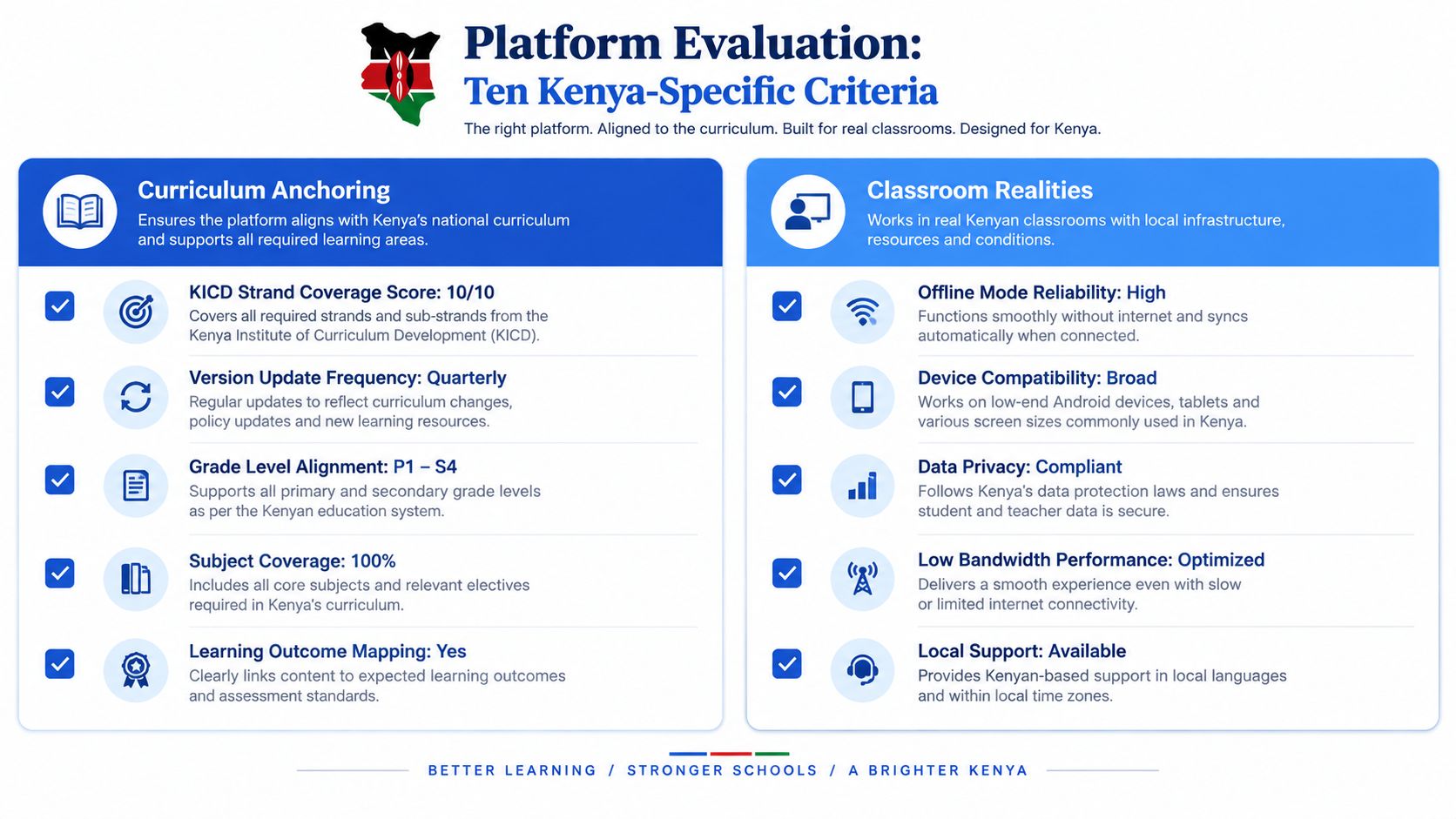
Drop any platform scoring below 3 on curriculum anchoring or device compatibility. A beautiful dashboard can't compensate for a planner that loses work when the hotspot disappears or can't identify the sub-strand being taught.
A Real Weekly Classroom and Home Workflow
Consider a Grade 8 Science teacher preparing a week on Energy Resources. The example matters because each person uses the same record differently. The teacher needs a teachable sequence, the learner needs clear activities, the parent needs a simple signal, and the school needs evidence that the plan and assessment connect.
On Sunday evening, the teacher selects the relevant strand and sub-strand, reviews the proposed 5E sequence, edits the inquiry questions, and checks the CEA rubric. She saves the plan and pins a projector view for classroom use. The plan is then attached to the week's timetable rather than left as a separate document.
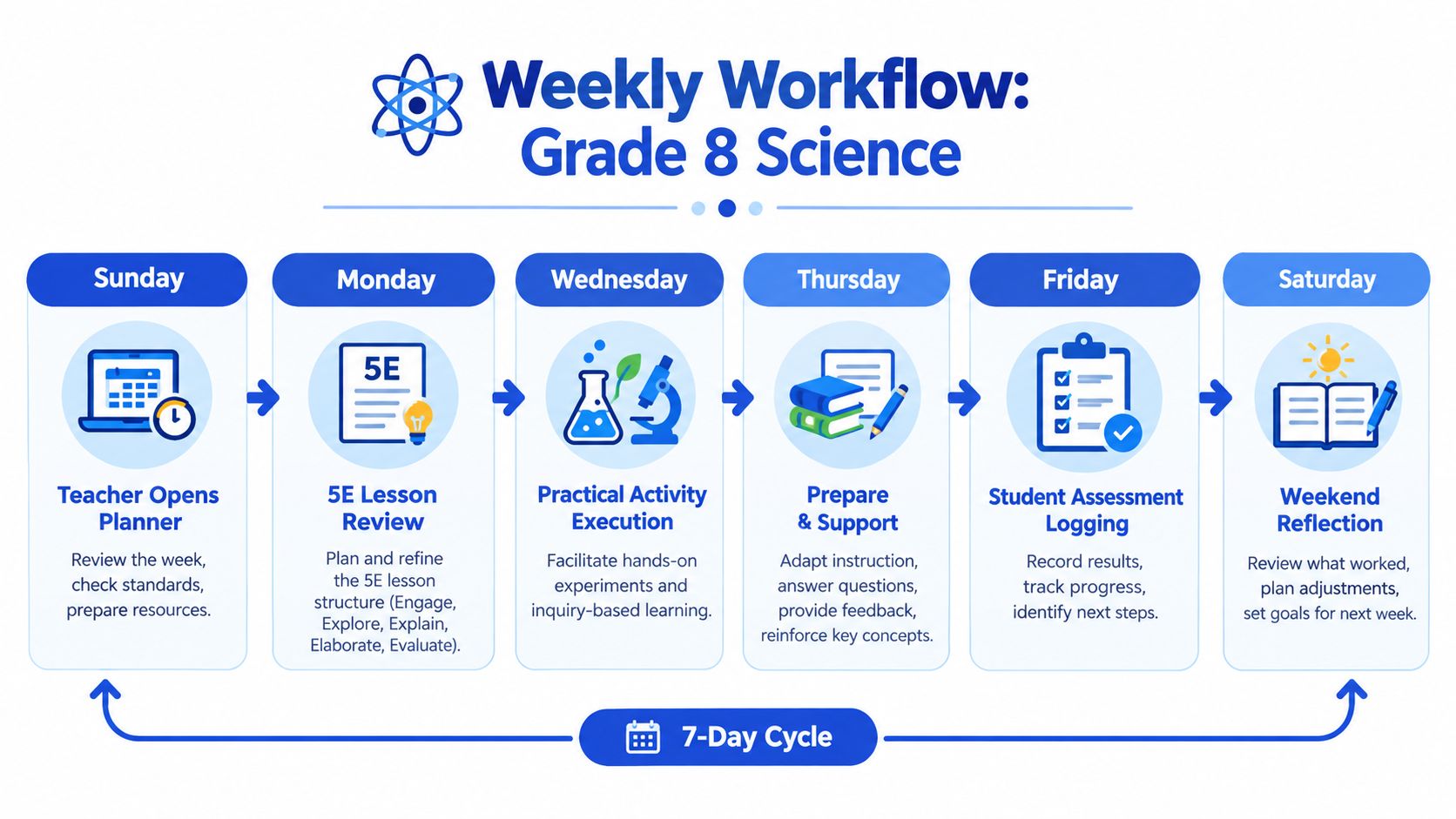
Monday to Thursday
Learners begin with the Engage prompt and move into Explore activities. Some use a school device, while others access the same activity on a shared family tablet or phone. If the content was cached earlier, the learner can continue without waiting for a stable connection.
The teacher observes group work, records brief evidence, and gives feedback against the selected outcomes. The school dashboard shows whether the lesson was delivered and whether learners have submitted work, while the parent view remains short enough to read on a phone.
A useful platform shouldn't turn every lesson into screen time. The teacher may use the projector for a diagram, printed materials for group work, and the phone only for the activity instructions and evidence capture. The self-learning resources should support classroom teaching, not pretend that every Kenyan learner studies alone online.
The workflow can also include a short explanation of the learner's task:
Friday and the weekend
On Friday, learners complete the CEA. The system can auto-mark objective items and store teacher-scored rubric evidence separately, so automation doesn't erase professional judgement. The planner then groups learners for follow-up, identifying the outcomes that need reteaching or another practical explanation.
On Saturday, the parent receives a concise SMS or USSD summary, depending on access. The message should state what was studied, whether the learner completed the check, and what to practise next. If the household chooses to buy the next practice pack, the parent can use an M-Pesa token process, while siblings continue to use distinct profiles on the same phone.
The handoff into the next week is the important part. Monday's reteaching plan should draw from Friday's evidence, not require the teacher to retype a list of weak areas.
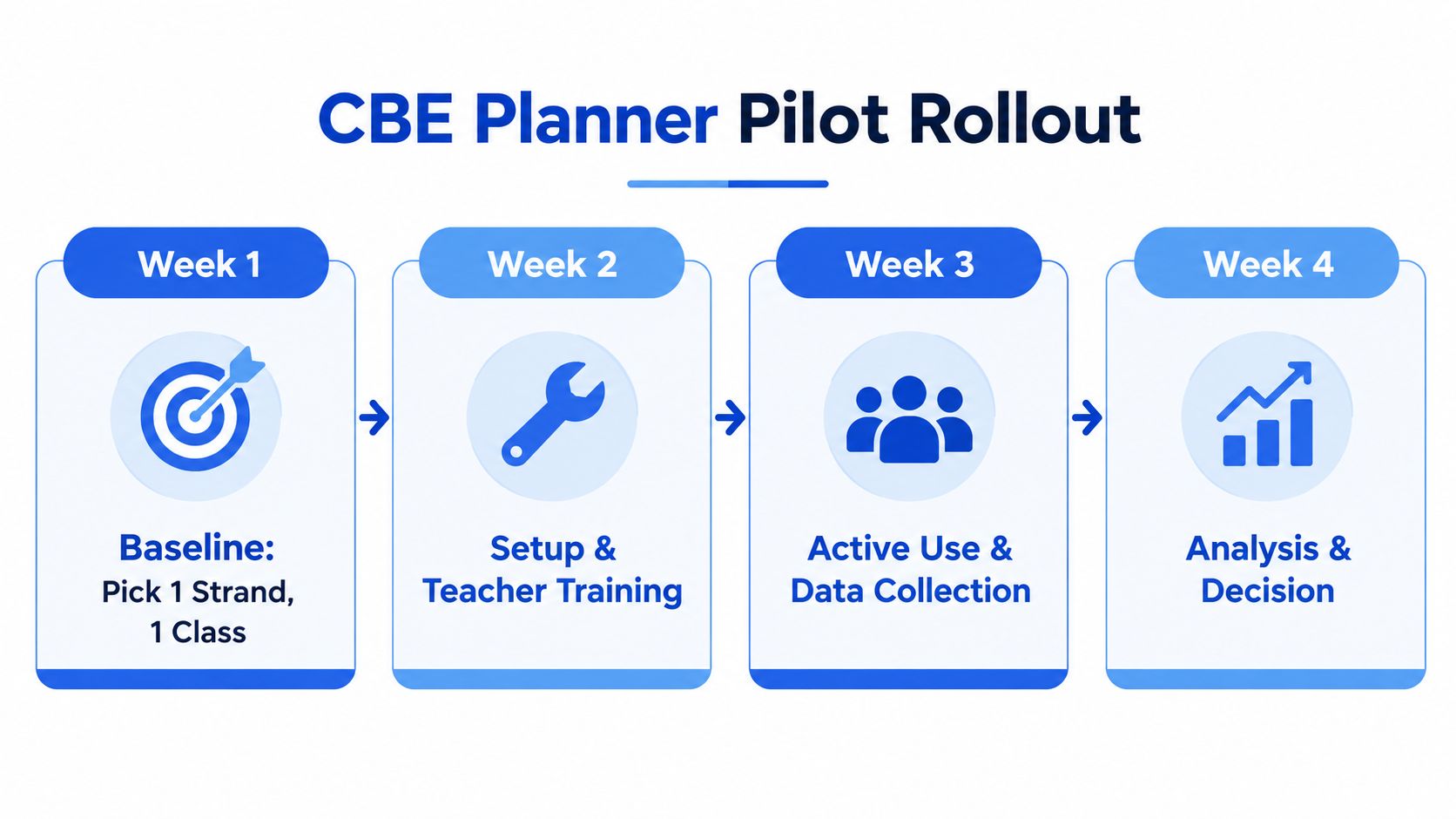
Piloting and Rolling Out in Schools and Households
A school doesn't need to place every class on a new platform immediately. A controlled pilot reveals whether the product saves time under local conditions.
Week 1 establishes the baseline
Choose one teacher, one class, and one strand. Record the existing assessment position and the teacher's current planning process before introducing the software. Note how long preparation takes, how evidence is stored, and how parents currently receive updates.
Week 2 tests the teacher workflow
Keep the learner and parent views closed while the teacher practises. Set up the school's payment route if one is needed, test the projector, download content for offline use, and deliver one observed 5E lesson. The observer should check whether the teacher can edit the plan, save it, recover it offline, and record evidence without assistance.
Week 3 introduces the household
Open learner and parent access gradually. Give families a printed consent note where phones are shared, explain PIN use, and send a short SMS welcome. Demonstrate what happens after a missed M-Pesa payment, how a retry works, and which resources remain available from the offline cache.
Week 4 reviews the evidence
Compare teacher use, learner completion, parent visibility, and assessment movement with the baseline. Don't measure only logins. Ask whether the teacher spent less time formatting, whether the next lesson responded to evidence, and whether parents understood the message.
Before rollout, agree what happens if the pilot fails. The school should be able to switch off access without losing learner records, export assessment evidence, and return to its existing process. Schools with capped data bundles should download core plans and media at a controlled time rather than expecting every home to stream content.
The proposed go or no-go rule is explicit: continue only if the pilot reaches at least 60% parent visibility, 80% teacher weekly use, and a measurable lift in CEA scores. Those thresholds come from the pilot brief rather than the independent research, so a school should define how each will be measured before starting. If a result falls short, investigate whether the problem is training, access, content, or workflow design before buying more licences.
Cost Models That Actually Work in Kenya
Price is only one part of affordability. A platform can have a low licence fee and still become expensive if every lesson requires streaming, printing, or repeated technical support.
A school should compare the payment source with the job the software performs. A term licence may suit a school that wants central administration and consistent access. A teacher account may suit an individual who needs planning support but doesn't yet have approval for a whole-school system. A household token may suit a parent who wants revision access without committing to a full school subscription.
Be cautious with dollar-denominated subscriptions. Even when the product is useful, foreign billing can make renewals harder for households that budget through mobile money. M-Pesa tokens can fit existing payment habits, but the vendor should state exactly what a token provides, how long access lasts, whether siblings are covered, and what happens when a payment fails.
| Model | Best for | Typical cost | Key caveat |
|---|---|---|---|
| Teacher freemium account | Individual teachers testing planning and assessment workflows | Free core access where offered | May exclude parent views, exports, or school reporting. |
| School term licence | Schools needing shared administration and consistent access | Quoted by the provider | Check renewal dates, user limits, onboarding, and support fees. |
| Per-learner token | Families buying focused revision or assessment access | Set by the provider through M-Pesa | Small payments can become difficult to manage if the token rules aren't clear. |
| Household bundle | Families with several learners sharing one phone | Quoted household plan | Confirm separate profiles, privacy, and multi-child access. |
| Offline-first package | Schools and homes with limited connectivity | Licence plus local data or download arrangements | Initial downloads, device storage, and updates still need planning. |
Hidden costs deserve attention. A school may need a projector connection, replacement toner for printed CEA scripts, staff training time, or a process for recovering accounts. Ask whether offline content expires, whether records can be exported at renewal, and whether support is included when the new term begins.
The right model is the one that keeps the weekly loop active. A cheaper product that teachers abandon after a few lessons is more costly than a properly tested plan that fits the school's devices, payment habits, and reporting needs.
Closing the Loop Between Teachers, Parents, and Students
The central choice isn't between paper and software. It's between a disconnected set of tasks and a shared weekly loop.
The teacher plans a strand-aware 5E lesson on Sunday. Learners complete activities during the week. Friday's CEA produces evidence. A parent receives a short update. The teacher uses the weak areas to prepare Monday's support. The school can review the record without asking the teacher to rebuild it from separate notebooks, messages, and spreadsheets.
Three misunderstandings often slow adoption.
- The software replaces the teacher: It doesn't. The teacher checks curriculum alignment, adapts examples, chooses suitable support, observes learning, and makes the final assessment judgement.
- Learners need personal laptops: They don't. A workable design can use shared school devices, a projector, a family phone, offline content, SMS, or USSD, depending on the task.
- Parents are passive observers: They shouldn't be. A parent can confirm that a learner received the weekly task, review the weak strand, encourage practice, and raise an access problem before it becomes a missed term.
Kenya's ICT policy and implementation evidence show why access and pedagogy must be considered together. Technology can support curriculum delivery, but teachers still need a workflow that reduces documentation time and professional development that helps them use the tool confidently. Recent Kenya-focused evidence also identifies high teacher-student ratios, preparation demands, marking, classroom management, continuous assessment, and digital capacity as practical barriers (evidence on teacher digital competence in Kenyan CBE).
For a school, the next step is a four-week pilot with one class and one strand. For a teacher, it is a live test using an actual lesson and actual offline conditions. For a parent, it is checking whether the proposed planner works on the household's phone, communicates clearly, and accepts a payment method the family already uses.
Keybaki offers a shared CBE lesson planner, curriculum-mapped learning resources, CEAs, and teacher, student, parent, and school views designed around Kenya's weekly learning loop. Visit Keybaki to review the platform and decide whether it fits your classroom or household pilot.
Comments
Loading…