· CBE assessment Kenya
CBE Digital Library Kenya Explained for Teachers and Parents
14 min read
On Sunday evening, a Grade 8 teacher may have several tabs open, a printed curriculum design beside the laptop, and a notebook full of lesson ideas. The difficult part isn't finding information. It's finding an activity that matches the right CBE strand, preparing a lesson around it, and knowing by Monday afternoon whether learners have understood the intended outcome.
At home, the problem looks different. A parent may know that a child is struggling in Mathematics or Integrated Science, but not know the exact area requiring practice. A collection of scattered notes and videos rarely answers that question clearly.
A CBE digital library in Kenya should do more than store PDFs. It should connect curriculum mapping, lesson preparation, classroom activities, continuous assessment, and feedback into one practical weekly routine. That matters for teachers, parents, learners, and school leaders working across Grades 7 to 12.
Kenya's public-school infrastructure is also changing. In 2026, the ICT Authority began a phased rollout of a teacher laptop and a 65-inch interactive smart board to 10,382 public junior secondary schools, with a later phase intended to reach more than 21,000 junior secondary schools nationwide, according to reporting on the national school-device rollout. The rollout was presented as support for CBE implementation, digital literacy, and access to digital educational resources.
The question is no longer whether digital content exists. The better question is whether a library helps people move from strand, to lesson, to practice, to evidence of mastery, even when internet access, devices, power, and time are limited.
Table of Contents
- Introduction to CBE Digital Libraries in Kenya
- What a CBE Digital Library Really Is
- Essential Features Every Kenyan CBE Library Needs
- How Planning Teaching and Assessment Connect in a Closed Loop
- Practical Ways Teachers Parents and Schools Use the Library
- How to Evaluate and Choose the Right CBE Platform
- Getting Started and Making Adoption Stick
Introduction to CBE Digital Libraries in Kenya
A useful CBE digital library begins with the curriculum, not with a search box. When a teacher selects a learning area, grade, strand, and sub-strand, the platform should return resources that fit that exact part of the Kenyan CBE framework.
That distinction saves time. Instead of downloading unrelated notes and trying to reorganise them later, the teacher can select an aligned lesson, activity, visual resource, or assessment and adapt it to the class.
Practical rule: A digital library is useful only when it helps a teacher make the next classroom decision.
For learners, the same system should make revision more focused. A student shouldn't have to reread an entire subject because one sub-strand is weak. The platform should help identify the area needing attention, provide suitable practice, and show whether the learner has improved.
Parents also need a clear view. A weekly message saying that a child needs support with a particular strand is more useful than a general instruction to “revise harder”. It gives the family a starting point for a short home session, whether the available device is a smartphone, a school computer, or an interactive board.
The need is especially clear because access remains uneven. Research on junior secondary schools found that 23% of public schools had functional computer laboratories, compared with 78% of private schools, while internet connectivity was available in 31% of schools and rural schools had an average learner-to-device ratio of 47:1, as reported in this study of digital access in Kenyan junior secondary schools.
This guide treats the library as a working system rather than a content dump. It explains the curriculum structure, the features that matter, the weekly planning and assessment loop, practical roles for teachers and parents, and a sensible way to compare platforms before adoption.
What a CBE Digital Library Really Is
Think of a physical school library. You don't organise it by throwing every book into one room. You use shelves, labels, sections, and an indexing system so a learner can find the right material without searching blindly.
A CBE digital library should work in the same way.
The library shelf analogy
At the broadest level, learning areas are the main bookshelves. They represent wide CBE domains such as languages, Mathematics, Sciences, Humanities, and other recognised areas of study.
Inside each learning area are strands. A strand is like a labelled section on a shelf. It groups related content around a meaningful theme rather than presenting a random list of topics.
Within a strand are sub-strands. These are the specific shelves or individual books that bring the curriculum closer to classroom action. A resource connected to a sub-strand can support a particular learning outcome, activity, explanation, or assessment task.
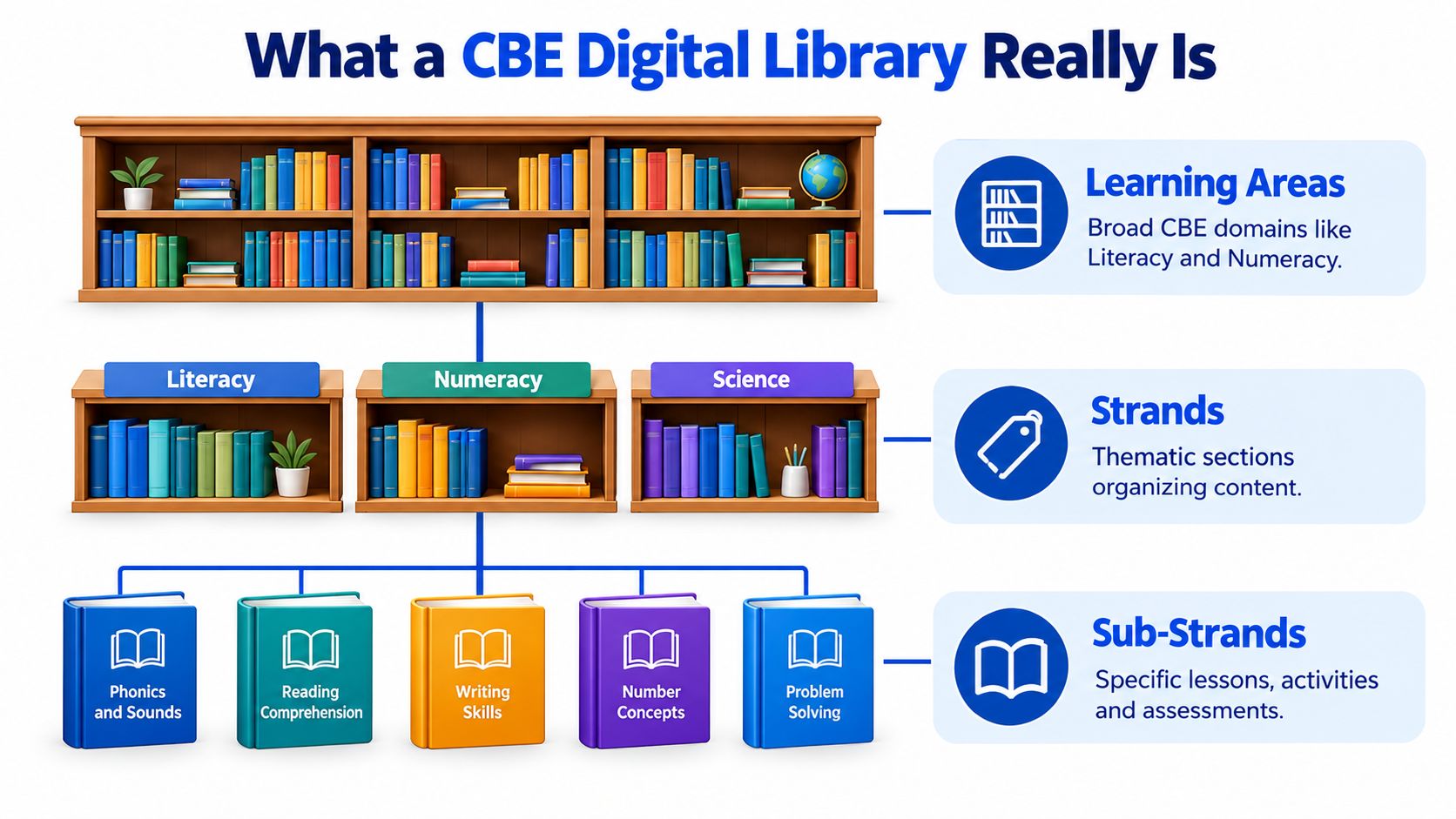
KICD's curriculum structure commonly places about 4–7 strands within a learning area, while a strand often contains 2–6 sub-strands, according to this overview of strands and sub-strands in Kenya's CBE. Those ranges show why broad labels alone aren't enough. A teacher needs a precise route from the learning area to the exact sub-strand being taught.
Why precise tags matter
Suppose a learner performs poorly on a CEA covering one sub-strand. A broad “Mathematics revision” label doesn't tell the teacher what to reteach. A sub-strand tag gives the teacher a narrower and more useful answer.
The same tag can connect several items:
- Lesson resources that introduce the concept.
- Activities that allow learners to apply it.
- Practice questions that check understanding.
- CEAs that record evidence of learning.
- Remedial materials that support learners who need another explanation.
This structure creates curriculum auditability. A teacher can see why a resource belongs in a lesson, a department head can review coverage, and a parent can understand what a child is practising.
Generic e-learning platforms may contain strong videos, quizzes, or notes, but they often follow a different curriculum sequence. A CBE library must keep the Kenyan framework visible so the resource supports the intended learning outcome rather than merely discussing a related idea.
A file tells you what it contains. A curriculum tag tells you where it belongs and what it is meant to support.
The result is more than convenient storage. It is a searchable map that helps teachers plan with purpose and helps schools connect classroom work to assessment evidence.
Essential Features Every Kenyan CBE Library Needs
Kenyan schools need to judge digital libraries against real classroom conditions. A platform may look impressive during a demonstration, but it must still work when learners share devices, connectivity drops, or a teacher needs to prepare a lesson quickly.
Curriculum mapping and assessment visibility
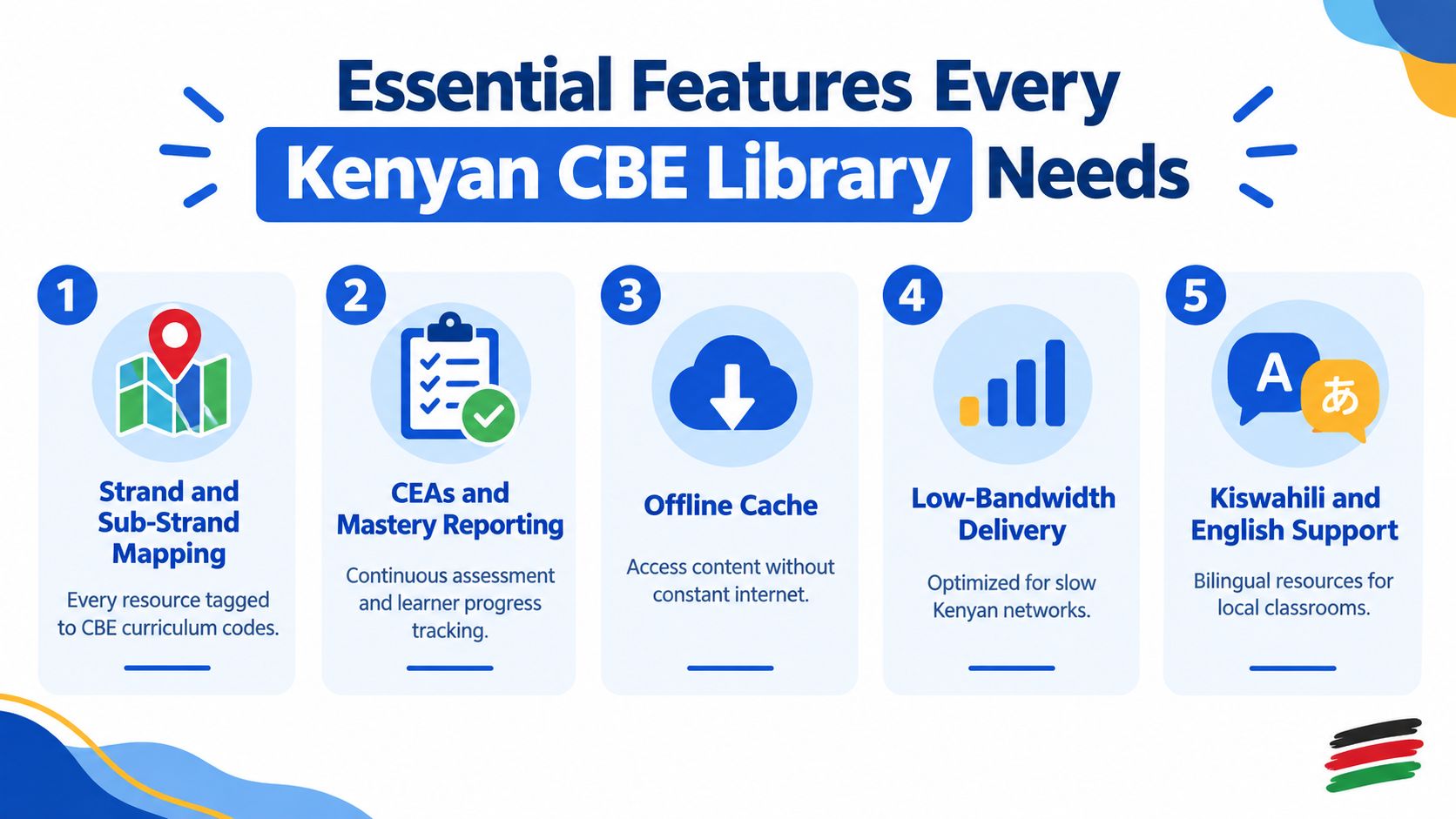
Every resource should show its grade, subject, strand, and sub-strand. A teacher should be able to trace a lesson or quiz back to a specific curriculum location without opening several unrelated files.
Assessment should sit beside the content. CEAs need to show what they assess, and reports should identify the strands where learners need support. This is the difference between a library that stores materials and one that helps a teacher decide what happens next.
Offline access and low-bandwidth design
Connectivity must shape the product from the beginning. A 2020 baseline cited in later reporting found working internet connections in 25.7% of primary schools and 34% of secondary schools, while only 546 public schools had been connected for the first time by the end of 2023, reaching more than 340,000 students and teachers, according to Ericsson's account of connectivity and digital learning in Mombasa.
The same report describes schools saving KSh 120,000 in mobile data bundles through connectivity initiatives, while also facing unreliable connections, inconsistent power, ICT skills gaps, and limited funding. That makes offline caching, compressed media, local playback, and low-data pages practical requirements, not optional extras.
Language, devices, payments, and privacy
English and Kiswahili support helps teachers and families use resources comfortably in local classroom settings. The interface should also remain readable on low-resolution screens and shared smartphones, not only on large computers.
Payments should suit local practice. M-Pesa tokens and phone-number sign-in remove the need to store bank-card details, while PIN profiles help several learners use one family phone.
Data protection matters too. Schools should ask what learner information the platform collects, who can see it, how records can be exported, and how accounts can be deleted. These safeguards should align with the Kenya Data Protection Act.
A practical feature checklist is available on Keybaki's platform features page. Schools can use the same questions when reviewing any provider, whether the platform focuses on digital books, lesson planning, assessment, or all three.
How Planning Teaching and Assessment Connect in a Closed Loop
A strong CBE library follows the teacher's working week. It doesn't leave lesson planning in one place, classroom delivery in another, and assessment results in a notebook that nobody revisits.
The loop begins when a teacher selects a strand and pulls in aligned resources. The teacher then turns those resources into an editable 5E lesson plan, moving through Engage, Explore, Explain, Elaborate, and Evaluate.
A week in the classroom
On Monday, the teacher uses an engaging question, image, or short activity to introduce the learning challenge. Learners explore through discussion, observation, group work, or guided practice.
On Tuesday and Wednesday, the teacher explains difficult ideas and gives learners opportunities to apply them. The teacher can adjust the activity for different needs rather than presenting one identical task to everyone.
By Thursday or Friday, the teacher runs a CEA linked to the same strand and sub-strand. The result should do more than produce a mark. It should show which learning outcomes are secure and which require further attention.
The following week's plan can then begin with the weak area. The teacher doesn't need to retype every result or search again from the beginning. Mastery feedback points back to the relevant strand, allowing the next lesson to include targeted reteaching and additional practice.
The important handoff: Assessment becomes useful when its result changes the next lesson.
This loop also clarifies the roles of different people. The teacher delivers and interprets learning, the learner completes practice, the parent sees the area needing home support, and the school leader reviews progress across classes.
A platform's CBE assessment tools should therefore be judged by what happens after a quiz is marked. If the result remains a static score, the school still has to do the difficult linking work manually. If the result returns to the planner, assessment becomes part of instruction.
Practical Ways Teachers Parents and Schools Use the Library
A digital library becomes useful when each person knows the next action. The same platform can serve different users, but teachers, parents, learners, and school leaders shouldn't use it in exactly the same way.

For teachers
Start with one upcoming strand. Open the associated resources, select a suitable activity, and edit the 5E plan so it reflects the class context, available materials, and learner differences.
Download or cache the materials before the lesson where possible. In a room with a projector or interactive board, presenter mode can make the same resource visible to the whole class. Where devices are limited, one teacher-led display can support discussion while learners work in pairs or groups with printed follow-up tasks.
After the lesson, schedule a short CEA. Review the sub-strand results before planning the next week, rather than waiting until the end of a term.
For parents and learners
A parent should begin with the weekly briefing, not with a random search. If the report identifies a weak strand, the learner can open the related revision queue and complete a focused practice session on the shared phone.
Use a separate PIN profile for each child where available. That keeps one learner's progress distinct from another's and makes short sessions easier to manage.
For home revision: One clearly named weak area is more manageable than a general instruction to study everything.
Parents can ask three simple questions: What strand are you working on? Which question was difficult? What can you now explain without help? These questions turn screen time into a conversation about learning.
For school heads and departments
School leaders should review coverage by grade and subject, then compare it with assessment evidence. A dashboard is most useful when it prompts a department discussion about reteaching, shared resources, or support for a particular class.
Start small. Ask one department to use the same strand tags, weekly CEA rhythm, and reporting format. Once teachers can see the benefit, the approach can extend across Grades 7 to 12 without forcing everyone to change their entire routine at once.
How to Evaluate and Choose the Right CBE Platform
Schools shouldn't choose a platform because it has the longest list of features. They should test whether the platform connects the work teachers already do.
A provider such as Keybaki can be considered as one example of a Nairobi-built CBE platform. Its public product materials state that its library contains 168 CBE digital books for Grades 7 to 10, organised across subjects, strands, lessons, and competency assessments, while Grade 11 and 12 content is listed as coming soon, as shown on the Keybaki digital library page.
That coverage is useful to verify, but it shouldn't replace a practical school trial. Ask a teacher to find one sub-strand, prepare a lesson, deliver it, run an assessment, and locate the next action from the result.
| Evaluation criteria | What to verify | Why it matters in Kenya |
|---|---|---|
| Curriculum auditability | Grade, subject, strand, sub-strand, and learning-outcome tags | Teachers can justify resource selection and identify precise gaps |
| Closed-loop integration | Assessment results connect to planning and remediation | Scores lead to reteaching instead of remaining in separate records |
| Offline and device fit | Cached content, low-data pages, shared-phone access, and projector support | Schools may face unreliable internet, limited devices, or inconsistent power |
| Language coverage | English and Kiswahili resources or interface support | Teachers and families can use material in familiar classroom contexts |
| Payment model | M-Pesa options, clear school terms, and no unnecessary card storage | Families and schools can pay through familiar local channels |
| Data safeguards | Minimal collection, role-based access, export, and deletion controls | Learner records need responsible handling under Kenyan data-protection requirements |
The national device rollout provides another reason to examine classroom delivery, not only content volume. Interactive boards and teacher laptops create opportunities for digital lessons, but schools still need resources that load reliably and support group teaching.
For a deeper comparison of assessment functions, use this guide to CBE assessment tools. The same evaluation process applies to other platforms. Choose the system that teachers can use consistently with the devices, connectivity, languages, and reporting habits already present in the school.
Getting Started and Making Adoption Stick
Adoption works better as a short pilot than as a sudden whole-school instruction. Choose one grade or department, select a small set of strands, and agree on how teachers will tag resources and record CEAs.
During the first month, keep the routine simple:
- Week one: Train teachers to find strand-mapped resources and adapt a 5E plan.
- Week two: Deliver lessons using cached content or projector mode where necessary.
- Week three: Run a CEA and review the weakest sub-strands together.
- Week four: Plan targeted reteaching and ask parents to support the agreed revision areas.
Cache resources when connectivity is available, use low-data materials where possible, and plan shared-phone sessions around short, focused tasks. School leaders should protect time for teachers to review mastery data together, because a dashboard alone won't change classroom practice.
Kenya's National Broadband Strategy 2025–2030 includes building or upgrading digital learning infrastructure such as learning management systems and e-libraries. That policy direction makes implementation discipline increasingly important. Schools that build the planning, teaching, and assessment habit now will be better placed to use new infrastructure when it reaches them.
Keybaki brings together a CBE-mapped digital library, 5E lesson planning, classroom delivery tools, and continuous assessments designed around the weekly learning loop. Visit Keybaki to review how the platform can support teachers, parents, learners, and schools across Kenya's CBE journey.
Comments
Loading…