· CBE lesson plans
CBC Teacher Documents: A Complete Reference for Grades 7–12
20 min read
It's Sunday evening in a Kenyan junior secondary staffroom. A Grade 8 English teacher has scheme books open on one side, lesson plan files on the other, a record-of-work sheet under a pile of exercise books, and assessment folders waiting for updates. The work isn't only to prepare Monday's lesson. The teacher must also show what the curriculum requires, what has been taught, how learners responded, and what needs to happen next.
That's why CBC teacher documents should be treated as one connected evidence chain, not a collection of unrelated templates. The chain begins with curriculum planning, moves through daily teaching and assessment, and ends with learner progress records that a school head, parent, or quality assurance officer can understand.
Table of Contents
- What CBC Teacher Documents Actually Are
- The KICD Anchor Behind Every CBC Document
- The Core Set of CBC Teacher Documents
- Lesson Plans as the Audited Teaching Record
- Records of Work and Individualized Education Plans
- How Keybaki Maps and Auto-Generates CBC Documents
- Storage, Versioning, and Compliance Best Practices
- From Assessment Evidence to the Next Week's Plan
- Quick Reference Matrix of CBC Teacher Documents
- Common Questions About CBC Teacher Documents
What CBC Teacher Documents Actually Are
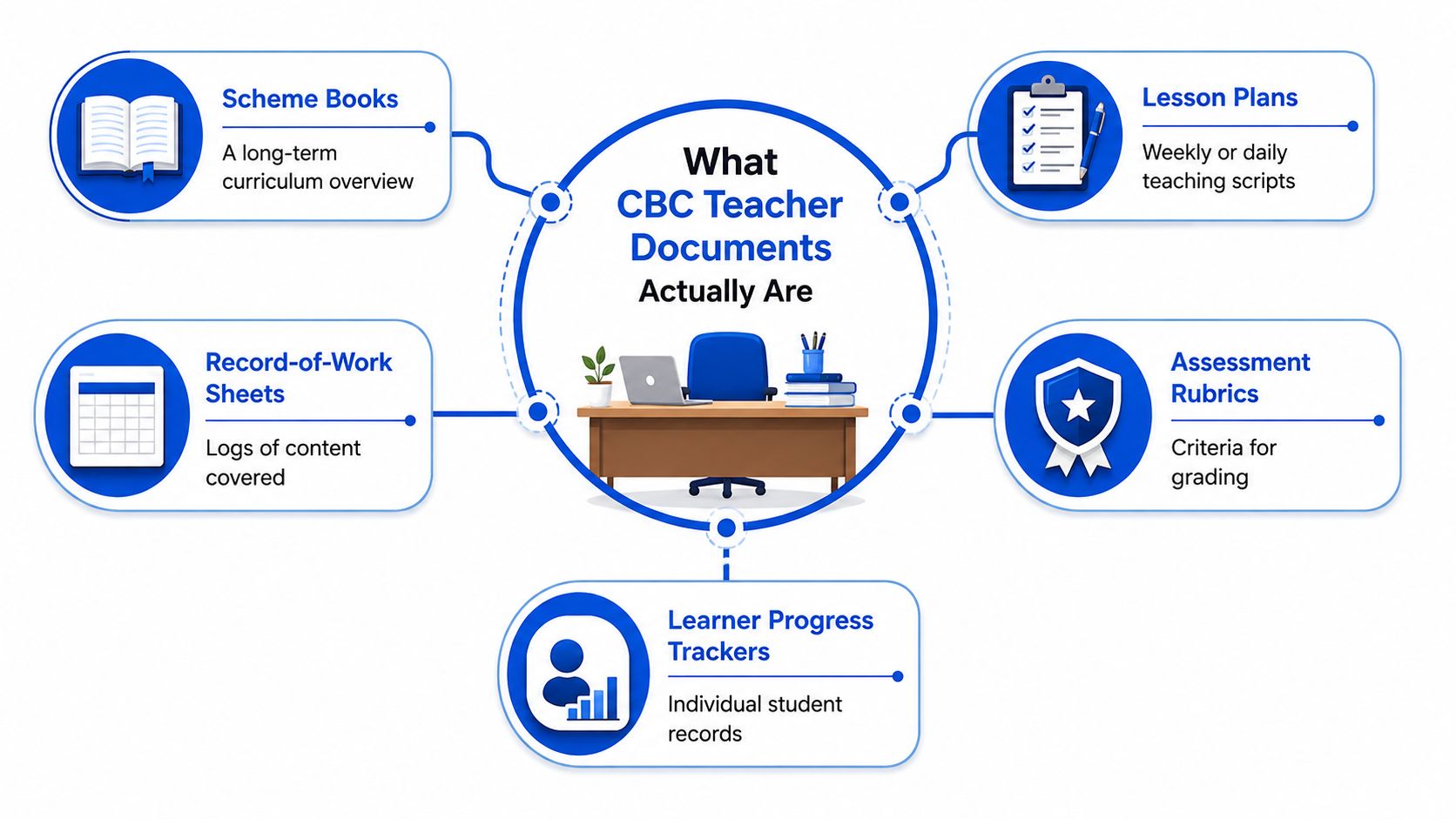
CBC teacher documents perform three practical jobs. First, they guide daily instruction. A scheme of work gives the term direction, a lesson plan turns one part of that scheme into classroom activity, and a record of work confirms what happened. Second, they provide evidence of curriculum coverage for school administration and quality assurance. Third, they help teachers record learner growth through formative checks, rubrics, work samples, and support plans.
The State Department for Basic Education's Junior Secondary guidance identifies Schemes of Work, Lesson Plans, Record of Work Covered, and an Individualized Education Plan among the professional documents prepared by teachers (Junior Secondary implementation guidance). This applies directly to Grades 7, 8, and 9. Teachers in Grades 10 to 12 also need the same traceable planning habit as senior-school pathways develop, because their daily teaching still needs to connect to approved curriculum designs and learner evidence.
Teacher records and school records
You're personally responsible for preparing and maintaining documents that show how you plan and deliver your subject. These normally include:
- Scheme of work: The term-level map of strands, sub-strands, outcomes, activities, resources, assessment, and reflection.
- Lesson plan: The detailed plan for a particular lesson, including activities, checks for understanding, and reflection.
- Record of Work Covered: The running account of what you taught, when you taught it, and whether the planned sequence changed.
- Learner progress records: Evidence of individual performance and support needs.
- IEP: A targeted plan for a learner who needs specific adaptations or additional support.
- Assessment and portfolio evidence: Rubrics, CEA results, learner work, projects, and other evidence linked to competencies.
School-level records, such as the timetable, attendance register, admission records, and general institutional files, may involve several members of staff. You should still understand how your teaching documents fit into them, but you shouldn't assume that every school record is your personal responsibility.
Working definition: A CBC teacher document is any organised record that connects an approved curriculum expectation to planned teaching, learner assessment, curriculum coverage, or individual support.
The KICD Anchor Behind Every CBC Document
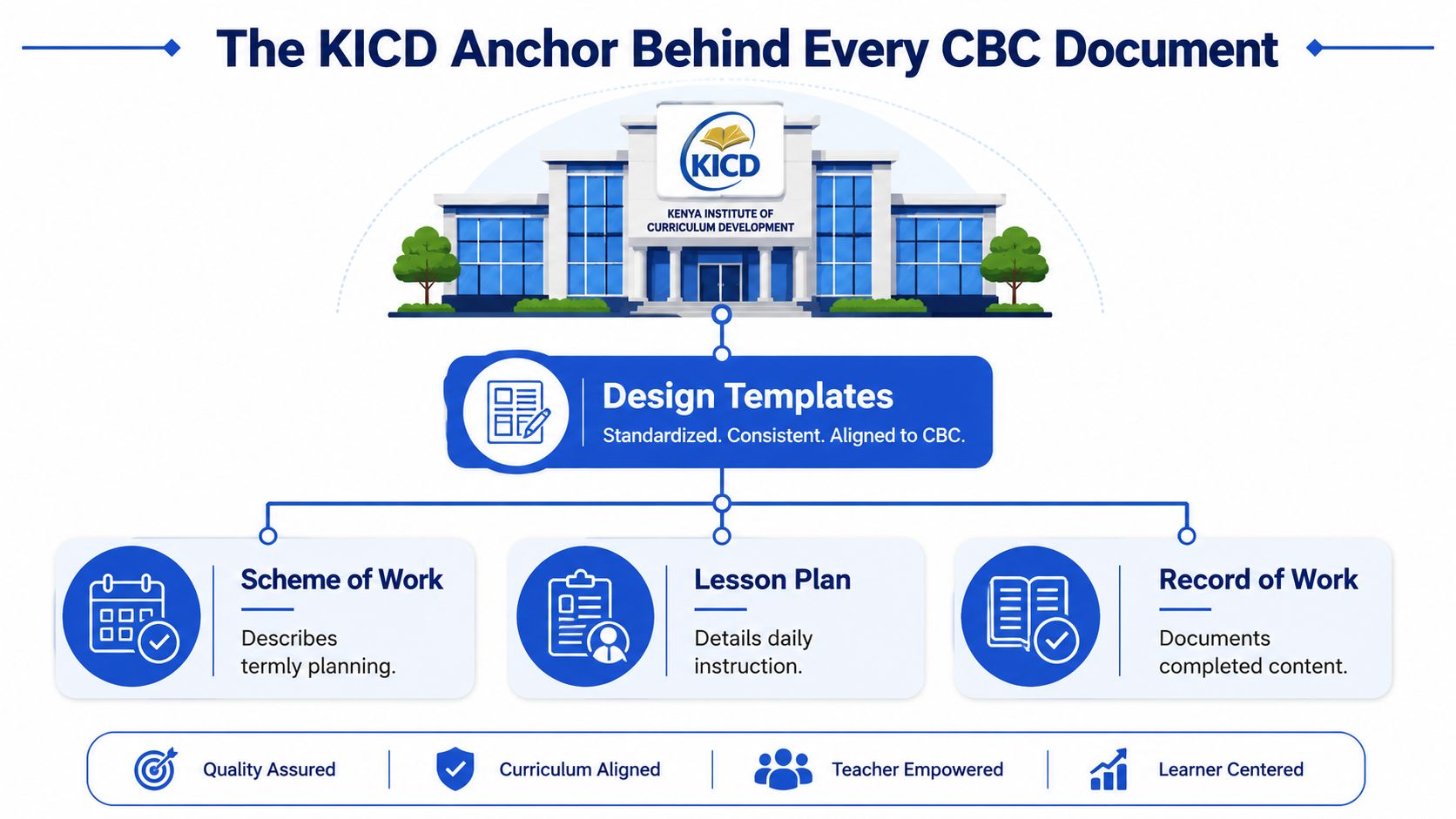
A Grade 7 Mathematics lesson may be well taught, yet difficult to defend during a review if its scheme entry, activity, and assessment point to different outcomes. The Kenya Institute of Curriculum Development, or KICD, is the official source for CBC and CBE materials in Kenya. Its CBC materials portal provides curriculum designs, approved learning resources, teacher education resources, values-based education content, and parental engagement guidelines for learning levels such as Junior School, Senior School, Teacher Education, and Special Needs Education.
KICD gives your records a common anchor. A Grade 7 scheme of work, a Grade 9 assessment task, and a Grade 12 lesson plan should each be traceable to the approved curriculum design for that subject and level. The curriculum design is the map. Your classroom documents are the route record, showing what you intended, taught, checked, and adjusted.
What traceability looks like
Begin with the strand and sub-strand. Link the specific learning outcome, key inquiry question, learning experiences, resources, values, competencies, and Pertinent and Contemporary Issues to the same curriculum location.
For example, a Grade 7 Mathematics entry may use the Number strand and Fractions sub-strand. The scheme entry states what learners should do with fractions. The lesson plan carries those references, turns the outcome into classroom activities, and shows how understanding will be checked. A rubric or CEA then assesses that intended learning, rather than introducing an unrelated task.
The evidence trail should read clearly:
- KICD curriculum design
- Scheme-of-work entry
- Lesson plan
- Learner activity or assessment
- Record of work and progress evidence
Keep the curriculum title, strand, sub-strand, and relevant outcome visible in working documents. A HoD, school head, parent, or reviewer can then follow the reason for the lesson and see how the assessment connects to it. This also makes corrections easier when a timetable change or learner need affects the original plan.
Keybaki's CBE-mapped library organises curriculum content by subject, grade, strand, and sub-strand. Its 5E planner and CEAs can help turn the weekly planning and assessment loop into linked records for classroom use, parent communication, and school review. Check generated content against the approved design and apply professional judgement before filing it. The library reduces repeated copying while keeping the KICD anchor visible.
The Core Set of CBC Teacher Documents
A useful term workflow begins with the broadest record and becomes more specific as teaching progresses. The documents below form the practical core for Grades 7 to 12.
Scheme of work
This is the term-level plan. It should identify the week or lesson, strand, sub-strand, specific learning outcomes, key inquiry questions, learning experiences, resources, assessment methods, and reflection. Prepare it before teaching begins, file it according to your school's procedure, and make sure the HoD can review it.
Example: A Grade 9 Biology entry under the Ecology sub-strand could state that learners will identify relationships among organisms, use a local school-ground observation activity, record findings in a table, and explain one relationship using evidence.
Lesson plan
The lesson plan turns one scheme entry into a teachable session. Include the date, class, subject, curriculum references, outcome, inquiry question, resources, learning activities, assessment, extended learning, and reflection. Update it for each lesson or according to the weekly filing system agreed by your school.
Record of Work Covered
This is the factual log of delivery. It should show the date, class, subject, strand, sub-strand, topic, lesson-plan reference, and remarks. If a lesson is postponed because of a school activity, record the change instead of pretending the original plan was followed.
Assessment plan and learning record
Your assessment plan should show how you'll collect evidence across activities, tasks, observations, projects, and CEAs. The Learner Progress Record then stores the individual evidence and comments needed to describe growth, support needs, and next steps.
Individualized Education Plan
An IEP is for a learner who needs planned adaptations or targeted support. It should state the learner's identified need, measurable target, classroom adaptations, review date, referrals where applicable, and parent or guardian participation.
Portfolio or CEA evidence folder
Keep representative learner work, rubrics, project evidence, CEA records, feedback, and follow-up actions together. The folder should show more than a mark. It should help someone understand the competency being developed and the evidence used to judge progress.
| Document | Purpose | Update Frequency |
|---|---|---|
| Scheme of Work | Maps curriculum delivery across the term | Termly, with approved revisions |
| Lesson Plan | Guides one lesson and records reflection | Each lesson or weekly filing cycle |
| Record of Work Covered | Confirms actual curriculum coverage | After lessons or teaching days |
| Assessment Plan | Organises evidence collection | Termly, reviewed during teaching |
| Learner Progress Record | Tracks individual growth and support | Whenever evidence is collected |
| IEP | Plans targeted learner support | Per learner, reviewed periodically |
| Portfolio or CEA Folder | Stores linked assessment evidence | Throughout the term |
For a practical explanation of how planning documents fit together, see this guide to CBE documentation for teachers. The key test is simple: another teacher should be able to open the file and follow the route from curriculum expectation to classroom evidence.
Lesson Plans as the Audited Teaching Record
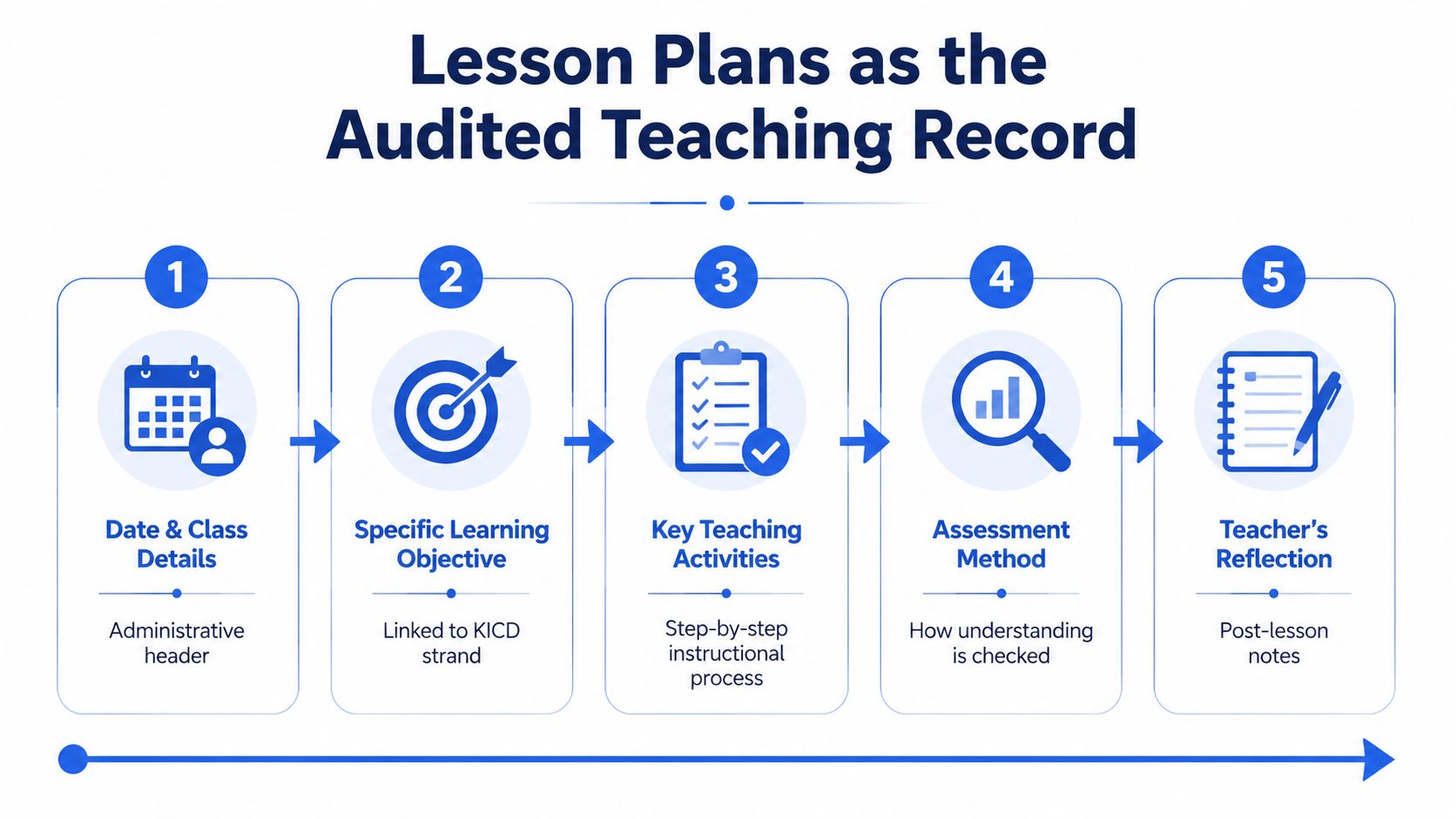
A lesson plan should allow a reviewer to understand what you intended, what learners did, how you checked learning, and what you'll change next. Kenya's official CBE implementation guidance requires teachers to prepare and use lesson plans for every lesson. It also says the plan should break the scheme of work into teachable units, state lesson-specific learning outcomes, and provide opportunities for extended learning (official Junior Secondary implementation guidelines).
Build the plan around one outcome
A strong lesson plan carries the date, class, subject, strand, sub-strand, specific learning outcome, key inquiry question, resources, scheme reference, learning activities, assessment, extended learning, and reflection. The 5E sequence, Engage, Explore, Explain, Elaborate, and Evaluate, gives the teaching activities a logical flow.
Consider a Grade 8 Integrated Science lesson on digestion:
- Engage: Display a simple meal illustration and ask learners where food goes after swallowing. Check responses orally.
- Explore: In pairs, learners arrange labelled cards showing the path of food through the digestive system.
- Explain: Learners compare their sequence with a diagram, while the teacher clarifies the role of each named organ.
- Elaborate: Groups connect common foods to the digestive processes involved and explain their reasoning.
- Evaluate: Learners label a diagram and write a short explanation of digestion. The teacher uses the responses as formative evidence.
- Extended learning: Learners keep a short food observation record and identify questions they'd like to investigate.
- Reflection: Record which organ functions remained unclear and how the next lesson will address the gap.
The plan should fit the actual lesson period and available resources. It shouldn't read like a textbook chapter. The reviewer needs to see the teaching decision, the learner activity, and the evidence collected.
Avoid weak audit trails
Common problems include missing strand or sub-strand references, outcomes copied from a different topic, reflections repeated word for word, and assessment activities that don't measure the stated outcome. A short honest reflection is more useful than a long generic paragraph.
Keybaki's CBC lesson plan format follows the same principle by placing curriculum mapping, 5E activities, resources, differentiation, assessment, and reflection in one editable planning flow.
Records of Work and Individualized Education Plans
The Record of Work Covered answers a direct administrative question: what did the class complete? Fill it immediately after teaching while the details are still clear. A useful entry includes the week, date, class, subject, strand, sub-strand, lesson topic, lesson-plan reference, and a remark on completion or slippage.
A Grade 10 Mathematics record might look like this in practice:
| Date | Sub-strand | Topic | Lesson-plan reference | Remark |
|---|---|---|---|---|
| Monday | Trigonometry | Sine and cosine in right-angled triangles | G10-MAT-T1-W3-L1 | Covered, learners completed guided task |
| Tuesday | Trigonometry | Solving routine problems | G10-MAT-T1-W3-L2 | Rescheduled because of a school activity |
| Thursday | Trigonometry | Application problems | G10-MAT-T1-W3-L3 | Covered, additional practice assigned |
The remark column protects the integrity of the record. A changed sequence isn't automatically a failure. An unexplained record is harder to defend.
Use the IEP for planned support
An IEP begins with evidence from formative assessment, observation, learner work, or communication with the family. It should identify the specific barrier, set a target for the next review period, describe classroom adaptations, record referrals, and include a parent or guardian sign-off process.
For instance, a learner struggling to read instructions in a Grade 8 Science task may need simplified written directions, oral clarification, extra visual support, and a way to demonstrate understanding without being assessed only through lengthy text. The IEP should name those adaptations and show whether they helped.
| Field | Record of Work | Individualized Education Plan |
|---|---|---|
| Main focus | Curriculum coverage | Individual learner support |
| Evidence | Lessons taught and remarks | Assessment, observation, and learner profile |
| Time frame | Teaching sequence | Target and review period |
| Main users | Teacher, HoD, school reviewer | Teacher, HoD, support staff, parent or guardian |
| Key question | What was covered? | What support will help this learner progress? |
Keybaki's record tracker can flag incomplete sub-strands, while its IEP function connects learner profiles with lesson adaptations and CEA evidence. The teacher must still decide whether a target is appropriate and whether an adaptation supports participation.
How Keybaki Maps and Auto-Generates CBC Documents
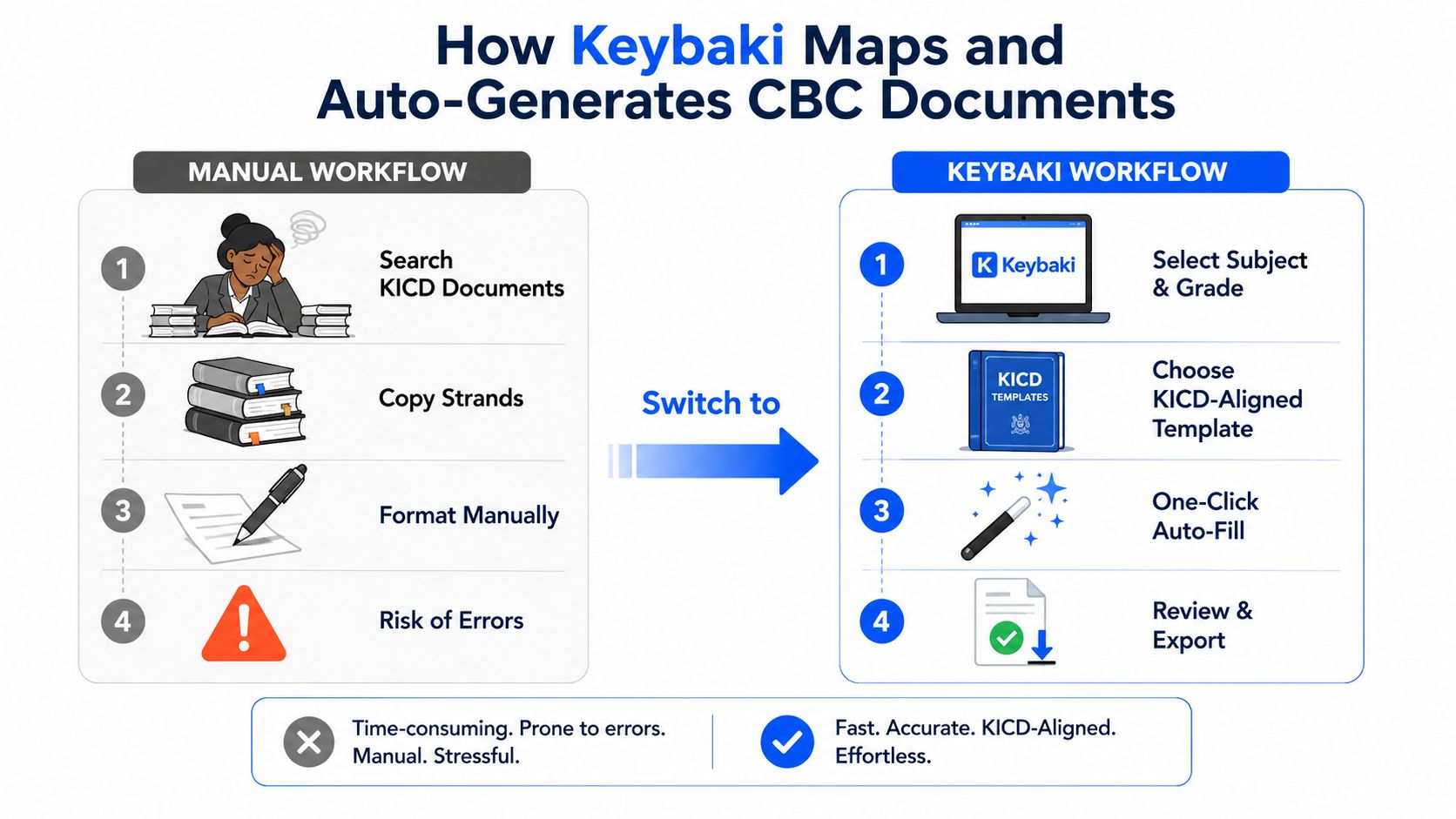
Manual preparation often forces a teacher to locate a curriculum design, copy a strand into a scheme, repeat it in a lesson plan, enter it again in a record of work, and create a separate assessment task. That repetition creates opportunities for spelling errors, mismatched outcomes, and gaps between what was taught and what was assessed.
A mapped workflow keeps the same curriculum reference across the documents. In Keybaki, a teacher selects a subject, grade, strand, and sub-strand from the CBE library. The 5E planner then uses the selected curriculum context to prepare an editable lesson structure with the learning outcome, inquiry question, activities, resources, differentiation, and assessment prompts.
The weekly sequence can work like this:
- Select the curriculum location.
- Review the scheme entry.
- Open the 5E lesson planner.
- Edit activities for the class and available resources.
- Schedule a matching CEA.
- Record delivery and review learner evidence.
What can be linked
The useful feature isn't automatic writing for its own sake. It's the shared curriculum reference. A CEA can link to the strand and lesson that introduced the skill, while the result can inform the next planning decision. The record of work can then show the lesson's status without forcing the teacher to duplicate the same information in several places.
A tool like this can reduce repeated typing across schemes, lesson plans, records, and assessment preparation. It can't replace teacher judgement. You still need to adapt examples for your learners, check that the resource is available, write a genuine reflection, and set suitable IEP goals.
Professional judgement: Automation should remove duplicate entry, not remove the teacher from decisions about pace, inclusion, evidence, or feedback.
Check every generated document against the current KICD material and your school's filing requirements. If a curriculum design changes, review affected schemes, lesson plans, assessment links, and records before using the updated version in class.
Storage, Versioning, and Compliance Best Practices
A CBC document supports an audit only when a colleague can locate it, identify its term and week, and see which copy is current. A file stored on one teacher's computer may contain sound planning, but it becomes difficult to review during an absence, a handover to the HoD, or a quality assurance visit. Treat the folder like a staffroom cupboard, every document needs a labelled place.
Create a secure folder for each subject, organised by grade, term, and strand. Keep the record of work beside its related lesson plans. Place assessment rubrics and learner evidence in named folders, rather than leaving them in messaging apps or on personal devices.
Use consistent file names
Use one naming pattern:
Subject_Grade_Document_TermWeek_Version
For example, Mathematics_G8_SchemeOfWork_T1W3_v2 identifies the subject, grade, document, term, week, and revision number. Apply the same pattern to lesson plans, CEAs, records of work, and exported reports. A clear name saves time when a teacher must retrieve evidence quickly.
Preserve the change trail
Keep an earlier approved file. Save a revised copy and add a short note explaining the change. Record whether a lesson moved, a resource became unavailable, or an outcome needed clarification. This gives the HoD a visible history instead of several unexplained files.
Maintain a separate IEP folder for each learner receiving additional support. Date every review, limit access to authorised staff and the parent or guardian, and keep sensitive details out of general staff groups.
Plan for Kenyan connectivity
Use a secure cloud folder when possible, with an offline weekly backup for unreliable connectivity. Give HoDs or parents view-only access where appropriate. Confidential learner records should not travel through an open group.
The school principal should confirm retention and archiving rules. Follow the school's approved filing procedures and the KICD guidance document already used by the school before removing or archiving term records. Keybaki exports should follow the same naming, access, and version rules as paper or locally prepared documents, so its CBE-mapped records remain easy for teachers, parents, and school heads to verify.
From Assessment Evidence to the Next Week's Plan
A CEA result shouldn't end the teaching conversation. It should help you decide whether the next lesson needs reteaching, more guided practice, extension, or a different explanation.
Take a Grade 8 English lesson on persuasive writing. If learner evidence shows that many pupils haven't developed clear thesis statements, the next plan can return to thesis clarity before moving further into the writing sequence. Learners who demonstrate secure understanding can work on extension tasks involving counterclaims, while others receive structured sentence frames and examples.
This is the difference between recording a result and using evidence. A rubric level, written response, observation note, or learner explanation should lead to a visible action in the following plan.
Keybaki's CEA workflow links assessment activity to the relevant strand and lesson, then presents mastery information for planning. Teachers can use that evidence to prepare the next 5E sequence instead of searching through separate books to identify the weak area.
A parent-facing report should translate the evidence into clear language. It can include the assessed competency, a short comment, the learner's current area of strength, a priority for improvement, and a practical home activity. Parents don't need an unexplained collection of raw marks. They need information that helps them support the learner.
For more guidance on using classroom evidence during instruction, see this resource on formative assessment.
The weekly loop is straightforward:
Plan, teach, assess, adjust, communicate.
When those actions appear across the lesson plan, CEA record, learner progress file, and parent briefing, the teacher can explain not only what was taught but also why the next lesson looks different.
Quick Reference Matrix of CBC Teacher Documents
Use this matrix as a desk-side reminder when setting up a subject folder or orienting a new teacher. Ownership can vary by school, but the person listed should be responsible for keeping the record current and accessible.
| Document | Purpose | Owner | Frequency | Storage Location |
|---|---|---|---|---|
| Scheme of Work | Maps termly curriculum coverage | Subject teacher, reviewed by HoD | Termly, with revisions | Subject folder, term subfolder |
| Lesson Plan | Guides and reflects on daily teaching | Subject teacher | Every lesson or weekly cycle | Subject and grade lesson-plan folder |
| Record of Work Covered | Shows actual delivery and changes | Subject teacher, reviewed by HoD | After teaching | Beside matching lesson plans |
| Assessment Plan | Schedules evidence collection | Subject teacher | Termly, reviewed as needed | Assessment folder |
| Learner Progress Record | Tracks individual growth | Subject teacher | Throughout the term | Secure learner-progress folder |
| IEP | Sets and reviews individual support | Teacher, HoD, parent or guardian | Per learner, reviewed periodically | Restricted learner IEP folder |
| CEA Evidence | Records competency checks | Subject teacher | When assessments are administered | Subject, grade, and strand folder |
| Portfolio Evidence | Stores selected learner work | Subject teacher and learner | Throughout the term | Portfolio or learner-work folder |
| Parent Report | Communicates progress and next steps | School and subject teacher | According to school reporting cycle | Secure reporting folder |
Pin a copy in the staff WhatsApp group, but don't share confidential learner information there. The matrix helps with orientation, while the detailed records provide the evidence needed for review.
Common Questions About CBC Teacher Documents
Where can I get CBC templates?
Begin with the school's approved formats and the KICD materials portal cited earlier in this article. Check that each template matches the current curriculum design and includes the strand, sub-strand, learning outcomes, experiences, assessment, and reflection. A template is useful only when it helps connect classroom activity to evidence.
What should be ready for an audit?
Keep the current scheme of work, recent lesson plans, record of work, assessment evidence, learner progress records, and relevant IEP files organised. A reviewer should trace a lesson from its curriculum reference to learner evidence without asking you to rebuild the sequence from memory. Date revisions and retain the version used for teaching.
Can one teacher handling several learning areas maintain everything?
It is demanding where staffing is limited. Reporting has described a shortage of more than 100,000 teachers before CBC rollout and schools where one teacher covers all subjects, with a national median of three teachers per school (reporting on Kenya's teacher shortage). A later government update reported 56,000 permanent and pensionable teachers, 20,000 interns, and plans for another 6,000 hires, indicating that staffing adjustments were still underway (government staffing update discussed in this policy coverage).
Reduce repetition through shared strand references and a weekly 5E planning routine. Keep class reflections, learner evidence, and IEP decisions specific to each learner. A copied strand outline may be reusable. A copied observation is not.
How should parents receive assessment information?
Share the competency assessed, the learner's demonstrated strength, the next area to practise, and a suitable home activity in plain language. Keep raw rubrics and sensitive details secure. Parents need clear evidence and next steps, not every working note.
Keybaki provides a CBE-mapped library for Grades 7 to 12, an editable 5E lesson planner, strand-linked CEAs, and shared teacher, parent, student, and school views. Visit Keybaki to organise planning, assessment evidence, and parent communication around the same curriculum reference.
Comments
Loading…