· shared phones
Mobile Learning in Kenya: A Practical Guide for CBE
13 min read
On a Sunday evening in many Kenyan homes, one phone sits at the centre of the room. A parent checks M-Pesa, one child wants to revise, another needs a quiz, and the data bundle has to last until tomorrow. That is the starting point for mobile learning in Kenya, not a glossy app demo or a promise that every learner has a personal smartphone.
If a handset is shared, the question changes. It is no longer “Can we get learning onto a phone?” It becomes, “Can we keep learning moving when the phone is borrowed, the signal drops, and everyone still needs to study?” That is the design problem behind mobile learning in a CBE home, and it is why practical systems must work around time, access, and continuity, not just device ownership.
A repair shop owner looking after school phones would recognise the same pattern from cell phone repair software, because the device matters less than whether it stays usable when families depend on it. In Kenya, that reality shapes every sensible mobile-learning choice.
Table of Contents
- A Shared Phone, Two Children and a Sunday Plan
- What Mobile Learning Means in a Kenyan CBE Classroom
- Why Kenya's Access Profile Changes the Design
- Shared Phones and Low-Bandwidth Realities
- Practical Habits for Teachers and Parents on Shared Phones
- How Keybaki Closes the Planning-Teaching-Assessment Loop
- What Most Mobile Learning Guides Get Wrong About Kenya
- Getting Started This Week Without Data Stress
A Shared Phone, Two Children and a Sunday Plan
The parent knows the routine. One child wants to open tonight's revision, the other wants to check last week's questions, and the phone is also needed for calls, messages, and the next transfer. Nobody in that room is asking for a fancy learning experience. They want a plan that survives a shared handset and a small data balance.
That is why mobile learning has to be understood as a household workflow, not just a school technology. A phone can carry a lesson, a quick check, and feedback, but it can also become a bottleneck if the learning assumes uninterrupted time, constant connectivity, or private ownership. In real Kenyan homes, the challenge is often not access to a device, it is access to a usable moment.
What the parent is actually deciding
The parent is weighing three things at once. First, whether the child can learn now. Second, whether the phone still needs to be free for everyone else. Third, whether the data bundle is better spent on learning content or on other urgent needs.
Practical rule: If a learning activity only works when the phone is free for a long stretch, it will fail in many Kenyan homes.
That is why the best mobile-learning choices feel smaller and more deliberate. They fit around the household rhythm, they allow a learner to stop and return later, and they do not punish a family for sharing one handset. That same logic matters for schools too, especially where a teacher wants to link home revision with CBE progress without making the family carry the whole load.
A useful way to think about it is simple. Mobile learning is not “school on a phone” in the old desktop sense. It is a way to keep a learner moving through short, meaningful interactions, even when the phone is shared, the signal changes, or attention is pulled elsewhere.
What Mobile Learning Means in a Kenyan CBE Classroom
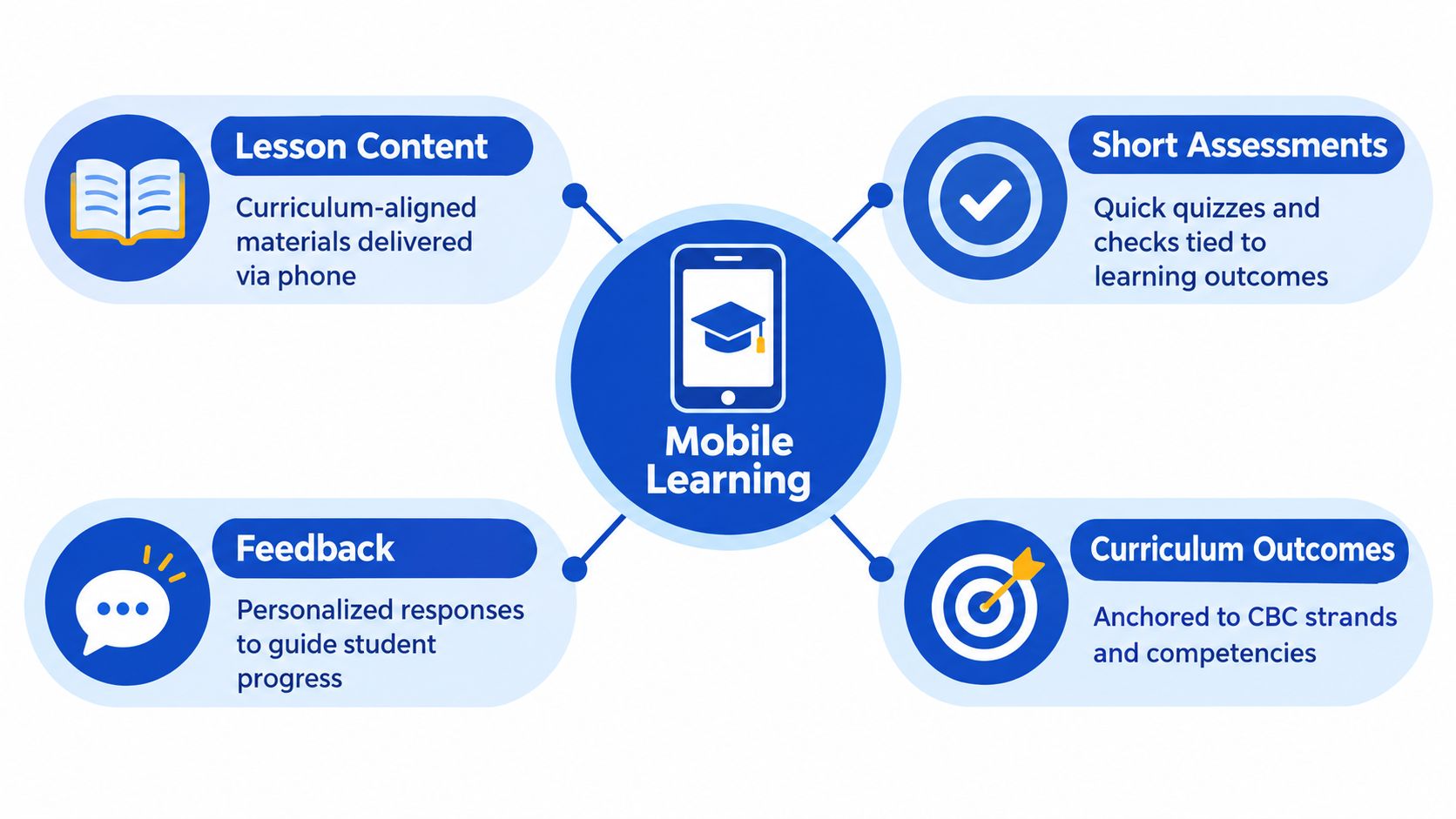
In a CBE setting, mobile learning is a loop, not a library. A learner receives lesson content, answers a short check, gets feedback, and moves closer to a curriculum outcome. The phone is the delivery channel, but the unit of value is the strand and sub-strand, not a video or an app screen.
That distinction matters because CBE already breaks learning into manageable parts. A strand can be planned, practised, checked, and revisited. On a phone, that structure works well because it supports short sessions, quick responses, and visible progress. Mobile learning becomes useful when it tracks the same logic a teacher uses in class, only in smaller steps.
The mechanics that make it work
A clean mobile-learning flow has four parts. Lesson content gives the learner the input. Short assessments confirm what stuck. Feedback corrects mistakes or reinforces understanding. Curriculum outcomes keep everything anchored to what the learner is meant to achieve.
That is why SMS-based and phone-based learning have a long history in Kenya. The country has already seen curriculum-linked mobile tools used to support practice, quizzes, and revision during disruption, and that history matters because it shows that phones are not just communication devices. They can carry structured learning when the content is designed for that purpose.
Short mobile lessons work best when each one can stand on its own, because a learner on a shared phone may not come back in the same sitting.
For teachers, this means planning in smaller blocks. For parents, it means asking whether the child can finish something useful before the phone is needed again. For students, it means learning that does not collapse if the session is interrupted. That is the shape of mobile learning in Kenyan CBE classrooms.
Why Kenya's Access Profile Changes the Design
The numbers from Kenya make one thing clear. Mobile access is wide, but digital-learning access is much narrower. Afrobarometer's 2019 survey found that 95% of Kenyan households had a mobile phone, while only 20% had access to a computer. The same survey showed that just 50% of Kenyans reported owning a phone with internet access, and 49% said they never went online, while internet use rose from 11% in 2008 to 44% in 2019. The point is not only that access is improving, it is that access is uneven and layered. Afrobarometer's Kenya dispatch on e-learning barriers
The KNBS profile points in the same direction. It reports that 68.5% of people aged three and above used a mobile phone, while only 16.6% had used the internet in the preceding three months, and that three in ten households had internet connectivity. KNBS study description Those figures make the practical design lesson obvious. A mobile-learning system in Kenya cannot assume continuous internet use, and it certainly cannot assume that rich media is always available.
What those figures mean for design
First, core learning flows must work without constant connectivity. If a learner can open only one lightweight page, that page should still contain something useful.
Second, rich media should be optional, not mandatory. A downloaded illustration or a short clip can help, but it should not become the only path to learning.
Third, shared-device access must be explicit. The system has to know which child is doing which task, because one family phone often serves more than one learner. A personal-school-one-device assumption breaks quickly.
That is why a progressive-fallback model makes more sense than an app-only model. Basic phone access reaches more households than computer-based e-learning, but internet-dependent services still exclude many learners. For CBE, the safer design choice is to make the learning loop survive on low bandwidth first, then add richer material when the connection allows it.
Shared Phones and Low-Bandwidth Realities
A 2025 study in Rangwe, Homa Bay County, found that mobile phones were the most available ICT tool, with 73.7% of respondents reporting constant access, while also pointing to limited infrastructure, inconsistent teacher training, and insufficient ongoing support as barriers to effective CBE implementation. A contrasting study in Matungulu, Machakos County, rated digital-resource availability low at a mean of 2.43 and overall ICT-resource availability limited at 2.52. Those findings sharpen the question. The issue is not whether a learner can hold a phone. It is whether learning stays productive when the phone is shared, the battery is low, the signal is patchy, or the device is only available for a few minutes at a time.
That is where design discipline matters. A mobile-learning plan for Grades 7 to 12 should assume intermittent connectivity, shared-device use, low-resolution screens, and limited charging time. It should also expect that a learner may stop midway through a lesson and return later, possibly on a different day.
The practical architecture that fits Kenya
A progressive-fallback design starts with the smallest dependable action. The learner opens a cached lesson, answers a short item, and receives feedback even if the connection disappears. Richer media can be added later when data is available. The platform stores progress locally, then synchronises compact records rather than forcing the phone to reload everything.
For a teacher, that means the weekly plan should survive interruption. For a parent, it means the child can revise in short bursts without needing a long uninterrupted session. For the product builder, it means local storage, queue-based sync, and clear session separation are not nice extras, they are the foundation.
Keybaki's learning-app comparison article is one place where families and teachers can see how that kind of thinking is applied in practice. The important point is not the brand name, it is the logic, learning has to keep moving even when the household cannot give it a perfect window.
Practical Habits for Teachers and Parents on Shared Phones
The easiest mistake is to treat mobile learning as an individual activity. In Kenyan homes, it is often a shared activity managed around meals, chores, charging, and available time. That means the most helpful habits are the ones that make the phone easier to share, not harder.
Teachers need to plan for revision that can survive interruption. Parents need to know what to support without becoming subject experts. Both need a clear way to see whether a learner completed something useful.
| Habit | Teacher focus | Parent focus |
|---|---|---|
| Use cached content | Set tasks that can open without fresh data | Open lessons when the bundle is low |
| Keep sessions short | Assign one small objective at a time | Encourage a child to finish one task before the phone changes hands |
| Separate learners clearly | Use profiles so siblings don't mix progress | Make sure each child uses the right profile |
| Schedule checks smartly | Time CEAs for the school or home window that is most likely to be free | Help the child complete the check when the phone is available |
| Share progress visibly | Send weak-strand briefings and simple updates | Review the briefing before weekend revision |
| Build a weekly queue | Plan for the week, not only the next period | Use weekend time for revision rather than guessing what to practise |
A useful rule is to treat “completed by Friday” as the planning unit when the phone is shared. Daily perfection is unrealistic in many homes, but weekly completion is possible if the tasks are short, sequenced, and easy to resume.
Keep the interaction small, and make the next step obvious.
That is also where no-internet channels matter. A Kenyan SMS model can still support learning when the user experience is straightforward, but activation is a separate problem from instructional quality. One initiative showed positive learning impact without requiring a smartphone or internet access, while another had a steep drop-off between invitation and actual lesson access. The lesson is clear. If families cannot get into the content, good curriculum design alone is not enough.
How Keybaki Closes the Planning-Teaching-Assessment Loop
A teacher opens the 5E planner on a Sunday and picks the strand for the week. The planner turns that into Engage, Explore, Explain, Elaborate, and Evaluate blocks, so the lesson doesn't start as a blank page. The teacher edits the blocks, adds differentiation, and schedules a CEA for the class. Keybaki's lesson planner is built for that weekly rhythm, where the plan starts with curriculum structure and ends with an assessment that can be revisited later.
On the learner side, the same strand appears through the family phone in cached form once it has been opened. The parent sees a weak-strand briefing for the week, and the child uses a PIN-based profile so siblings don't mix progress on one handset. If the phone is borrowed or the signal drops, the session can resume later instead of being lost.
The strength of the loop is in what happens next. CEA results feed the next week's plan, so the teacher doesn't have to retype the weak areas by hand. That matters because the platform can hold CBE-mapped content, English and Kiswahili materials, and offline cache in one flow, while the family pays through M-Pesa without storing cards. A walkthrough of the lesson-planner workflow makes the handoff between planning and assessment easier to visualise.
A week that actually closes
A strong loop looks like this in practice. The teacher plans once, teaches once, checks understanding, and gets the weak strand back in the next cycle. The parent sees what needs support. The learner gets a revision queue that is short enough to finish on a shared phone.
That is why a mobile-learning system is more than a content shelf. It is a calendar, a check, and a feedback path that stays visible to teachers, parents, and learners. When those pieces are connected, the phone stops being just a device in the house and becomes part of the school week.
What Most Mobile Learning Guides Get Wrong About Kenya
Most mobile-learning advice starts from the wrong assumption. It treats phone ownership as if it were the same thing as learning access. In Kenya, that shortcut breaks quickly, because a household may have a phone but not a reliable internet connection, not enough charging time, or not enough private time for a child to study properly.
The second mistake is measuring the wrong thing. A signup, an install, or an opened app tells you very little about whether learning happened. A more honest measure is whether the learner completed a session, resumed after interruption, and kept moving through the week on a shared phone.
Better metric: count completed learning sessions and successful returns after disconnection, not just logins.
The engineering side matters too. Shared handsets need separate learner profiles, queue-based sync needs to preserve teacher edits, and minimal data collection should align with basic privacy discipline. If a platform cannot cope with family scheduling, it is not ready for many Kenyan homes, no matter how polished it looks on a demo screen.
Getting Started This Week Without Data Stress
The safest first step is small. Choose one subject, one strand, and one weekly goal. Ask whether the platform can anchor content to CBE strands, keep a cache for offline use, support multiple children on one phone with PIN sign-in, show English and Kiswahili content, adapt to low-resolution school screens, and connect planning to CEAs instead of leaving them separate.
If you're comparing tools, a good place to sanity-check the format is best microlearning platforms for 2026, but the Kenyan test stays the same, can a child start on a shared phone, stop midway, and still finish something useful later? If the answer is yes, the platform is closer to home learning here.
A realistic first week is simple. Draft one 5E plan, schedule one CEA, and review the weak-strand briefing with the learner on the family phone. That is enough to see whether the system works in the home, not just in a brochure.
If you want a mobile-learning setup that keeps CBE planning, assessment, and family-phone use in one weekly loop, visit Keybaki and see how it handles strands, CEAs, offline access, and shared-device learning in the Kenyan context. It's built for teachers, parents, and learners who need the phone to do more than just open a lesson.
Comments
Loading…