
· homework help
7 Homework Help Strategies and Tools for Kenyan Families
13 min read
A child is stuck on a fraction problem, the family has one phone on charge, and the parent is trying to guess whether the issue is the method, the language, or the CBE strand. That is a normal homework evening in many Kenyan homes. The right homework help depends on the task, the device, and how much visibility the parent needs. Some tools are best for a fast answer check, others for low-data revision, and a few are better when you need a closed loop from assessment to the next week's work. For the background on how homework entered modern learning, see this short browse homework invention facts note.
Table of Contents
- 1. Photomath
- 2. Brainly
- 3. Shupavu291
- 4. StadiSpace
- 5. MwalimuPLUS
- 6. Longhorn eLearning
- 7. Keybaki
- 7 Homework Help Platforms: Feature Comparison
- Build a Weekly Homework Routine That Holds
1. Photomath
Photomath is the fastest option when the problem is a math question sitting on paper and the learner needs to see the working, not just the answer. It scans many printed and handwritten problems, then shows step-by-step solutions, multiple methods, graphs, and explanatory videos on iOS and Android. For Kenyan homes that share one device, that makes it useful as a quick check after a student has tried the problem alone. Its strongest use is checking procedure across arithmetic and higher maths, not replacing actual understanding.
Best use on a school night
Use Photomath for the one question that has stalled the whole evening. Scan it, compare the steps, then ask the child to redo a similar question without the camera help. That pattern keeps the phone from becoming a crutch.
Practical rule: if the learner cannot explain the second step after reading the solution, the topic is still weak.
The tool is math-only, so it should sit beside other support rather than stand alone. For secondary school learners who want a more deliberate path through maths, this high school mathematics guide is a better companion to a quick scanner than a full study plan. Some explanations also sit behind a paid plan, so households should test the free flow first and keep the app for checking work, not for every topic.
2. Brainly
Brainly works best when the learner has a homework question that needs a human-style explanation, not just a formula. It combines community answers, AI-assisted support, and a Tutor option with live expert sessions on eligible plans. That mix helps when a child is unsure how to phrase a question or when the parent wants a second explanation from someone outside the house. It is especially useful for common STEM questions, where a quick answer can unblock the evening.
Where it fits in a Kenyan home
Brainly is a good fit when the phone is available but everyone is too busy for a long search. The learner can post the question, compare community explanations, and move on once the working makes sense. Because answer quality can vary, the child still needs to check the logic, not just copy the final line.
- Use it for common questions: Homework that has a standard method works better here than rare, highly specialised tasks.
- Use Tutor when the question is stuck: Live expert help reduces the waiting that comes with arranging a separate session.
- Check every answer: Community help is useful, but the learner should verify steps before submitting.
For a family trying to build stronger independent study habits, this self-learning guide pairs well with Brainly because it pushes the child to work before asking for rescue. That matters in homes where homework time is short and one shared phone must serve several purposes. Brainly can open the door, but it should not become the only place the child looks.
3. Shupavu291
Shupavu291 is the practical choice when internet access is weak or missing. It runs through Safaricom *291# and SMS short code 20851, so even a basic phone can handle lessons, quizzes, and Ask-A-Teacher questions. That matters in homes where the family phone is older, the data bundle is small, or the child needs revision while the connection is unstable. The service is built for low-bandwidth use, which makes it far more realistic than a streaming-heavy app.

What it does well at home
Shupavu291 is strongest when the family wants a short revision cycle. A learner can open a topical lesson, answer a few questions, and send in a homework query without needing a large screen. The teacher response feature is useful when the parent cannot explain the topic and the child needs guidance that feels school-linked rather than random.
Text-only support sounds limited, but in many households it is the most dependable option.
The trade-off is clear. SMS and USSD are not rich experiences, and the content sits in the 8-4-4 curriculum, so alignment with newer CBE strands is only partial. Even so, for a home that needs homework help to work on a basic handset, this is one of the most realistic tools in Kenya. For the family on a shared device, the phone does not need to be smart to stay useful.
4. StadiSpace
StadiSpace is the better pick when the main need is CBE practice with instant marking. It is built for Grades 4 to 10 and gives quizzes, feedback, progress analytics, and downloadable PDF reports on higher tiers. That makes it useful for learners who need repeated practice, not a one-off answer. It also suits parents who want to see whether the child is improving between homework sessions.
Why it feels different from a search tool
A search-based site answers a question and disappears. StadiSpace keeps the child in a loop of quiz, mark, feedback, repeat. That loop is useful for revision nights, especially when the learner needs to see patterns in mistakes instead of hunting across the web for a new explanation.
For Kenyan families organising a study week, this secondary school revision materials guide can help decide which topics to revisit after a practice set. StadiSpace's strength is discipline. It keeps the learner close to the curriculum and makes practice feel like part of homework, not extra work tacked on after dinner.
- Use it for regular reinforcement: Weekly practice is better here than last-minute exam cramming.
- Use reports to spot weak areas: The parent should look for repeated mistakes, not just scores.
- Use it when the child needs feedback: Instant marking is valuable when no adult is available to mark by hand.
The limit is also clear. It focuses on quizzes and practice, not live tutoring, and it does not present itself as a full replacement for teacher explanation. For a home that needs structure more than conversation, though, it fits very well.
5. MwalimuPLUS
MwalimuPLUS suits homes that want a Kenya-built learning platform with a stronger school feel. It offers KICD-approved content, practice resources, progress analytics, and optional live evening tuition. That mix helps when a learner needs both independent homework practice and scheduled support from online classes. It also gives parents a clearer view of what the child is doing, instead of leaving them to guess from a scribbled exercise book.
Good for families that want a guided rhythm
The value here is balance. A learner can watch instructional videos, work through the question library, and then join selected live tuition when the family schedule allows it. The phone-number sign-in and Android access make it easier to use on a family device, especially where the same handset moves between parents and children.
MwalimuPLUS is useful when the home wants more than a content dump. It gives enough structure to keep homework moving, but it still depends on a stable connection for live sessions. That means it works best as a planned evening tool, not a rescue tool for every urgent question.
Use live tuition for the topics that keep coming back, then use the library for the rest of the week.
The main trade-off is availability. Live classes are limited to selected grades, subjects, and times, so families should check fit before depending on it. For households that can plan around that schedule, it offers a tidy bridge between schoolwork and home revision.
6. Longhorn eLearning
Longhorn eLearning makes sense when the family wants curriculum content from a familiar publisher. It offers digital curriculum materials, assessments, progress reporting, web access, and mobile apps. That gives learners a steady place to practise against Kenyan subjects and approved texts, which is useful when homework follows the textbook closely. For many homes, publisher familiarity also lowers the friction of getting started.
Where it helps and where it doesn't
The biggest strength is alignment. A parent who wants the child to work from recognised curriculum material may prefer a publisher portal over a broad, open-ended homework site. The progress reporting also helps when the child needs a record of what has been done over the week.
The weaker side is flexibility. Pricing may vary by plan or campaign, coverage can differ across grades and subjects, and access partnerships can change. That means families should treat it as a solid revision environment, not a guaranteed all-subject answer desk.
For focus at home, this Android app blocker for focus can help a learner avoid jumping between homework and distractions while using the platform. Longhorn works best when the child already knows what subject they must revise and the parent wants a respectable, curriculum-linked source. It is less helpful when the learner needs a quick explanation from scratch.
7. Keybaki
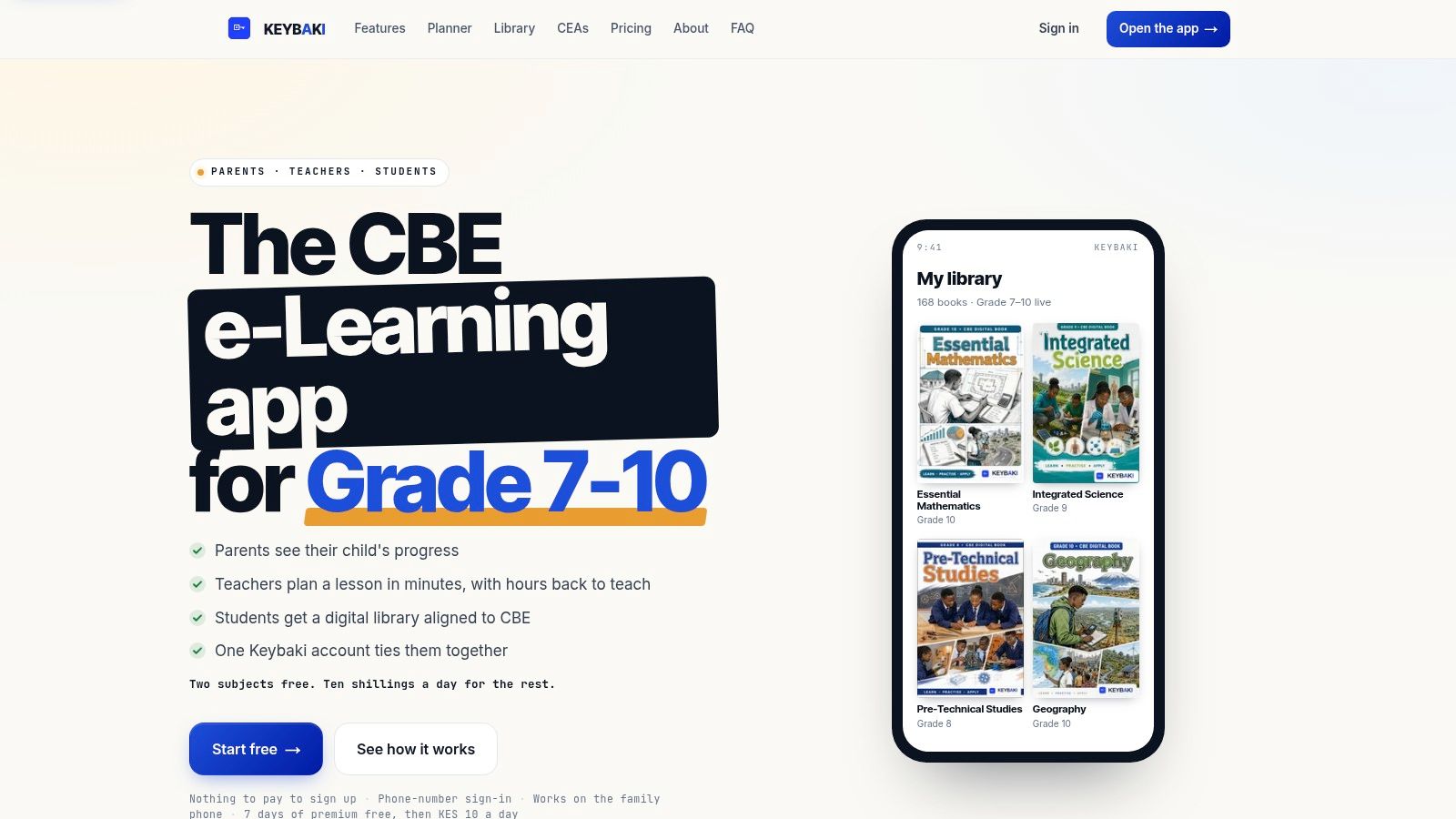
Keybaki is the strongest choice when the goal is not just homework help, but a full weekly learning loop. It brings Kenyan CBE learning into one shared platform for teachers, students, and families. The library is strand-mapped, the assessments are competency-based, and the results feed directly into the next round of revision. That matters because the question in many homes is not only “What is the answer?” but “What strand is weak, and what should the child do next?”

Why it works as a family-phone setup
Keybaki is built for shared devices. Parents can manage up to three child profiles on one family phone, and the platform supports phone-number sign-in, offline access to loaded materials, English and Kiswahili content, and M-Pesa payments. That makes it practical in the same households that struggle with laptop-only tools and unstable data. The child can revise, the parent can follow progress, and the teacher can keep planning in the same ecosystem.
The CBE side is where it stands out most. Lessons, activities, and CEAs are organised by strands, so the learner is not browsing blindly. Students get auto-marked competency checks and adaptive study queues that point them back to weak strands, while parents receive weekly briefings that make the learning gap visible without requiring them to interpret the whole assessment.
Practical rule: if a tool cannot tell you what strand is weak, it is only half helping.
Teachers also get a useful side of the platform, with editable 5E lesson plans, timetables, and free access for up to three subjects. Students get two subjects free, and the premium path opens after a seven-day trial for KES 10 per day. That pricing and the free tier make it easier to test the workflow before committing. If the home wants homework help that closes the loop from practice to revision to feedback, this is the one to start with.
7 Homework Help Platforms: Feature Comparison
| Platform | Setup and Resource Requirements | Expected Learning Outcomes | Ideal Use Cases | Key Advantages |
|---|---|---|---|---|
| Photomath | iOS or Android device with a camera; some features work offline after installation | Step-by-step math solutions, alternative methods, and graph support | Checking math work and studying procedures from arithmetic through calculus | Fast problem scanning; explanations and interactive graphs |
| Brainly | App or web access; live expert tutoring requires an eligible paid plan | Community and AI-assisted answers, with optional live tutoring | Quick homework questions and additional STEM help | Combines community answers, AI assistance, and tutoring |
| Shupavu291 | Basic phone supported; uses SMS or Safaricom USSD with minimal data | Curriculum-related lessons, quizzes, and teacher responses | Revision where internet access or smartphones are limited | Low-bandwidth access and Ask-A-Teacher support |
| StadiSpace | Web access and M-Pesa for payment; designed for Grades 4–10 | CBE quiz practice, instant feedback, and progress tracking | Targeted practice and monitoring progress | CBE alignment, instant marking, and progress analytics |
| MwalimuPLUS | Web or Android access; reliable internet needed for live classes | Independent practice, instructional videos, and optional online tuition | Kenyan curriculum study with a choice of self-study or live classes | KICD-approved content, progress dashboards, and M-Pesa payments |
| Longhorn eLearning | Web portal or mobile app; pricing and data-access offers may vary | Curriculum content, assessments, and progress reporting | Practising and revising Kenyan subjects and approved texts | Publisher-linked local content and multi-country coverage |
| Keybaki | Phone sign-in; loaded materials can be accessed offline; M-Pesa payments; free access is limited by subject | Strand-mapped CBE lessons, adaptive assessments, targeted study recommendations, and progress tracking | Coordinating CBE teaching, student revision, and parent progress monitoring | Tools for teachers, students, and families; offline access and local payment options |
Build a Weekly Homework Routine That Holds
The best homework routine in a Kenyan home usually mixes three layers. Use a quick low-data tool when a child is stuck on one urgent question. Use a structured practice platform when the week needs steady reinforcement. Then use a closed-loop system when you want weak strands to carry into the next week's revision instead of disappearing after the homework is done. That sequence fits the reality of one shared phone, limited data, and a parent who needs to see progress without sitting beside the child every evening.
A simple weekly rhythm works better than trying every app at once. On Monday or Tuesday, let the learner use a quick check tool for the hardest question. Midweek, run a short practice session on a quiz-based platform. On Saturday, review the weakest strand and repeat it in a platform that tracks mastery and gives the parent a summary. That keeps the child from drifting between random help sources.
If you only take one step this week, set up one family-phone profile and choose one weak strand to revise on Saturday. Keep the routine small enough to repeat. The goal is not more apps, it's more follow-through. For a deeper reflection on learning habits, smry's Locke education summary is a useful companion to that idea.
Keybaki brings this whole homework-help approach into one place, with strand-based lessons, CEAs, parent briefings, and family-phone support built for Kenyan CBE learning. If you want homework help that shows what to revise next instead of leaving the child stuck, visit Keybaki and see how it fits your home routine.
Comments
Loading…